
Opening a war room from a CloudWatch alarm
When a CloudWatch alarm goes into ALARM, Landfall opens a war room for it, or attaches to the room that alarm already has open. The alarm reaches Landfall through SNS and a small forwarding Lambda.
This page is not about reading telemetry; see Connecting AWS to Landfall. The two are independent.
How it works
Landfall accepts an automated trigger on POST /triggers, the same public ingest endpoint Datadog, Coralogix and Sentry use. It is authenticated by your organization's bearer ingest token, which identifies the organization. Landfall recognizes a CloudWatch alarm by an AlarmName or NewStateValue string at the top level of the body, which is the JSON CloudWatch publishes to an SNS topic on an alarm action.
The alarm's ARN is its identity, so one alarm keeps to one room while that room is open. Plain SNS HTTPS subscriptions can't attach an Authorization header, so the recipe below puts a small forwarding Lambda between SNS and Landfall.
What you'll need
- An admin seat on your Landfall organization, to mint the ingest token.
- AWS credentials that can create an SNS topic, a Lambda function and its execution role.
- At least one CloudWatch alarm already configured. This guide doesn't create one.
- The Lambda runs on Node.js 20 or later, which has a built-in fetch.
1. Mint the ingest token
If you already minted one for Datadog, Coralogix or Sentry, reuse it. The same token works for every source on this endpoint. The token has no screen in the app yet, so it is two API calls, made once with your own Landfall account.
Get a session token or an API key
If your organization signs in with email and password, sign in with curl:
TerminalSESSION=$(curl -s -X POST https://api.landfalls.ai/auth/login \ -H "Content-Type: application/json" \ -d '{"email":"<you>","password":"<your password>","orgSlug":"<your-org>"}' \ | jq -r .accessToken)If your organization signs in through SSO, there is no password to hand curl. Create a personal API key instead, under Your settings → API keys → New key. The key starts with lf_key_ and is shown once. Use the whole key as $SESSION.
TerminalSESSION='<the whole key, starting lf_key_>'
Either way the credential acts as you, so you must be an admin of the organization. Revoke the API key from the same panel afterwards if you made it only for this.
POST /o/<your-org>/triggers/ingest-token
Terminalcurl -X POST https://api.landfalls.ai/o/<your-org>/triggers/ingest-token \ -H "Authorization: Bearer $SESSION"
The response is { "token": "…" }. It is a separate, long-lived credential, scoped to opening incidents in this one organization and nothing else. Landfall stores only its hash, so a lost token means minting a new one, which immediately invalidates the old one; there is no dual-valid window. Keep it out of the Lambda's code.
2. Point CloudWatch at Landfall
aws sns create-topic
If your alarms already notify an SNS topic, skip this and reuse that topic.
Terminalaws sns create-topic --name landfall-incident-triggers
Add the topic to your alarm's actions
--alarm-actions notifies the topic when the alarm goes into ALARM. Add the same topic to --ok-actions if you want recoveries recorded on the room, and to --insufficient-data-actions if you want missing data noted there too.
Terminalaws cloudwatch put-metric-alarm --alarm-name <your-alarm> \ --alarm-actions <the topic arn> \ --ok-actions <the topic arn> \ <the rest of your existing alarm definition>
Deploy the forwarder Lambda
The function forwards the alarm's own JSON unchanged. It already carries every field Landfall reads.
index.mjsexport const handler = async (event) => { const token = process.env.LANDFALL_INGEST_TOKEN; for (const record of event.Records) { // CloudWatch's own alarm-notification JSON, already the shape Landfall // expects, forwarded as-is rather than re-parsed or rebuilt. const alarmPayload = record.Sns.Message; const res = await fetch('https://api.landfalls.ai/triggers', { method: 'POST', headers: { Authorization: `Bearer ${token}`, 'Content-Type': 'application/json', }, body: alarmPayload, }); if (!res.ok) { // Log and move on: one bad delivery shouldn't fail the whole batch. console.error('Landfall trigger ingest failed', res.status, await res.text()); } } };Terminalzip function.zip index.mjs aws lambda create-function --function-name landfall-trigger-forwarder \ --runtime nodejs20.x --handler index.handler --zip-file fileb://function.zip \ --role <an execution role with basic Lambda logging permissions> \ --environment "Variables={LANDFALL_INGEST_TOKEN=<the token from step 1>}" aws lambda add-permission --function-name landfall-trigger-forwarder \ --statement-id sns-invoke --action lambda:InvokeFunction \ --principal sns.amazonaws.com --source-arn <the topic arn> aws sns subscribe --topic-arn <the topic arn> \ --protocol lambda --notification-endpoint <the function arn just created>
| URL | POST https://api.landfalls.ai/triggers |
|---|---|
| Header | Authorization: Bearer <your ingest token> |
| Body | The SNS record's Message, unchanged |
| States | ALARM, and optionally OK and INSUFFICIENT_DATA |
What CloudWatch's fields become
| CloudWatch field | In Landfall |
|---|---|
| AlarmName | The incident title |
| AlarmArn | The alarm's identity. Without it, AWSAccountId, Region and AlarmName together |
| NewStateValue | ALARM opens or repeats, OK is a recovery, INSUFFICIENT_DATA is recorded as no data |
| NewStateReason | The summary on the incident's first timeline event |
| StateChangeTime | When it happened; with the state, it also identifies this one delivery |
| Trigger.MetricName | The severity hint: a name containing 5xx or error proposes SEV2, anything else SEV3 |
| Trigger.Dimensions | The incident's entity. A DistributionId dimension names a CloudFront distribution, a TargetGroup or LoadBalancer a target group, and a Service or ServiceName a service |
| Trigger.Threshold | Recorded in the severity basis of a SEV2 proposal |
3. Test it
Publish a test notification straight to the topic:
aws sns publish --topic-arn <the topic arn> \
  --message '{
    "AlarmName": "landfall-test-alarm",
    "NewStateValue": "ALARM",
    "NewStateReason": "Threshold crossed",
    "StateChangeTime": "2026-01-01T00:00:00.000Z",
    "Trigger": {
      "MetricName": "5xxErrorRate",
      "Namespace": "AWS/CloudFront",
      "Dimensions": [{ "name": "DistributionId", "value": "E123ABC" }]
    }
  }'
Within a few seconds a new incident titled landfall-test-alarm appears in your organization's Incidents list with the AWS CloudWatch badge, proposed at SEV2 because the metric name contains 5xx. The incident is about CloudFront distribution E123ABC, its first timeline event carries the reason Threshold crossed, and the proposed severity records its basis, cloudwatch state=ALARM metric=5xxErrorRate. Publish the same message again and nothing new is recorded, because the same state change time and state mark it as a redelivery.
Then test a real alarm end to end, for example with aws cloudwatch set-alarm-state --alarm-name <your-alarm> --state-value ALARM --state-reason "Testing Landfall".
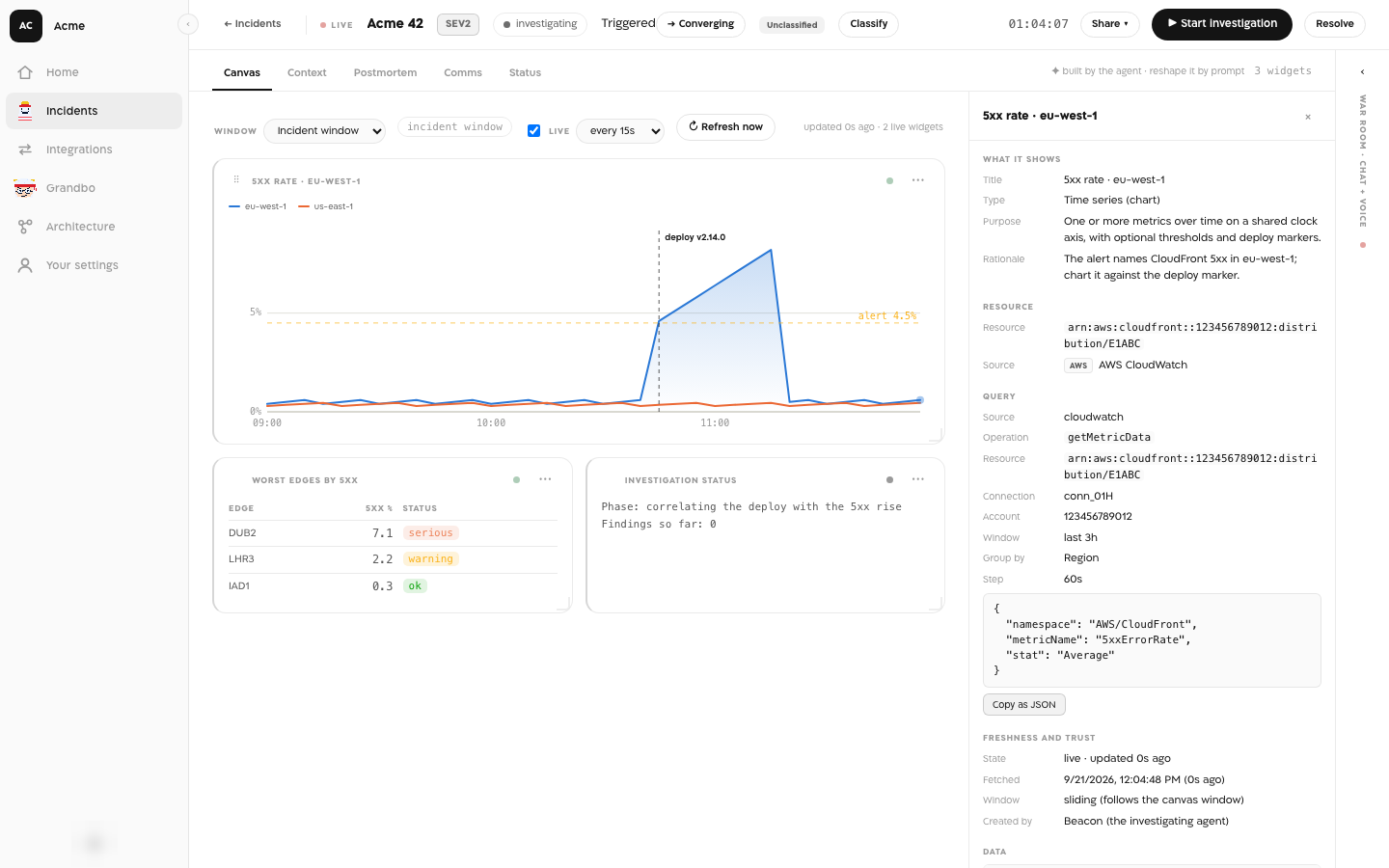
With AWS also connected as a source, Beacon can chart the alarm's metric inside the room.
Repeats and recovery
The alarm's ARN is the attach identity. While a room for that alarm is open, a later ALARM is recorded on it as a repeat and opens nothing new. An OK is recorded on that room as a recovery and never opens an incident. INSUFFICIENT_DATA is recorded on an open room, or ignored when there is none. A redelivered message, with the same state change time and state, is recognized and not recorded twice.
A recovery never resolves the room. The alarm clearing is a fact about the alarm, and closing the war room is a person's decision. Once a person resolves the room, the alarm's next ALARM opens a new one. An ALARM that would open a room while an active maintenance window matches it is suppressed, and no room opens.
Troubleshooting
| What you see | What it means |
|---|---|
| 401 Missing trigger ingest token | The request had no Authorization header. Check the Lambda's LANDFALL_INGEST_TOKEN variable. |
| 401 Invalid trigger ingest token | The token is wrong, or a newer mint replaced it. The two look the same. Mint a new token and update the Lambda. |
| 422 Unrecognized trigger payload | The body has neither AlarmName nor NewStateValue. Check that the Lambda forwards record.Sns.Message, not the whole SNS record. No incident is created. |
| "outcome": "ignored", "reason": "no-open-incident" | An OK or INSUFFICIENT_DATA arrived and that alarm has no open room |
| "outcome": "suppressed" | An active maintenance window matched the alarm, so no room opened |
| Nothing arrives at all | The alarm does not list the topic for that state, or the Lambda is not subscribed to the topic or lacks the invoke permission. The function's own logs show a Landfall trigger ingest failed line for any delivery Landfall refused. |
| Two rooms for one alarm | The first room was resolved before the second ALARM, or a hand-built payload without AlarmArn changed its account, region or name between sends |
Reference
| Endpoint | POST https://api.landfalls.ai/triggers |
|---|---|
| Auth | Authorization: Bearer <ingest token> identifies the organization directly; there is no separate org path parameter |
| Issue or rotate | POST https://api.landfalls.ai/o/<your-org>/triggers/ingest-token as an admin. Shown once; minting again invalidates the previous token |
| Recognized by | An AlarmName or NewStateValue string at the top level of the body |
| Attach identity | AlarmArn, or AWSAccountId + Region + AlarmName when the ARN is missing |
| Each delivery | ALARM opens a room (201) or attaches to the open one (200). OK records a recovery and INSUFFICIENT_DATA records no data, on an open room only. Never auto-resolves |
| Rejected payloads | 422, no incident created; a missing or invalid token is a 401 |
| Incident badge | AWS CloudWatch |
| Also accepts | Datadog, Coralogix and Sentry payloads on the same endpoint with the same token. See Datadog, Coralogix and Sentry. |
How every trigger shares this pipeline: Integrations architecture.