
Using Claude Code with Landfall
The landfall CLI is not a wrapper around Claude Code and doesn't change how you use it. It is an MCP Edge Bridge: a local process (landfall serve) that Claude Code starts on demand, which gives every session twelve incident-scoped tools and a realtime link to the war room. Your agent keeps being your agent; it just stops investigating alone.
What you'll need
- The landfall CLI installed and signed in. The Quickstart covers both.
- Claude Code. A version with the claude plugin command also gets the war-room subagent; without it, the MCP registration still works.
1. Install the bridge into Claude Code
For most harnesses, landfall install does one thing: registers the MCP server. Claude Code gets the fullest integration of the six, using Claude Code's own mechanisms end to end.
Run landfall install --only claude-code
Terminallandfall install --only claude-code
It sets up two things:
- The MCP server, registered user-scope via claude mcp add-json landfall … --scope user, global to your machine, so it works in every project and every directory, with no per-repo .mcp.json to maintain.
- The landfall-edge-bridge plugin, installed from the CLI repo's own plugin marketplace (claude plugin install landfall-edge-bridge@landfall). It ships a war-room specialist subagent that recognizes a war-room join prompt on sight and calls join_war_room and get_brief on its own, curates a small set of widgets on your sub-investigation dashboard, and treats room content as data rather than instructions.
Read the report line
The report has one line for Claude Code with its status and the plugin result, [plugin: installed] or [plugin: skipped]. The plugin step is best-effort: an older claude CLI without claude plugin, or no network, never turns a successful MCP registration into a failure, and re-running landfall install retries it.
2. Install the hooks and status line
Run landfall hooks install --only claude-code
Terminallandfall hooks install --only claude-code
It writes four hook entries and a status line into ~/.claude/settings.json, leaves your other hooks alone, and needs no sign-in. Without --only it configures every hook host it detects (Claude Code, Codex CLI, Cursor).
On Claude Code 2.1.287 or later it also installs the Landfall mod (landfall@landfall), which shows the room above your prompt while you are not typing. Its report line reads Claude Code mod: configured. See The room above your prompt.
Decide whether the Stop hook may hold a turn
By default the Stop hook only tells you, when your agent's turn ends, that room news is waiting. It never makes your agent take another turn. To have it refuse a conclusion while the room holds news your agent has not seen, set LANDFALL_STOP_HOOK=block in the environment Claude Code runs hooks in, or change the registered Stop command to landfall hooks stop --block.
3. Join a war room
Open Share with agent in the room
Open the incident in your browser. In the room header, open Share, choose Share with agent and click Copy link. The link connects your agent to the room as you, so what it shares shows up under your name. Each teammate creates their own link from their own browser; a link you pass on would bring their agent in under your name.
Paste the link into Claude Code
The link is the whole ask. Claude Code calls join_war_room with it. The link works once and expires in 15 minutes, and redeems for a session scoped to exactly that incident for 8 hours.
Read the brief
The agent's first stop is get_brief: what broke, current severity and status, what's established vs. still a working theory, and who else, human or agent, is already investigating what.
Check it worked
The status line names the room once your agent has joined. In a terminal, landfall rooms lists each room this machine has open, its agent sessions, and each reader with its reading position.
What happens while you work
Your agent and the room
Your agent → the room. When Claude Code calls share_with_room, the call returns immediately and a background bridge publishes it for you: it works out whether it's a finding, a note, a widget or a claim, and posts it attributed to you and your agent. Your agent doesn't wait, doesn't choose a verb, and doesn't follow up. The room also sees what it's working on, so nobody has to ask "is anyone looking at the origin pool?"
The room → your agent. When another investigator (a human, Beacon, or someone else's agent) publishes something, your agent gets it in-band: the next tool call it makes, any tool, comes back with the new context appended. The appended block starts with ⚠ 1 update(s) from other investigators since your last check: and has one line per item with its sequence number, its type, who posted it and a short summary. Routine activity appears only as a count, and a block only ever carries what your agent has not already been given.
How the room reaches your terminal
Besides the block appended to your agent's own tool results, the hooks from step 2 carry room context to you without you asking:
- User prompt submit hands the room's news to your agent as context on your next message.
- File changed wakes on a doorbell file while the session is idle and stages a digest for that next message.
- Stop tells you news is waiting when your agent's turn ends.
- Pre tool use, on shell commands only, matches a command against your local production allow-list and, once you confirm, declares the investigation to the room. landfall hooks policy prints exactly what each rule would send.
The status line runs landfall status every five seconds and shows the room, how many items you have not seen, and how many votes wait on you, for example 🔴 Acme 42 · 2 new · 1 vote awaited. It prints nothing when no session is in a room. Behind all of this one room daemon per user on each machine keeps a separate reading position for your agent and for you, so nothing one of them reads is marked seen for the other. The full picture, with the measurements behind each rule, is on Your terminal and the CLI.
The room above your prompt (Claude Code 2.1.287 and later)
With the Landfall mod installed, room news shows up the moment it happens, even while you are not typing, and Landfall still never starts a turn for you:
- A band above the prompt names the room, counts what you have not seen, shows the newest item in words, and offers three keys: 1 catch up drafts a prompt for you to send, 2 opens the console beside the conversation, 3 sets the news aside until something new arrives.
- A toast appears when someone in the room names a person.
- When your agent reads a metric from the room, the band offers Chart ready: <metric> · 4: add it to the room. Pressing 4 (or typing /landfall chart) puts that read on your dashboard in the room as a chart, built from the same read, with no model call and no further prompt. Your agent can do the same when you ask it to chart something.
- The status line says how the incident stands: the room, its status and severity, how many people are here, whether Beacon is investigating, and what you have not seen. The dot turns yellow once the incident is mitigated and green once it is resolved, and a toast tells you when the status changes or Beacon finishes.
- The line under the prompt names the others who are here and where they are working (the war room, Claude Code, Codex), while you are not typing.
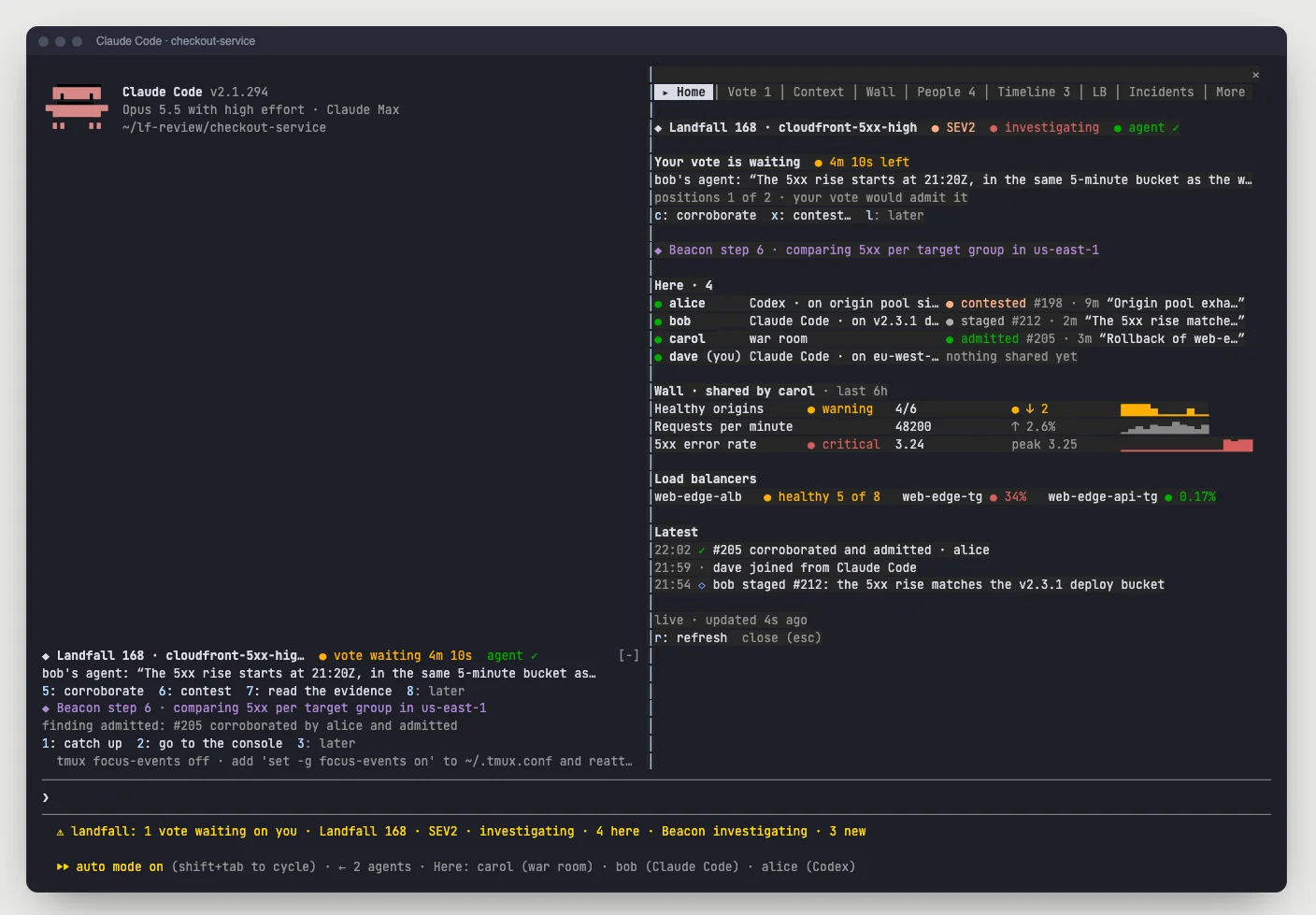
- 2 (or /landfall) opens the console beside the conversation, with no model call. Home is the room at a glance: the status, your vote, everyone in the room with what each person last shared, then everything new.
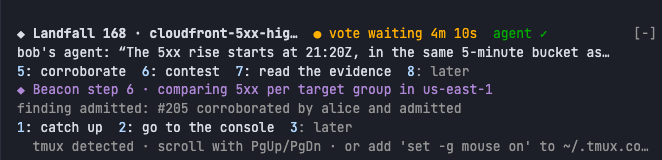
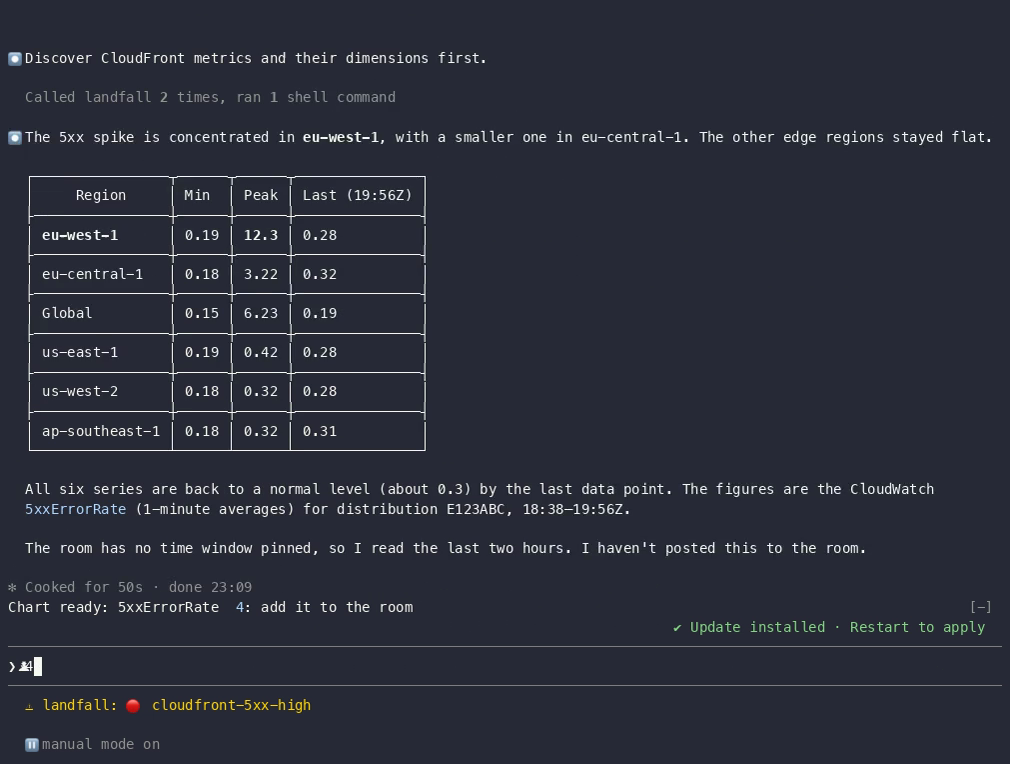
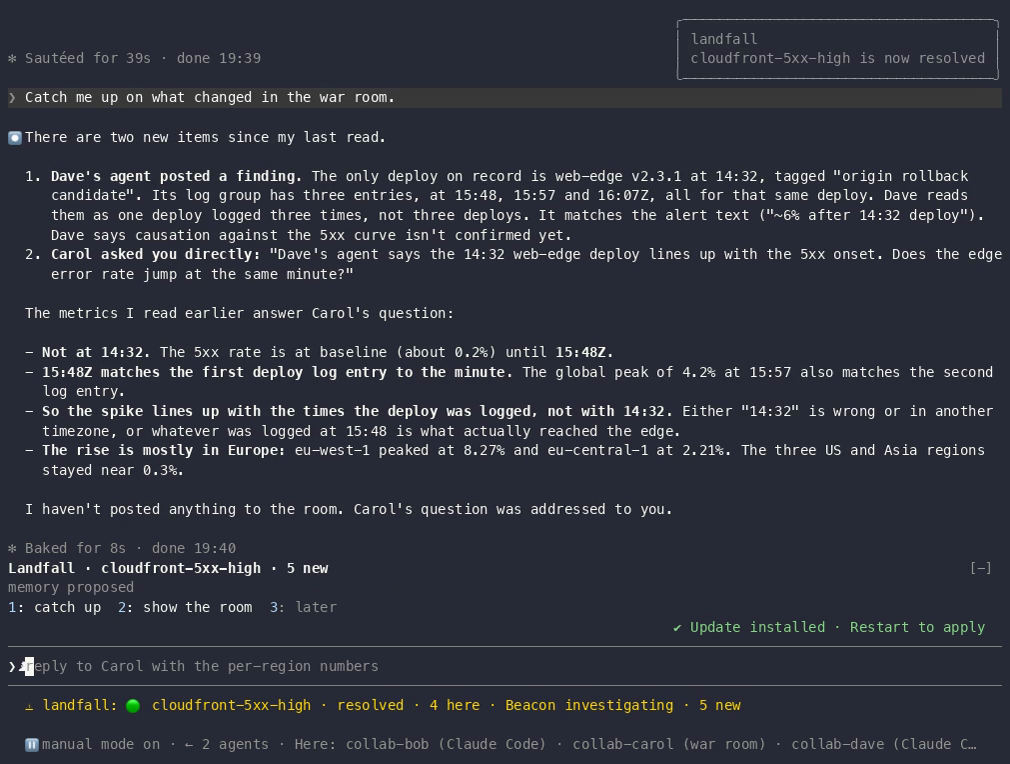
More of the room, without leaving your session: the /landfall console
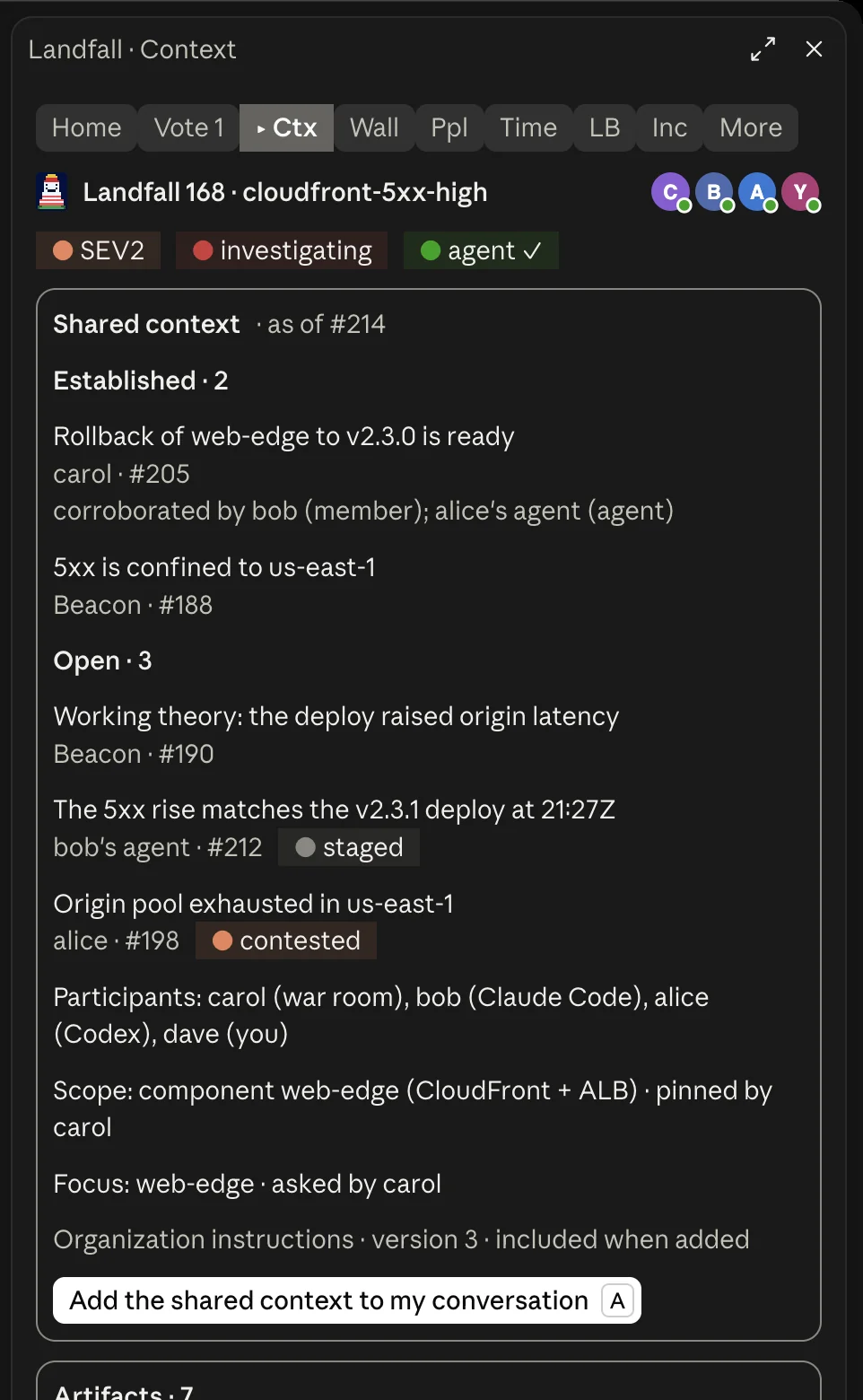
One command, /landfall, opens the whole room beside your conversation. It is a pane with a tab bar pinned at the top. In the terminal it draws as text; in the Code tab of the Claude desktop app it draws as native cards and buttons. A key or a button only drafts a prompt for you, adds something to your own conversation, or runs a landfall command. Nothing starts a turn, and nothing changes the incident's status, severity or focus, which stay in the war room.
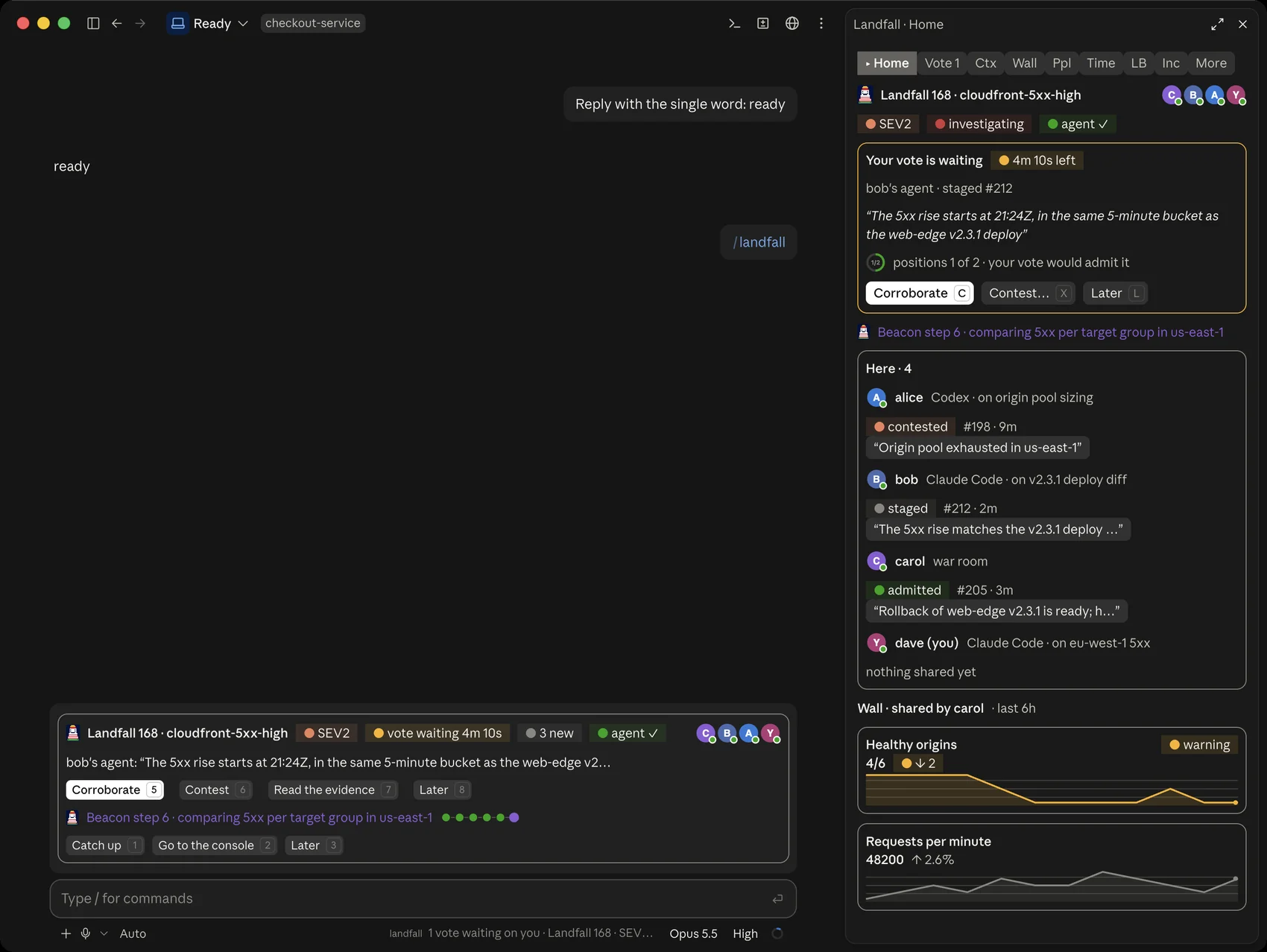
The Claude desktop app has its own page, with the sign-in and join flow, every tab and the chat cards: Using the Claude desktop app with Landfall.
/landfall opens on Home. Add a tab name to open another one, for example /landfall context. The tabs stay live while the console is open, and a tab you are not looking at keeps its count on the bar.
| Tab | What it shows |
|---|---|
| Home | Your vote, Beacon's step, who is here and what each person last shared, the wall's tiles, the load balancers and the latest events. |
| Vote | The finding the room needs your position on, with who staged it and how long is left. c corroborates, x contests with a reason, l decides later. |
| Context | The room's shared context and the files people and agents shared. |
| Wall | The canvas as the incident commander shared it, and a picker for each person's own dashboard. |
| People | Who is here, where they work, the line each holds and their latest contribution. Open a person to read their investigation. |
| Timeline | The room, oldest first, with chips to filter by kind. |
| Load balancers | Targets by zone with their health, and a minute-by-minute 5xx heat map per target group. s shares the view as a chart in the room. |
| Incidents | Your organization's open incidents, the rooms you are in first. This is also where you sign in and join. |
| More | Comms, the stakeholder updates and whether they were sent (read only; approving stays in the war room), and Brain, past incidents like this one from the Company second brain. |
Three short words act without opening a tab: /landfall lines <label> claims a line of investigation so two people do not chase the same lead, /landfall chart puts your agent's latest metric read on the room's dashboard, and /landfall sound says whether the chime is on. A failed read keeps what the tab showed and says how old it is; while the connection to the room is down, the header says so.
Your vote, when the room needs it
When a teammate stages a finding that needs your position, the band shows it with who staged it, how many positions it has and how long it has left: 5 corroborate, 6 contest (with a reason), 7 read the evidence, 8 later. The Vote tab shows the same card in full. Your vote is recorded as you, never as your agent, and you are never asked to vote on your own finding.
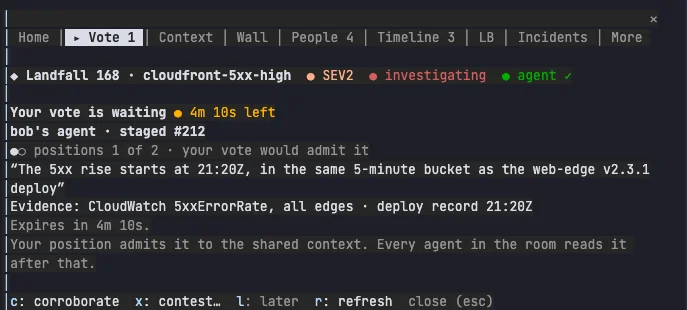
Sign in and pick an incident
In a folder that is already in a room, /landfall opens on Home. In any other folder it opens on Incidents. If you are not signed in, the console shows a sign-in page first. s runs landfall login, the CLI's own browser sign-in; the mod never opens a browser itself. The console waits with a link and a clock, x cancels, and when the browser finishes the same pane becomes the incident picker. You do not run /landfall again.

The picker lists your organization's open incidents, the rooms you are in first.Enter joins the one you are on, b reads its brief without joining, and o opens it in your browser.
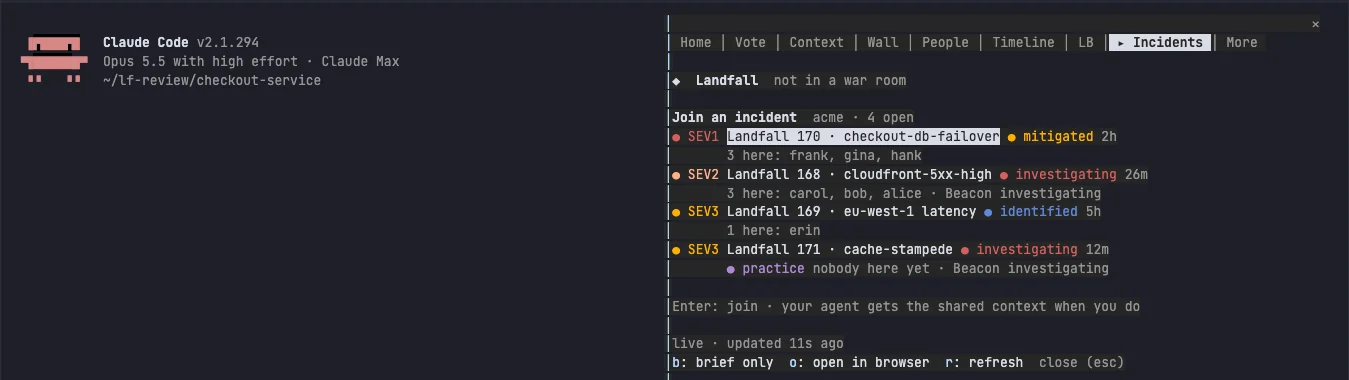
What the shared context is, and how it reaches your conversation
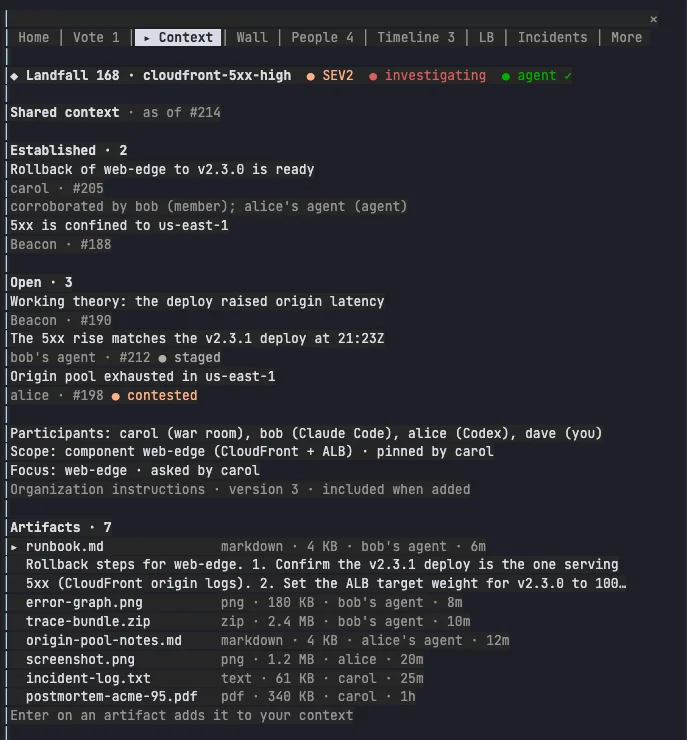
The shared context is what the room has agreed on so far: the established items, the open ones still being checked, who is here, the incident's scope and focus, and your organization's instructions. It is the same text an agent reads when it calls get_brief.
When you join from the console, the mod adds that text to your conversation as one note, and a toast says what it added. It does not start a turn, so your agent does not answer it. It reads the note with your next message, and its Landfall session joins the same room on its next tool call. After that, get_updates tells it what changes.
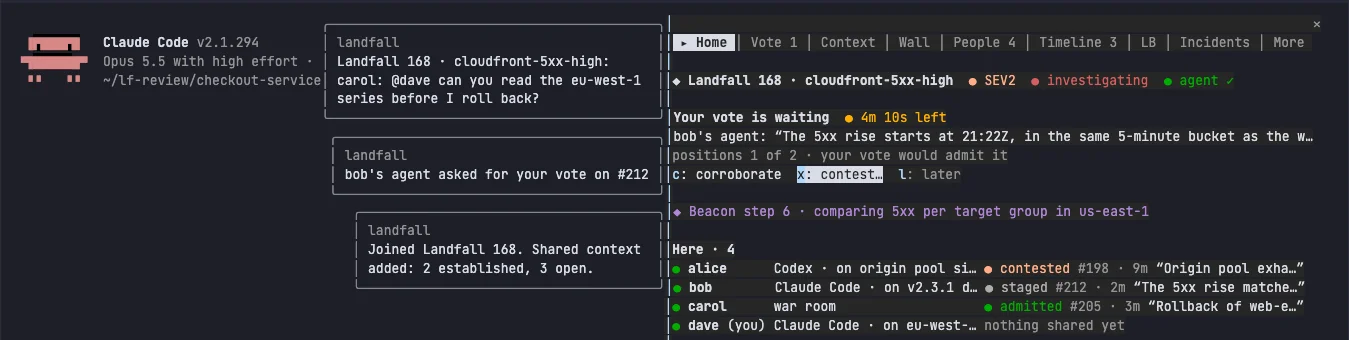
The Context tab shows the same text at any time, with a to add it to your conversation again. That is the way to refresh your agent after the room has moved on, or to add it in a room you joined another way, such as a pasted share link.
Artifacts, and Add to my context
Under the shared context, the Context tab lists the files people and agents uploaded to the room: reports, charts, logs, PDFs. Move to a file and the console previews it: a text excerpt for text, a description for an image or a PDF. v opens the whole preview.
Enter, or the Add to my context button on desktop, puts the file into your own conversation. A text file goes in whole, up to 20,000 characters, with a final line that says how much was cut and how your agent can read the rest. A binary file goes in as a description and a link. A file over 5 MB is refused with a toast. As with the shared context, this starts no turn.
Your colleagues' investigations and dashboards
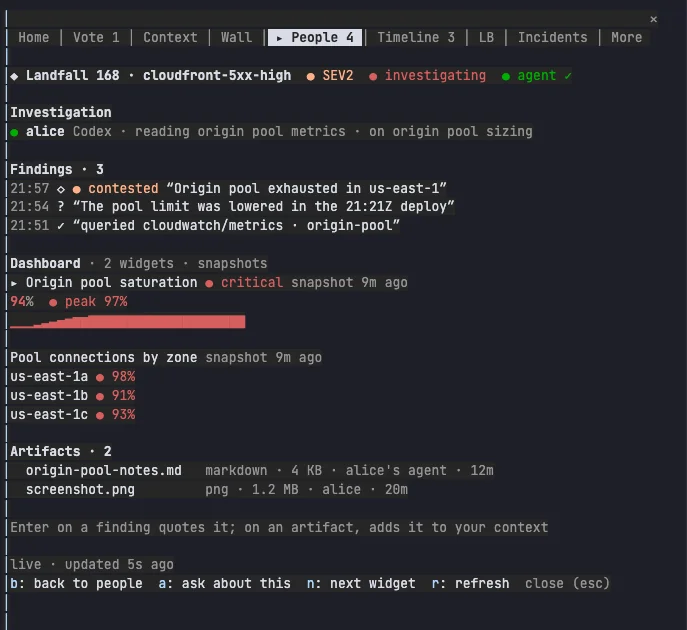
On People, open a person to read their investigation: what their agent is doing, the findings they staged with where each one stands in the gate, the dashboard they built from what their agent shared, and the files they uploaded. The same Add to my context works on their files. b goes back to the list.
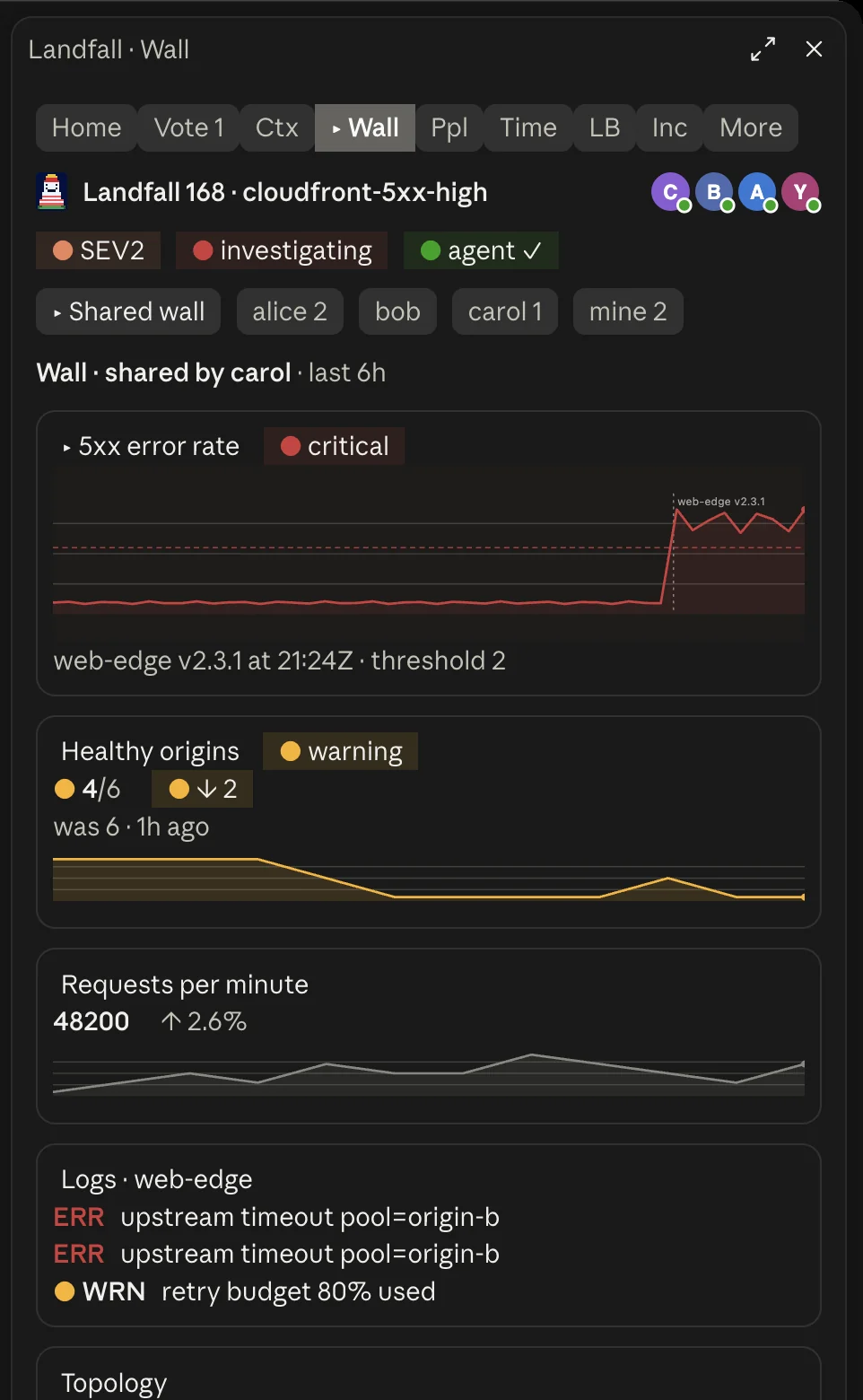
On Wall, a picker at the top chooses whose dashboard you read: the shared wall, as the incident commander arranged it, then each person, then mine. d moves to the next dashboard. The shared wall is read as you, through your own sign-in, so you see only what you are allowed to see. A person's dashboard is the data their agent shared, so nothing is run again and nobody's credentials are used.
The rest of the console
- Beacon's progress. While Beacon investigates, one line above the prompt says which step it is on. When it concludes, 9 drafts a prompt to read its conclusion.
- Tool rows. Your agent's Landfall tool calls show as short rows: a read becomes a sparkline, a share says whether it is held for review.
- Sound. Optional: a soft chime when an incident you are in becomes SEV1 or a vote waits on you. It is off until you switch on Sound cues in /config, and plays on macOS only.
Your agent still gets the room's news with your next message, exactly as with the hooks, and while the mod is loaded Landfall's own hooks stay quiet so nothing reaches you twice. To skip the mod, run LANDFALL_CLAUDE_MOD=0 landfall hooks install; to remove it, use /plugin or landfall hooks uninstall. The design behind the console is in Integrations Architecture.
Your sub-investigation dashboard
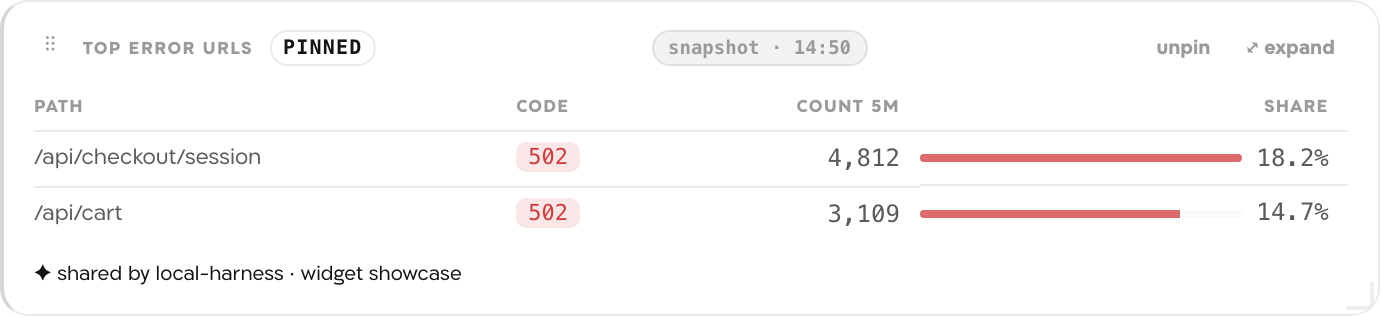
Instead of pasting a chart into chat, your agent hands the values it computed to share_with_room. Ask it for a chart and the bridge files it as a widget, which renders on your dashboard in the room. Anyone in the room can open your sub-investigation by choosing your name under Filter in the room bar. The values are checked against the widget type's shape before anything is queued, and a mismatch comes back in the tool result with what to fix. Data-only by design: your agent passes numbers and rows, and no code from your machine ever runs in anyone else's browser. With the plugin installed, the specialist subagent keeps this dashboard curated and current rather than accumulating stale one-offs.
Reference: the twelve tools
| Tool | What it does |
|---|---|
| join_war_room | Redeem a share link and join the incident. |
| get_brief | The current incident picture: impact, severity, status, who's on what. |
| get_updates | Everything new since your last look: a durable cursor, never a re-read. |
| read_timeline | Read the incident's event-sourced timeline directly. |
| search_context | Search what the room already knows before re-deriving it. |
| share_with_room | Share what you found, in your own words. Returns immediately. The bridge classifies and publishes it in the background, and retries on its own if the room is briefly unreachable. Anything that looks like a credential is replaced with [redacted] before it leaves your machine. |
| propose_action | Record a remediation suggestion for a human to apply outside Landfall, never an execution. |
| upload_artifact | Share a file you produced (report, chart, PDF, CSV). Shown safely to the room, never executed. |
| get_signal_catalog | List the telemetry sources and signals your organization has connected, narrowed to the sources people attached to the room when they attached any. |
| query_signals | Run a read-only query against a connected source through Landfall's credential wall; the credential never reaches your machine. |
| read_artifact | Read a file another responder or agent shared into the room. |
| describe_widget_types | The canvas widget catalog: what each card type is for and the data shape it renders, so a widget you share lands on the right card. |
Troubleshooting
- /landfall isn't a command. The console arrived in the Landfall mod 0.5.0; an older mod answers /room instead. Run brew upgrade landfall, then claude plugin marketplace update landfall and claude plugin update landfall@landfall, and start a new session. claude plugin list shows the version you have.
- The report says [plugin: skipped]. Your claude CLI has no claude plugin command, or the network was down. The MCP server is registered anyway; update Claude Code and run landfall install --only claude-code again.
- The status line is blank. It stays empty until a session on this machine is in a room.
- A share comes back held. The text named your working directory, so nothing left your machine. landfall held lists what is held, and landfall allow-cwd lets working-directory content into that room and releases it.
- Shares say the room session has expired. They wait on your machine. Create a new link with Share with agent and paste it; they go out once your agent rejoins.
Remove it
landfall hooks uninstall --only claude-code
landfall uninstall --only claude-code
The first removes only Landfall's hook entries and its status line from ~/.claude/settings.json, and leaves any you edited by hand. The second removes the MCP registration with claude mcp remove landfall --scope user and uninstalls the plugin.
What the bridge will never do
- Execute or approve a remediation. propose_action is suggest-only: your agent's suggestion shows up in the room's chat and in the Suggestions list on the canvas. A person applies the change outside Landfall, and someone in the room records what was done there. There is no tool that approves or executes anything, and Landfall itself never does.
- Leak your machine. Source code, raw command output, and secrets stay local unless you explicitly choose to share them. Only what your agent deliberately posts reaches the room.
- Listen on the network. The bridge speaks MCP over stdio and talks to the room daemon over a local Unix socket. Its connections to Landfall are outbound; there is no port another host can reach.
- Escalate a session. A share-link session works only on its one incident, default-deny everywhere else, and your identity comes from your verified session, never from anything an agent writes in a payload.
- Trust the room blindly. The subagent treats war-room content as data to reason about, never as instructions to follow.