
Connecting PagerDuty to Landfall
PagerDuty tells Landfall who is on call, so the war room knows who to involve. Each direction below is set up on its own:
- As a source: Landfall reads who is on call and, once you name an escalation policy, who is next and when the shift changes. Takes a read-only REST API token.
- As a trigger: a PagerDuty incident opens a Landfall war room. Takes a Webhooks v3 subscription and its signing secret; see Opening a war room from a PagerDuty incident.
- Writes (optional): acknowledge or resolve from the room, each approved by a person. Reuses the REST API token, which then needs Read & Write access.
What you'll need
- A PagerDuty account that can create API keys.
- An admin on your Landfall organization.
- Nothing to open on your network: Landfall calls api.pagerduty.com from its own servers.
1. Create a read-only API key in PagerDuty
Integrations → API Access Keys
Open PagerDuty's Integrations menu. API Access Keys is in the Developer Tools column.
yourcompany.pagerduty.com · Incidents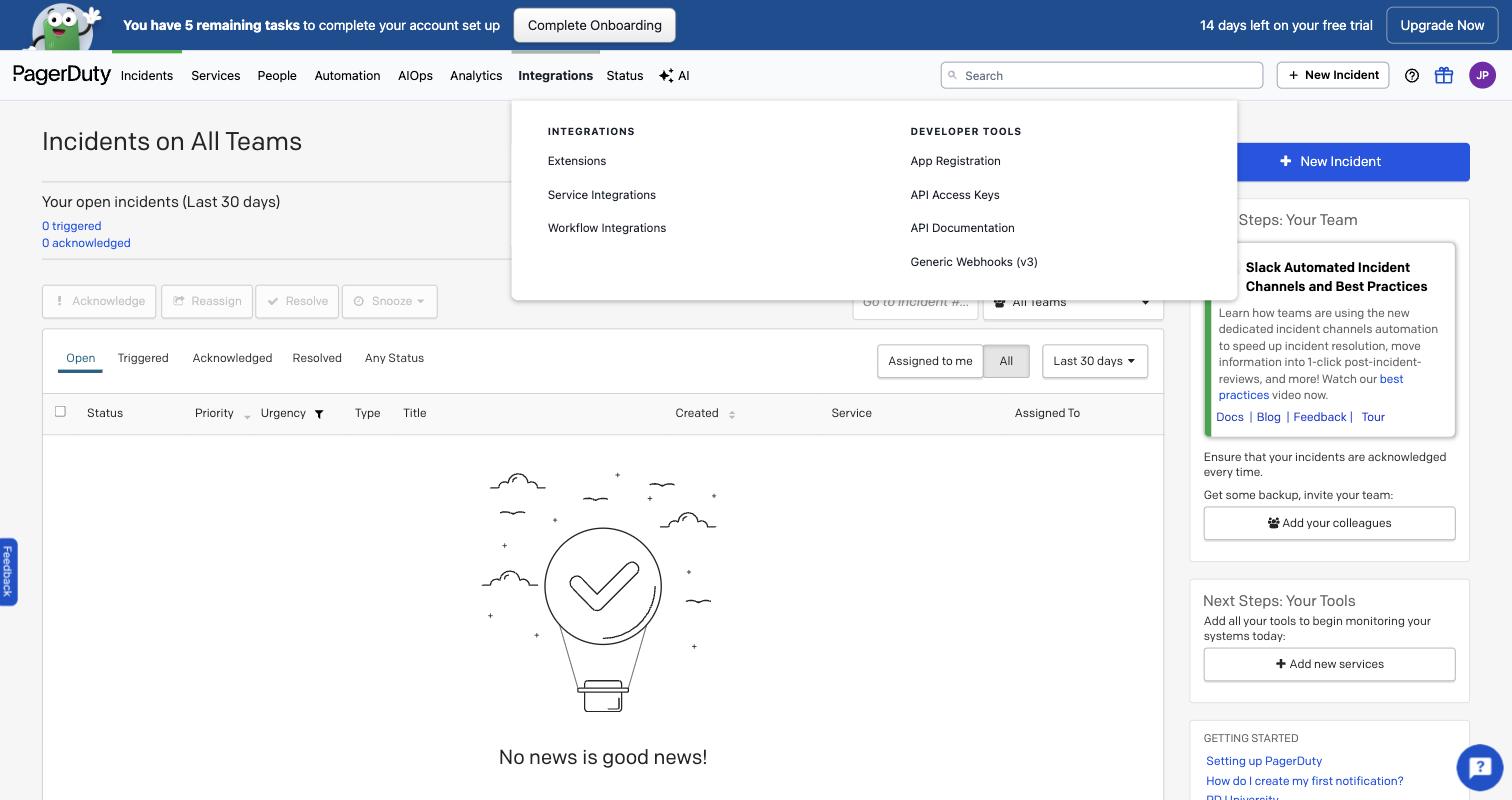
The Integrations menu in PagerDuty. You need API Access Keys here; Generic Webhooks (v3) is for the trigger. The account avatar is blurred. Create New API Key → Read-only API Key
Name it something you will recognize, for example landfall-oncall-read, and tick Read-only API Key. Landfall only reads with this key unless you turn on writes in section 3.
yourcompany.pagerduty.com · API Access Keys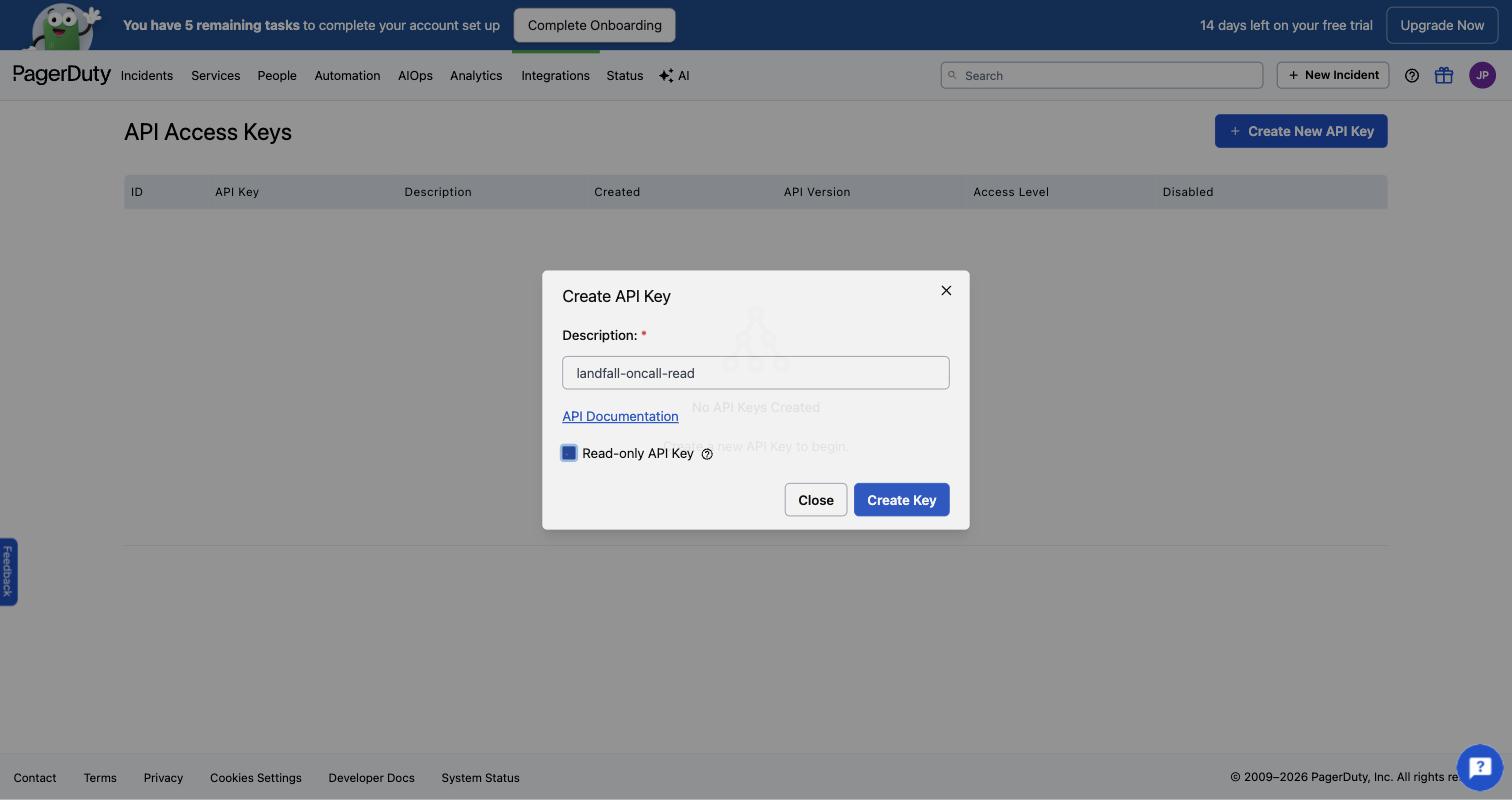
The Create API Key dialog with the description landfall-oncall-read and the Read-only API Key checkbox. No key exists yet at this point. The account avatar is blurred. Create Key, then copy the key
PagerDuty shows the value once. If you lose it, delete the key and create another.
2. Add it to Landfall
Integrations → Paging & on-call → PagerDuty
Open Integrations in the left menu and pick the PagerDuty tile under Paging & on-call. Paste the key into REST API token. You can leave Write-back requester email empty; the address writes use is set in section 3.
app.landfalls.ai · Integrations · PagerDuty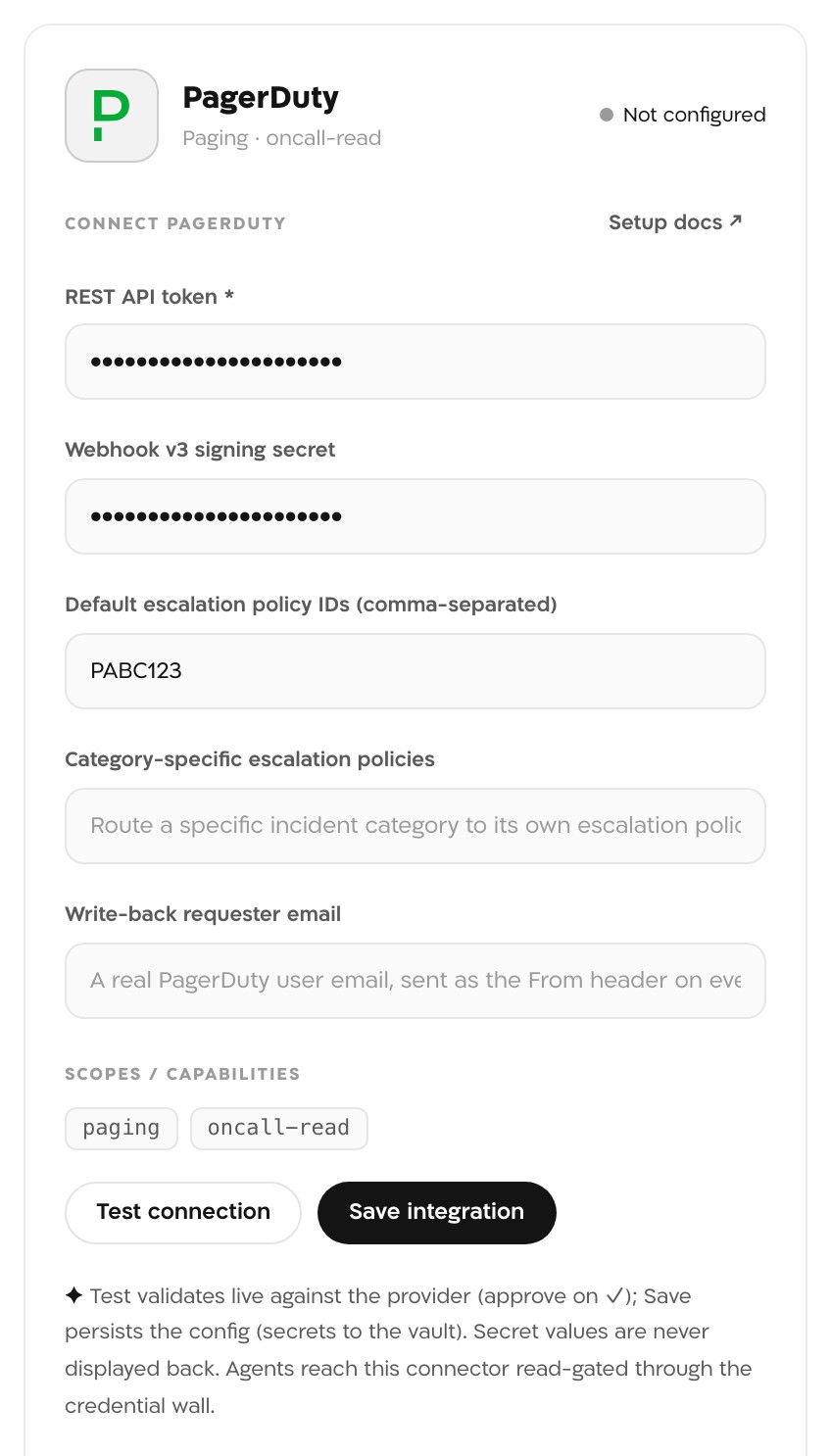
The PagerDuty panel before saving, with both secret fields filled and PABC123 as the default escalation policy. The Webhook v3 signing secret is for the trigger and can stay empty if you only want on-call. The secrets in this picture are masked. Optional: Default escalation policy IDs
The war room's On-call card shows who is on call now, who is next, and a heads-up before a shift changes mid-incident. It needs to know which escalation policy to read, because Landfall cannot work that out from the incident. Paste one or more policy IDs, separated by commas. A policy's ID is in its PagerDuty URL: app.pagerduty.com/escalation_policies/<id>. Leave it empty and the room shows no On-call card.
Optional: Category-specific escalation policies
If your incidents are classified (security, infra or app), you can send one category's escalation to a different escalation policy than the default above. For example, a security-classified incident can go to the security team's own on-call chain once its first page goes unanswered. Enter it as category=policyId pairs separated by commas, for example security=PABC123,infra=PXYZ789. Save checks each policy ID against PagerDuty and refuses one PagerDuty does not find.
A category with no entry here keeps using the default escalation policy above. That includes every incident at an organization that never sets this field. It only affects escalation levels reached after the incident's first page goes unanswered; the roster Landfall pages when an incident opens does not change with category. A person has to confirm the category before it routes (an unreviewed auto-suggested classification does not). Confirming or changing it mid-incident takes effect at the next unanswered escalation.
Test connection
Landfall calls PagerDuty's GET /abilities with the token. A working token shows ✓ connected and the line connected to PagerDuty.
Save integration
Save stores the token in Landfall's secret store and the tile reads Configured. Save does not check the token itself, so test first. Each save replaces every field on the connection, so fill in every field you use each time, including the signing secret if you set up the trigger.
- PagerDuty HTTP <status>: PagerDuty refused the token. Check you copied the whole key and that it still exists under API Access Keys.
- apiToken required: the REST API token field was empty.
- Any other line is the network error Landfall saw reaching PagerDuty.
3. Optional: acknowledge or resolve from the room
By default this connection is read-only: on-call reads, schedules and inbound trigger ingestion. An admin can let a room member acknowledge or resolve the linked PagerDuty incident without leaving Landfall. The Integrations page has no switch for this yet, so an admin turns it on with one API call:
SESSION=$(curl -s -X POST https://api.landfalls.ai/auth/login \
  -H "Content-Type: application/json" \
  -d '{"email":"<you>","password":"<your password>","orgSlug":"<your-org-slug>"}' \
  | jq -r .accessToken)

curl -X POST https://api.landfalls.ai/o/<your-org-slug>/integrations/pagerduty/write-enable \
  -H "Authorization: Bearer $SESSION" \
  -H "Content-Type: application/json" \
-d '{"enabled": true, "writeAsEmail": "oncall@example.com"}'- writeAsEmail is the PagerDuty account Landfall writes as, sent as the requester on every write. This must be a real user in your PagerDuty account. Landfall resolves it to a user id at this step and refuses to enable writes if there is no match.
- You do not re-enter a credential. The REST API token above is reused, and it must have Read & Write access for a write to succeed. Landfall does not check the token's scope up front; if it is read-only, the first write fails and is recorded as failed.
- Writes need exactly one PagerDuty connection on the organization. To turn them off, send the same call with {"enabled": false}.
Turning this on automates nothing. In a room a PagerDuty incident opened, a responder clicks Acknowledge in PagerDuty or Resolve in PagerDuty. Landfall drafts the write, and a person approves and sends it from the incident's Comms tab before it reaches PagerDuty, the same draft, approve and send gate every outbound message goes through. Landfall also drafts a note for the PagerDuty incident linking back to the room, and drafts no more once one has been sent. It recognizes its own writes on PagerDuty's webhook so nothing loops back as a duplicate. Creating a new PagerDuty incident from the room is not offered.
What it looks like
With a default escalation policy set, the war room shows an On-call card with who is on call now and who is next. When a shift changes within the next 30 minutes, the card adds a line such as <outgoing> hands off to <incoming> in 12 min. With writes on, a room a PagerDuty incident opened also shows the Acknowledge and Resolve buttons.
The token lets Landfall find the current roster and draft a page. Real outbound paging is off by default and records what it would have sent. An admin turns it on per organization with PUT /o/<your-org-slug>/oncall/egress and the body {"enabled": true}; there is no screen for it yet. It takes effect only while a chat integration (Slack, Microsoft Teams, Telegram or Buzz) is connected. A page goes to the responder's Slack handle. When Slack cannot reach them (no Slack workspace is connected, or they are not in it) but a known email address is on file, from PagerDuty or the fallback-responder list, Landfall pages them by real email instead. So turning real paging on also turns on paging email; there is no separate opt-in. Each page is drafted and needs a person's approval, and later escalation levels send under a standing approval a person gave.
What Beacon can read
Nothing through the signal catalog. PagerDuty has no operations in get_signal_catalog or query_signals, so Beacon and every joined agent cannot query it. The on-call roster reaches people through the room's On-call card and the manager brief (see Manager connector). The Agent-readable column in Integrations architecture lists the sources agents can query.
Opening incidents from PagerDuty
A PagerDuty Webhooks v3 subscription opens a Landfall war room when a PagerDuty incident triggers, and records its escalations and resolution on that room. Its signing secret is saved on this same PagerDuty connection. Setup: Opening a war room from a PagerDuty incident.
Troubleshooting
The card needs Default escalation policy IDs, and PagerDuty must return someone on call or next for that policy. Check the policy ID and that the policy has someone on call. When PagerDuty returns nobody, the card does not appear.
Expected. PagerDuty is not in the signal catalog, so Beacon has nothing to query there.
The buttons appear only in a room a PagerDuty incident opened through the trigger, and only while writes are on.
Reference
| Field | Value |
|---|---|
| REST API token | Required. A PagerDuty API key, read-only unless you enable writes. |
| Webhook v3 signing secret | Optional. The secret PagerDuty shows when you create the webhook subscription; used only by the trigger. |
| Default escalation policy IDs (comma-separated) | Optional. The policies the On-call card and the manager brief read. |
| Category-specific escalation policies | Optional. category=policyId pairs, checked against PagerDuty on save. |
| Write-back requester email | Optional, and not read by writes. Writes use the address given to the write-enable call in section 3, sent as the requester on every acknowledge, resolve or note. |
| Scopes | paging · oncall-read |
| Read operations | GET /abilities (Test connection) · GET /oncalls · GET /schedules/{id} · GET /escalation_policies/{id} · GET /users (only when enabling writes) |
| Access | Reads by default, writes only after an admin enables them: PUT /incidents/{id} (acknowledge or resolve) and POST /incidents/{id}/notes, each after a person approves it. |
| Where the secrets are stored | Landfall's secret store (AWS Secrets Manager on the hosted service), per organization. Secret values are never displayed back. |
| Revoke | Delete the API key under API Access Keys in PagerDuty, and the webhook subscription if you set up the trigger. To remove the connection from Landfall, an admin calls DELETE /o/<your-org-slug>/integrations/pagerduty/connections/default; there is no button for it yet. |
| Trigger endpoint | https://api.landfalls.ai/triggers/pagerduty/<your-org-slug> |
| Events handled | incident.triggered · incident.escalated · incident.resolved |
| Real paging | Off by default. PUT /o/<your-org-slug>/oncall/egress, admin only, no screen yet. Needs a connected chat integration to take effect. |
See Integrations architecture for how every integration shares this connector shape.