
The manager connector (remote MCP)
Point Claude at your Landfall organization and ask, in plain language, what is burning now, what happened before and what is waiting on a decision. It is a read-only lens: nothing you ask can approve, run or page anything, and its one optional write changes no incident state.
- As a source: your assistant reads incidents, briefs, open decisions, the organization's memory and the Company second brain. It takes one connection you sign in to and approve in Landfall.
- Writes (optional): one acknowledgement ("leadership has seen this") that changes no incident state, only if you tick it when you approve.
- As a trigger: not applicable. The connector cannot open an incident.
How it works
The connector is a remote MCP server, and Landfall is its own OAuth authorization server for it. Your assistant registers itself, sends you to Landfall's ordinary sign-in for your organization, and after you approve, holds a credential for that one organization (or one incident). Every request re-reads the grant and your membership, so a revoked connection or a departed member loses access at once.
What you'll need
- A Landfall account that is a member of the organization. The connector signs you in with whatever method your organization already uses.
- An AI assistant that supports remote MCP connectors, such as Claude.
1. Add it in your assistant
Copy your organization's connector address
It is your API base URL plus your organization's slug: https://api.landfalls.ai/o/<your-org>/mcp. Landfall shows it, with a Copy button, under Your settings → Connected assistants.
Add it in your assistant's connector settings
In Claude: Settings → Connectors → Add custom connector. Paste the address; registration and discovery are automatic. These steps are written for Claude; another assistant that supports remote MCP connectors takes the same address.
Sign in and approve
Your browser opens Landfall's sign-in for that organization, then a page titled Connect an assistant to <your organization>. It says what the connection would cover (every incident in the organization, or one incident), what it may read, and where your access would be delivered. Landfall cannot verify the app's own name, so decline if you do not recognize that destination. If the assistant asks for the acknowledgement permission, it is a separate checkbox, unchecked by default. Click Approve.
Or use the org-agnostic address
https://api.landfalls.ai/mcp works for any Landfall organization, with no slug to look up. Add it the same way. After you sign in, the approval page asks Which organization? if you belong to more than one, and skips the question if you belong to only one. It is the same connector underneath, with the same read-only guarantees.
Pin a connection to one incident
A connection can also cover a single incident: https://api.landfalls.ai/o/<your-org>/i/<number>/mcp. Use it to share exactly one investigation with someone who should see nothing else. A pinned connection sees that incident only, and the organization-wide memory and Company second brain reads are refused for it.
2. Ask it
- Now: “What incidents are ongoing?” · “How bad is the checkout incident, and who's on it?” · “What's waiting on a decision?” Served by the live incident list, the manager brief and the open decisions view. The brief includes a paragraph written to be forwarded to stakeholders as it is.
- The past: “What incidents did we have last month?” · “How was the CDN outage closed out?” Closed and resolved investigations are listed newest first, over a time window you name (90 days by default), and a closed incident's brief leads with the outcome: when it closed, and how.
- The organization's memory: “Have we had payments problems before?” · “What do we know about our CDN vendor?” Answered from the memory built out of past incidents. Every entry carries a confidence label, and a working theory is never presented as an established fact.
3. Read the Company second brain
The same connector lets an assistant or a coding agent read the Company second brain: what your organization has learned from its incidents, as pages that link to each other and quote the findings they rest on. The brain learns by itself after every resolved incident. A manager asks an assistant what the company knows about a service; an investigator's coding agent reads the lessons about the code it is about to change. Both read the same pages a person reads in the Wiki view and in a downloaded vault.
Company second brain → Connect
In the left menu, open Company second brain and click Connect. The dialog shows your organization's connector address and the steps for an assistant and for a coding agent.
app.landfalls.ai · Company second brain · Connect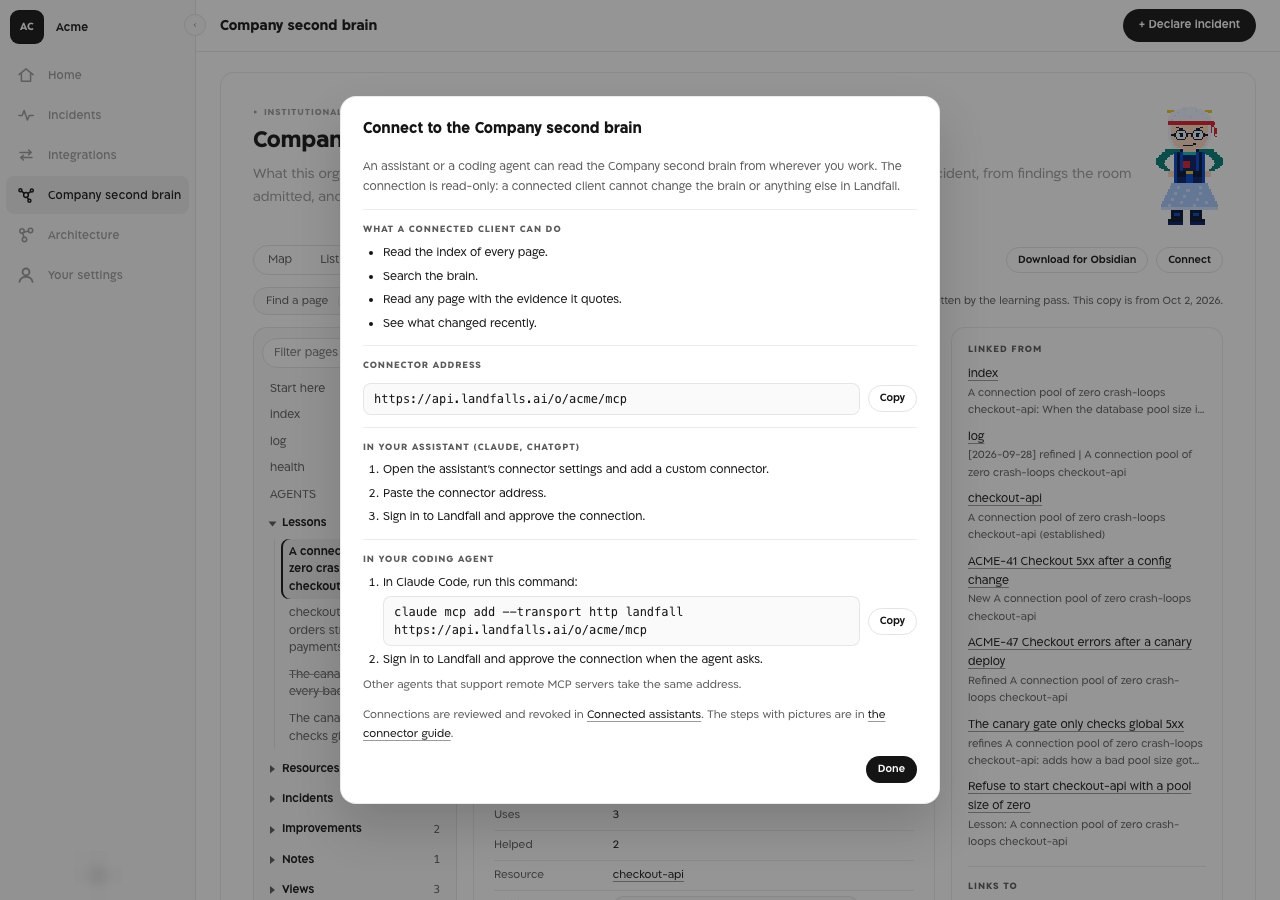
The Connect dialog in the Acme sample organization. The address and the Claude Code command already carry the organization's slug, and each has its own Copy button. In your coding agent
In Claude Code, run this command with your organization's address:
Terminalclaude mcp add --transport http landfall https://api.landfalls.ai/o/<your-org>/mcp
Sign in to Landfall and approve the connection when the agent asks. Other agents that support remote MCP servers take the same address.
Read what it reads
The brain tools return the same pages the Wiki tab shows: each page's properties, its text, and what links to it and from it.
app.landfalls.ai · Company second brain · Wiki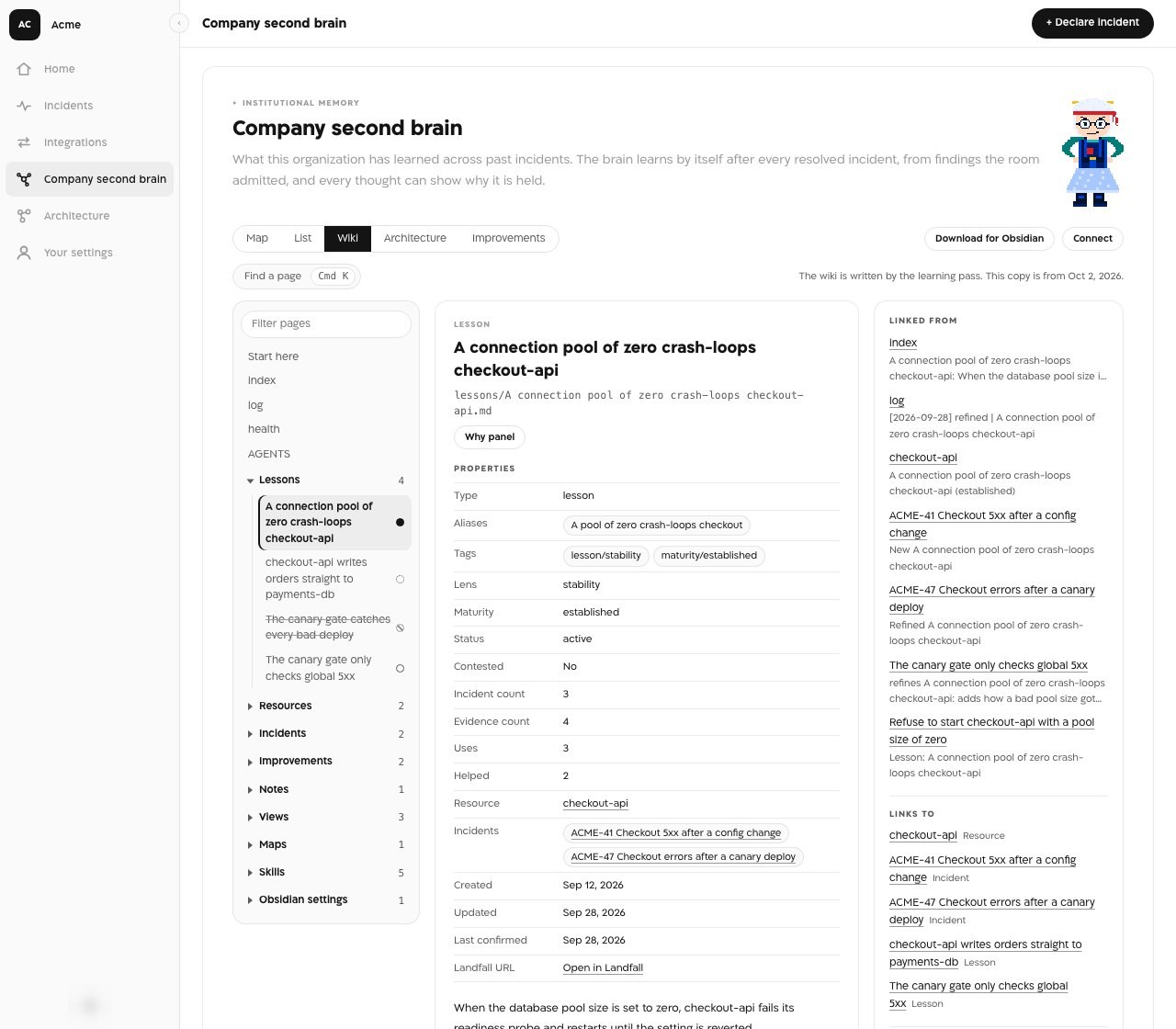
One lesson page in the Acme sample organization. brain_read returns this page as Markdown: the properties table, the text, the findings it quotes and the Linked from and Links to lists.
What the four brain tools do
| Tool | What it returns |
|---|---|
| brain_index | The place to start. An overview of the brain: its top-level pages, and for each folder how many pages it holds and the first few, each with a one-line summary. Asked for one folder, it lists that folder a part at a time. |
| brain_search | The pages that match a question, each with the passage that matched. |
| brain_read | One page as Markdown: its properties, its text, the findings it quotes, what it links to and what links to it. A long page comes in parts, each naming where the next one starts. A path that does not exist answers with the nearest matches. |
| brain_recent_changes | What was learned, refined or retired lately, newest first. |
All four are read-only, and a page path is the only handle: no result carries an internal identifier. A client that supports prompts is also offered three of the brain's skills as prompts (brain-query, brain-health, brain-review), which tell it to start at the index, cite the page and the quoted finding, and say when the brain does not know. The brain tools need an organization-wide connection.
What it looks like
Your assistant answers in its own chat, naming incidents by their human-readable id (like Acme 42). Raw identifiers never appear.
In an assistant that shows interactive answers (Claude, and other hosts that support MCP Apps), three answers arrive as Landfall cards inside the conversation instead of text. Each card is read only and draws from the answer it came with; its buttons only ask the connector again or open Landfall in your browser.
- Open incidents (list_incidents): one card per ongoing incident with its severity, status, how long it has been open and how many people have worked in it. Show the room opens that incident's room card in place.
- The room (get_room): how the incident stands, what is established and what is still open, who is in the room with each person's latest contribution to the shared context and where it stands, and the last few things that happened. Refresh asks again.
- The canvas (get_incident_status): the incident's widgets, drawn as the war room draws them, with a Refresh that reads them again for you.
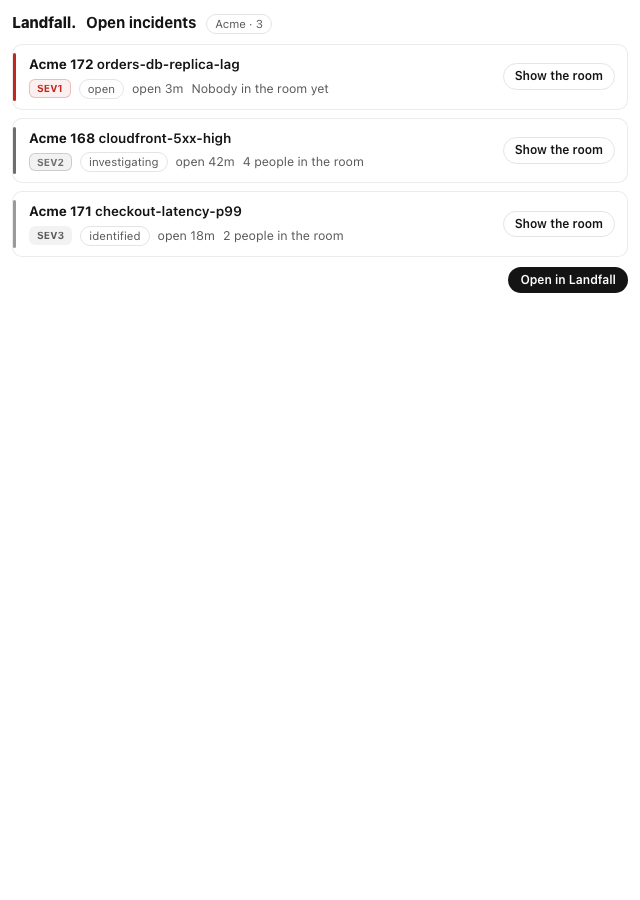
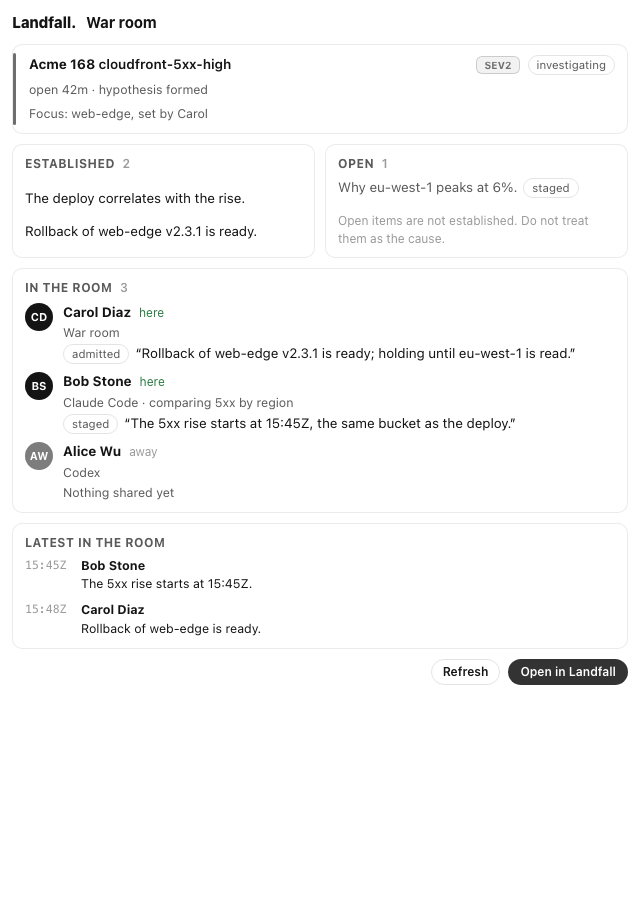
Using the Claude desktop app with Landfall shows all three cards, light and dark, next to the Code tab's /landfall console.
What a connected assistant can read
| Tool | What comes back |
|---|---|
| list_incidents | The ongoing incidents you may see, by their human-readable ids |
| get_incident_status | One incident's lifecycle, severity, phase and elapsed time |
| get_room | One incident's room: status, focus, what is established and open, who is in it with their latest contribution, and the last few timeline rows |
| get_manager_brief | What is affected, how bad, how long, whether it is contained, who is on it, what is waiting on a decision, what is still unknown, and a paragraph safe to send to stakeholders |
| list_open_decisions | What is waiting on a human decision; each is actionable only in the war room |
| get_investigation_summary, read_shared_context | For engineers: the phase, findings, leading hypothesis, recent timeline and suggested fixes. Content the room judged wrong is left out |
| list_closed_incidents | Past incidents, newest first, within a time window |
| get_org_history | Memory related to one incident's subject, and in which past incident it came up |
| query_org_memory, get_org_memory_summary | What the organization's memory says about a topic, and an overview of what it holds |
| brain_index, brain_search, brain_read, brain_recent_changes | The Company second brain's pages (see section 3) |
| get_signal_catalog, query_signals | The telemetry sources connected for the incident's organization, and one read from one of them through Landfall's credential proxy |
| describe_widget_types | What each canvas widget type is for and the data it renders |
get_signal_catalog and query_signals answer only on a connection pinned to one incident; they read the same catalog Beacon and every joined agent use (see Integrations architecture). The memory and Company second brain reads answer only on an organization-wide connection.
Opening incidents from the manager connector
Not applicable. The connector is a read-only lens: it cannot open an incident, page anyone or change severity. Declare an incident in Landfall, or connect a triggering integration.
Troubleshooting
- On the org-agnostic address, Approve stays disabled until you pick an organization under Which organization?.
- The page says you don't belong to an organization yet: the account you signed in with is not a member of any organization.
- not permitted: this connection is scoped to one incident: memory and second brain questions need the organization address.
- not permitted: incident-scoped session required: telemetry questions need a connection pinned to one incident.
Reference
| Field | Value |
|---|---|
| Organization address | https://api.landfalls.ai/o/<your-org>/mcp |
| Org-agnostic address | https://api.landfalls.ai/mcp; the organization is chosen when you approve |
| Incident-pinned address | https://api.landfalls.ai/o/<your-org>/i/<number>/mcp |
| Sign-in | Your organization's ordinary sign-in, then the approval page |
| Credential | Short-lived, pinned to one organization (or one incident), and revocable at any time |
| Access | Read-only. The one optional write is an acknowledgement that changes no incident state, granted only when you tick it |
| Never | Approves a fix, runs anything, changes a severity, pages anyone, posts in the war room or messages a stakeholder. A suggested fix is applied by a person outside Landfall and recorded in the room |
| Identifiers | Incidents by human-readable id only; no result carries a raw identifier |
| Brain tools | brain_index, brain_search, brain_read, brain_recent_changes; organization-wide connections only |
| Prompts | brain-query, brain-health, brain-review, for clients that support prompts |
| Membership | Re-checked on every request; a departed member loses access immediately |
| Revoke | Your settings → Connected assistants, then Revoke on the connection |