
Connecting Azure to Landfall
Beacon, the room's AI agent, reads Azure Monitor metrics and Log Analytics logs during an investigation, through one app registration (service principal) you create and scope yourself.
- As a source: the app registration's Directory (tenant) ID, Application (client) ID and a client secret.
- As a trigger: not yet. See Opening incidents from Azure.
What you'll need
- A Microsoft Entra ID tenant, and permission to register an application in it.
- Permission to add role assignments on the subscription or resource group Landfall should see.
- An admin seat on your Landfall organization. The Integrations page is admin-only.
1. Register an app in Entra ID
Give the app registration read-only roles scoped to what an investigation needs, not a broad Owner or Contributor role.
Entra ID → App registrations → New registration
Name it something recognizable, such as landfall-integration, keep Accounts in this organizational directory only, and register it. No redirect URI is needed.
Overview → copy the Directory (tenant) ID and Application (client) ID
Both are on the app registration's Overview page right after you create it.
Certificates & secrets → New client secret
Copy the secret's Value, not its Secret ID, straight away. Azure shows it once. Note its expiry date: when the secret expires, create a new one and save it in Landfall again.
Subscription → Access control (IAM) → Add role assignment
Assign these three roles to the app registration, at the subscription or the resource group Landfall should see:
- Reader: sees the subscription and its resources.
- Monitoring Reader: reads Azure Monitor metrics and metric definitions.
- Log Analytics Reader: queries Log Analytics workspaces (through Azure Resource Manager; no separate workspace credential is needed).
2. Add it to Landfall
Integrations → Context sources → Microsoft Azure
Open Integrations in the left menu, pick Microsoft Azure under Context sources, and paste the three values.
app.landfalls.ai · Integrations · Microsoft Azure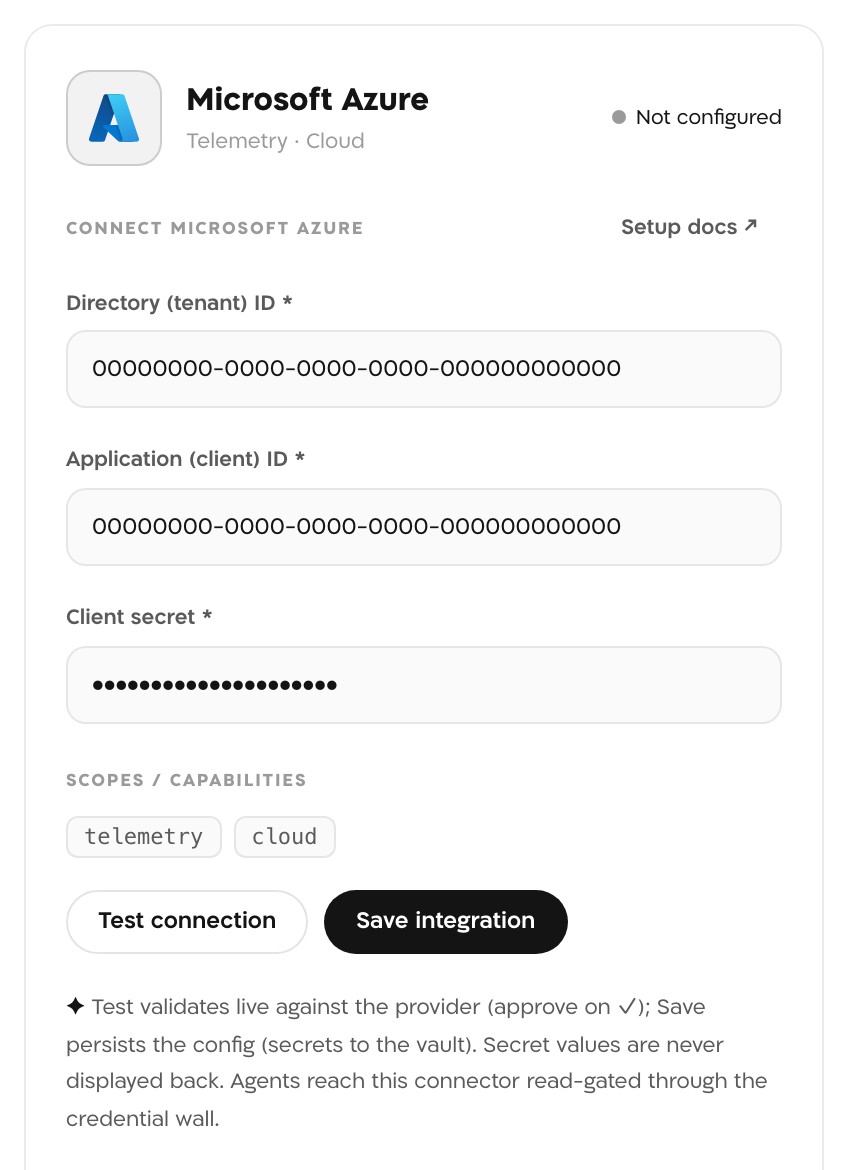
The panel before saving. The two IDs are all-zero examples and the client secret is masked. Landfall never displays a secret value back. Test connection
Landfall exchanges the client secret for an Azure Resource Manager token and lists the subscriptions it can see. On success the panel shows ✓ connected and the line Azure service principal authenticated (ARM access confirmed).
Save integration
Saving runs the same check again and refuses credentials that fail it. The client secret goes to Landfall's secret manager. Microsoft Azure then reads Configured under Context sources.
What it looks like
In a war room, a chart Beacon builds from Azure names its source in the widget's Info panel. Source reads Azure Monitor, and the query names azure-monitor and the operation, such as queryMetrics.
What Beacon can read
| Operation | What comes back |
|---|---|
| azure-monitor/discover | The metric definitions available for one resource (by its ARM resource URI) |
| azure-monitor/queryMetrics | A metric time series for one resource over a window |
| azure-monitor/discoverLogs | The tables with recent data in one Log Analytics workspace |
| azure-monitor/queryLogs | The result of a KQL query against that workspace over a window |
These operations reach Beacon and every agent that joins the room through get_signal_catalog and query_signals. See Integrations architecture.
Opening incidents from Azure
Not yet. Azure is a telemetry source today: Beacon reads Azure Monitor metrics and Log Analytics logs during an investigation. Opening incidents from Azure Monitor alerts is not built yet. If those alerts already page you through PagerDuty or Opsgenie, connect that tool's trigger and the page opens the room.
Troubleshooting
- A line starting Azure token exchange HTTP carries Entra ID's own reason. Check the tenant ID and client ID, and that you pasted the secret's Value rather than its Secret ID, and that the secret has not expired.
- A 401 or 403 from the Resource Manager check means the token works but has no Azure Resource Manager access. Check the role assignment.
A connection that passes Test connection does not necessarily have Monitoring Reader and Log Analytics Reader. Without them, Beacon's reads fail with a 401 or 403. Also check that the role assignments cover the subscription or resource group the incident's resources are in.
Reference
| Field | Value |
|---|---|
| Directory (tenant) ID | Entra ID tenant GUID, required |
| Application (client) ID | The app registration's client ID, required |
| Client secret | A client secret for the app registration, required; stored, never shown back |
| Roles | Reader, Monitoring Reader, Log Analytics Reader |
| Read operations | azure-monitor: discover, queryMetrics, discoverLogs, queryLogs |
| Access | Read-only: metric, table and query reads through Azure Resource Manager, with no write operation |
| Secret storage | Landfall's secret manager, never its database |
| Revoke | Delete the client secret or the app registration in Entra ID, or remove its role assignments |
| Trigger endpoint | None yet |