
Connecting GitHub to Landfall
Connect a GitHub organization so Beacon, the room's AI agent, can search code, read commits and pull requests, and trace an incident back to the change that caused it.
- As a source: the Landfalls Incident Response GitHub App, installed on your organization. There is no key to paste.
- As a trigger: the same App. You choose which GitHub events open an incident; see Opening incidents from GitHub.
How it works
Landfall registers one GitHub App, and your organization installs it the way you would install any other GitHub App, choosing which repositories it can see. There is no secret to create, copy or rotate on your side.
When Beacon needs to read, Landfall signs a request as the App and GitHub returns an access token for your installation that lasts about an hour. Landfall keeps that token in memory only. What it stores for your organization is the installation ID and the GitHub organization name, neither of which is a secret.
Uninstalling the App, or narrowing its repository access, in your GitHub organization's settings takes effect at once.
What you'll need
- An owner of the GitHub organization you want to connect. A member who is not an owner can only request the install, and nothing is connected until an owner approves it on GitHub.
- An admin on your Landfall organization. Only an admin can start the install and save the mapping and trigger settings.
1. Install the GitHub App
Integrations → Source control → GitHub → Connect GitHub
Before you connect, the GitHub panel reads Not connected and shows one button. Clicking it makes Landfall sign a token that ties the install to your Landfall organization for the next 10 minutes, then sends your browser to GitHub's install page for the Landfalls Incident Response App.
Choose repository access
GitHub asks whether the App can see all repositories, including ones created later, or only select repositories. This is GitHub's own install screen, and Landfall can read only what you select here. You can change the choice later from the App's settings in your GitHub organization.
Check exactly what access is requested
GitHub shows the permission summary before you approve anything. Every permission is read-only. The App has no write permission at all, so nothing through this connection can push, merge or comment.
github.com · <your-org> · Settings · GitHub Apps · Landfalls Incident Response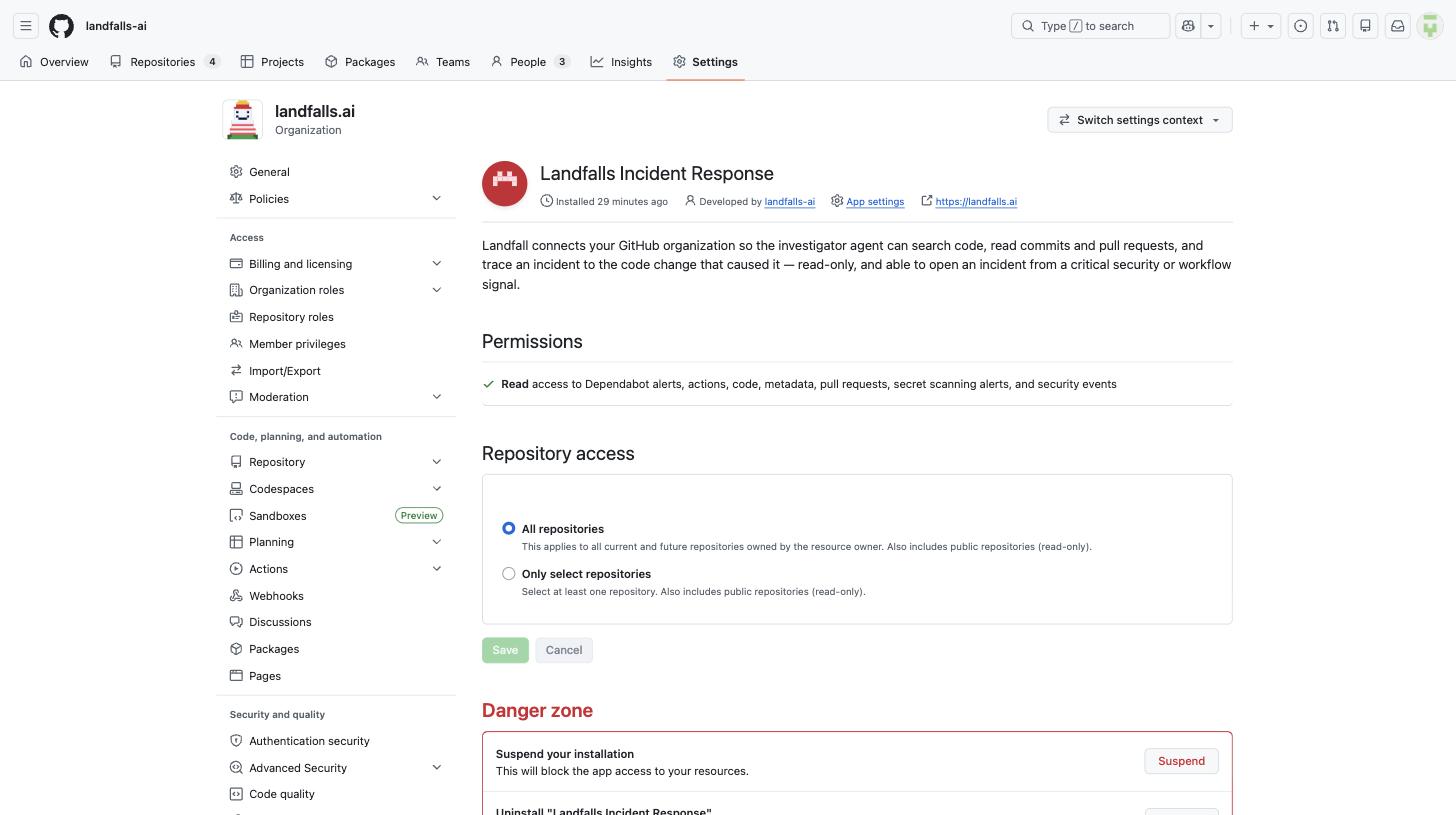
The App as installed on an organization. The Permissions line reads Read access to Dependabot alerts, actions, code, metadata, pull requests, secret scanning alerts, and security events, and Repository access is where you switch between all repositories and a selected few. The organization's name and avatar are blurred. github.com · Landfalls Incident Response · Permissions & events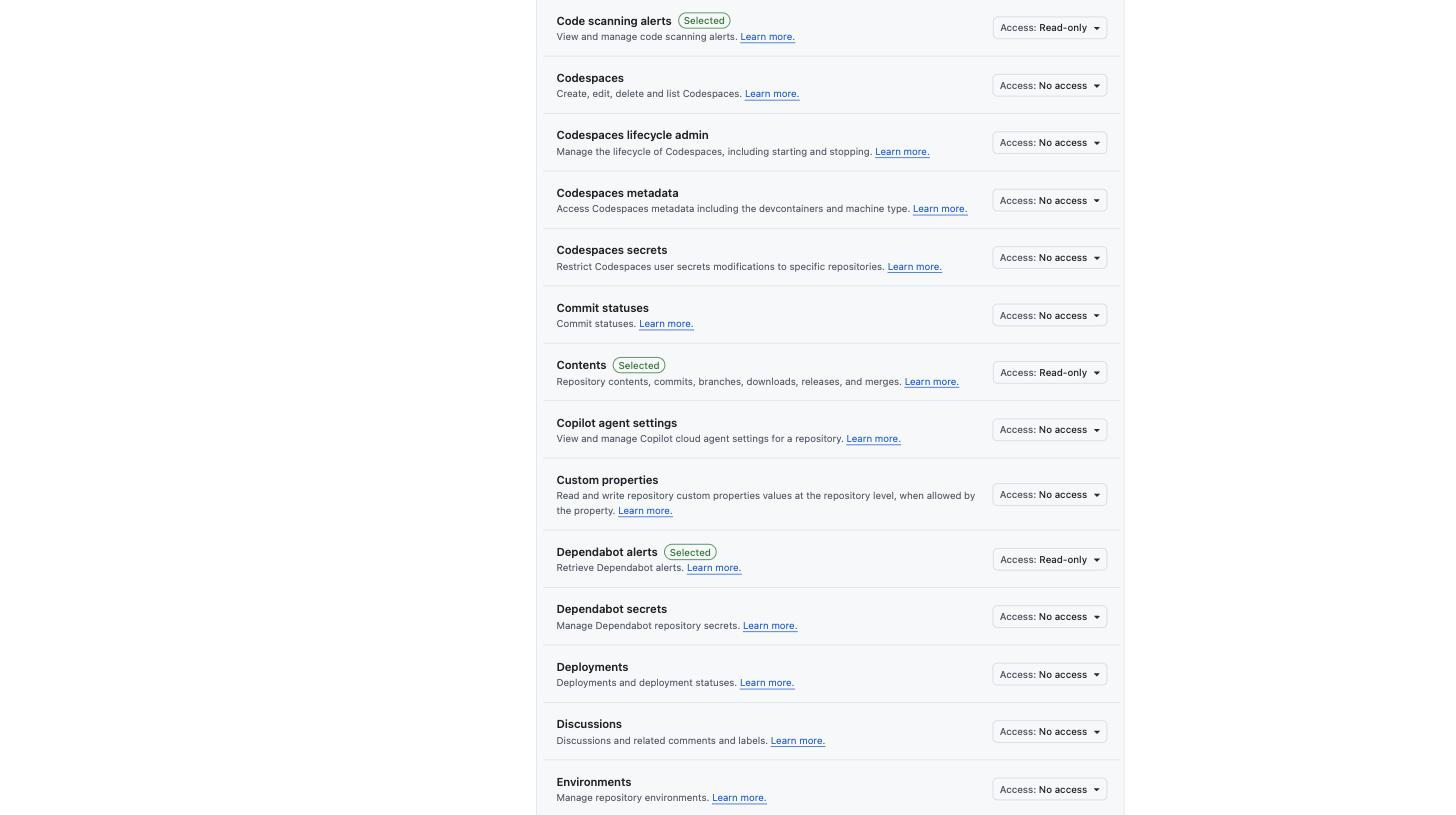
Part of the permission list Landfall registered for the App. Code scanning alerts, Contents and Dependabot alerts are Read-only, and the other permissions in this section are No access. An installing organization cannot grant more than this. Permission What it's for Contents: read Search code, read file contents, list commits, diff a commit, and blame a file: Beacon's code-browsing operations. Pull requests: read List and read pull requests, so a finding can link the pull request that shipped a change. Actions: read Workflow runs, so a failed run of a workflow you mark deploy-critical can open an incident. Code scanning alerts: read An optional trigger: open an incident from a code scanning alert. Dependabot alerts: read An optional trigger: open an incident from a Dependabot alert. Secret scanning alerts: read An optional trigger: open an incident when a leaked secret is detected. Where the secret was found is removed before the alert reaches an incident timeline; see Opening a war room from GitHub. Back in Landfall, connected
GitHub sends your browser back to the Integrations page. Before saving anything, Landfall checks the installation against GitHub's API, and an installation it cannot reach is not saved. Once it is saved, the panel reads Connected and shows the GitHub organization, the installation, and a note that repository access is managed on GitHub.
2. Map repositories to services
Beacon links an alerting service, from Datadog, CloudWatch or any other connected source, to the repository it lives in. In the GitHub panel's Service → repository mapping section, click + Add mapping for each service and enter the service name your telemetry uses, the owner and the repository. Then click Save mapping & triggers. An unmapped service still works: Beacon falls back to searching the repositories it can see. A mapping makes the first lookup immediate.
Right after you connect, Landfall also tries this for you. It takes the service names from your organization's recent incidents and compares them with the repositories the installation can see. A confident match is filled in, and anything less certain gets a needs confirmation badge and a Confirm button in the same section. It never overwrites a mapping you entered yourself. If nothing matches yet, nothing is written, and you enter mappings by hand.
What it looks like
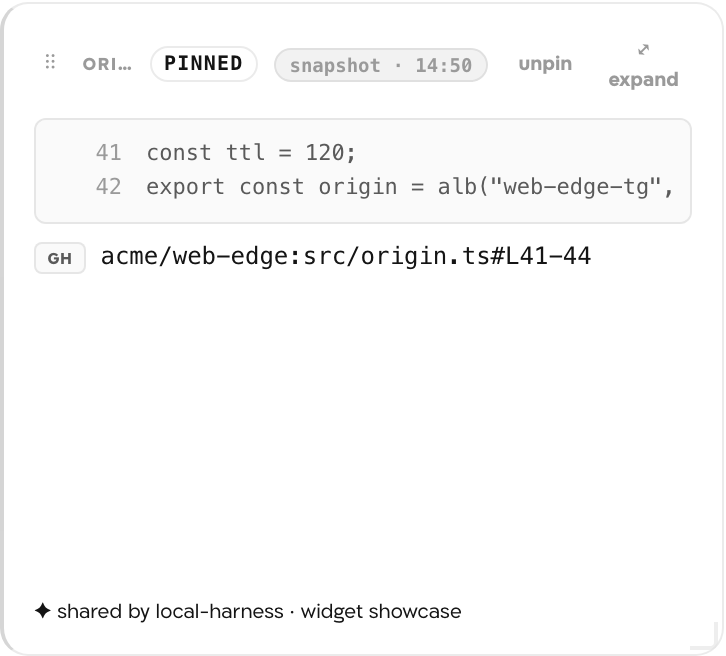
When Beacon posts a finding that cites code it read through this connection, the canvas shows a Code finding card: the lines it read, pinned to a commit, with a link back to GitHub.
What Beacon can read
| Operation | What comes back |
|---|---|
| searchCode | Files that match a search, across the installation or scoped to one owner or repository. File-level matches only, with no line numbers. |
| getFileContents | A file's contents at a commit or branch, by default the repository's default branch. |
| listCommits | Commit history for a repository, optionally limited to a path or a time window. |
| listPullRequests | Recent pull requests for a repository. |
| getPullRequest | One pull request's title, description and review state. |
| diffCommit | The file and line diff for one commit, or a pull request's merge commit. |
| getBlame | Which commit and author last touched each line of a file. |
| correlateDeploy | The commits and pull requests between two deploy markers, given as SHAs or as timestamps. |
| listInstallationRepositories | The repositories this installation can see, up to 100 per call. |
These operations reach Beacon and every agent that joins the room through get_signal_catalog and query_signals, with no GitHub-specific code on the agent side. See Integrations architecture.
Opening incidents from GitHub
The same App can open a war room from a code scanning, secret scanning or Dependabot alert, or from a failed run of a workflow you mark deploy-critical. Each of the four is off until you turn it on in the panel's Incident triggering section. See Opening a war room from a GitHub alert or failed deploy.
Code browsing and alert triggering use the same connection, but each alert type has its own switch. The App's permissions are the same either way; the switches decide which alerts Landfall acts on. Leave secret scanning off if you do not want those alerts to open incidents.
Troubleshooting
- The install link is good for 10 minutes. If you took longer on GitHub, start again from Connect GitHub.
- If a member who is not an owner ran the install, GitHub only sent a request. An owner has to approve it on GitHub, then run Connect GitHub again.
- GitHub App is not configured on this platform under the button means the Landfall deployment you use has no GitHub App set up.
- The repository was not in the installation's selection. Add it from the App's settings in your GitHub organization. Access changes at once, with nothing to redo in Landfall.
- Beacon is searching instead of going straight to a repository. Add a mapping for that service (step 2).
When GitHub reports a change to the installation, Landfall drops its cached token and records the GitHub connection as failed, so the GitHub tile reads failing. That happens when the App is uninstalled or repositories are removed, and today also when repositories are added. If the App is still installed, reads keep working. To clear the status, or to reconnect after an uninstall, click Disconnect in the GitHub panel, then Connect GitHub.
The link is pinned to the commit the finding was made against, so it shows what Beacon actually read. If that branch was force-pushed or history was rewritten, GitHub may no longer serve that commit.
Reference
| Field | Value |
|---|---|
| Panel | Integrations → Source control → GitHub. Nothing to type in; Connect GitHub starts the install. |
| Credential | None on your side. Landfall's App exchanges a signed request for an installation token that lasts about an hour, held in memory only. |
| What Landfall stores | The installation ID, the GitHub organization name, your repository mappings and your trigger settings. None of these is a secret. |
| Permissions | Read access to Dependabot alerts, actions, code, metadata, pull requests, secret scanning alerts, and security events (code scanning alerts) |
| Repository access | All repositories, or only the ones you select, set on GitHub |
| Read operations | searchCode, getFileContents, listCommits, listPullRequests, getPullRequest, diffCommit, getBlame, correlateDeploy, listInstallationRepositories |
| Access | Read-only. The App has no write permission, so Landfall cannot push, merge, comment, or dismiss an alert. |
| Activity | The panel's Recent activity section lists the latest reads made through this connection and any incident GitHub opened, from your organization's audit log. |
| Revoke | Uninstall the App, or narrow its repository access, from your GitHub organization's settings. Disconnect in Landfall removes Landfall's record only; the App stays installed until an owner uninstalls it. |
| Trigger endpoint | POST https://api.landfalls.ai/triggers/github, set once by Landfall on the App. See the triggering page. |