
Connecting Telegram to Landfall
Telegram is a chat Landfall posts incident updates to, through a bot you create. Landfall never reads your Telegram messages.
- As a channel: an update a person approves in Landfall is sent to a Telegram chat by your bot. Takes the bot token from @BotFather, and optionally a default chat id.
What you'll need
- A Telegram account, to talk to @BotFather and add the bot to a chat.
- An admin on your Landfall organization, to save the connection under Integrations.
- A personal Landfall API key. Turning on real egress and sending an update to Telegram have no screen yet, so both go through the API.
1. Create a bot in Telegram
@BotFather → /newbot
Follow the prompts to name the bot. BotFather replies with its token. Keep it like a password: anyone holding it can act as the bot.
Add the bot to the chat, then read the chat id
Add the bot to the group or channel that should receive updates first; a bot can only post to a chat it belongs to, and in a channel it must be an administrator. Then send /start@<your bot's username> in the group, or post in the channel, so the bot receives an update from that chat. Open https://api.telegram.org/bot<token>/getUpdates and read chat.id from the reply. A group id is a negative number. The chat id is optional in Landfall, but without one each update must name its chat.
2. Add it to Landfall
Integrations → Chat → Telegram
Open Integrations in the left menu and select the Telegram tile under Chat. Paste the token into Bot token and the chat id into Default chat id.
app.landfalls.ai · Integrations · Telegram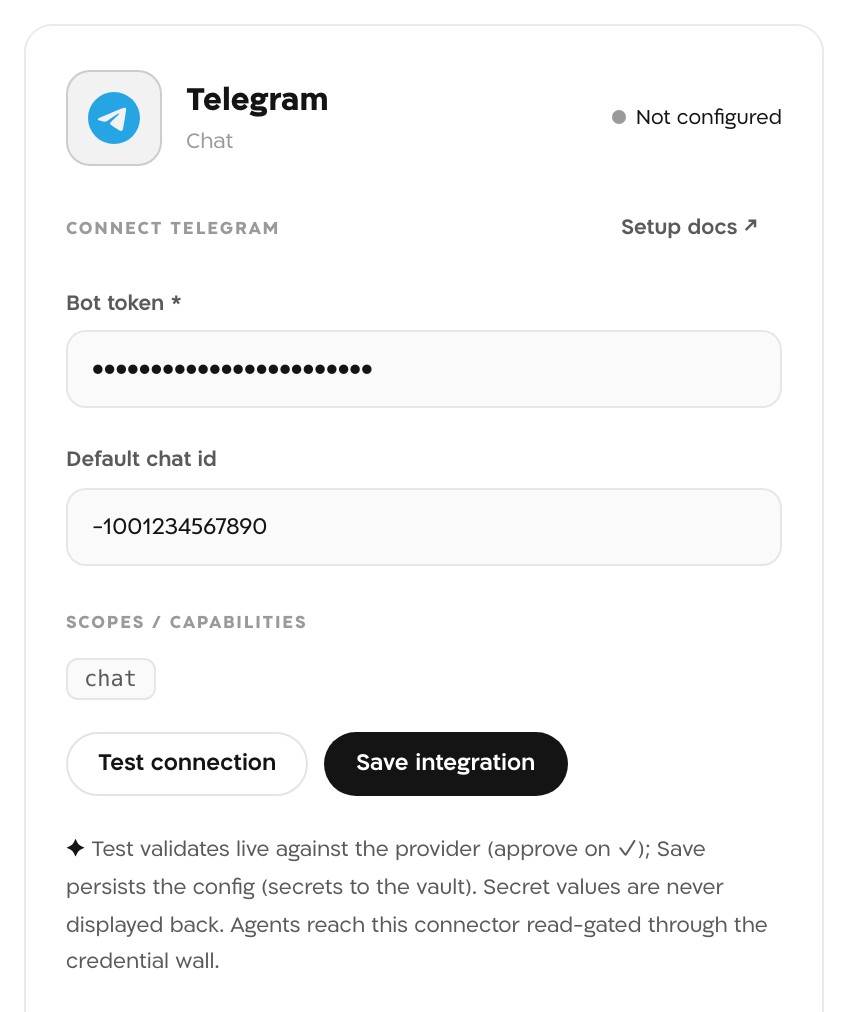
The Telegram panel before saving. The chat id is a placeholder group id, and the token in this picture is masked. Test connection
Landfall calls the Bot API's getMe with the token. No message is sent. A working token shows ✓ connected and the line connected as @<your bot>.
Save integration
The token goes to Landfall's secrets backend and is never shown again. The panel and the Telegram tile read Configured.
Turn on real egress (API only)
Real egress is off for every organization by default, and until it is on an approved update is recorded in the room and not delivered. An admin turns it on with a personal API key from Your settings → API keys. The switch covers every chat connection in the organization, and the change is audited.
Terminalcurl -X PUT https://api.landfalls.ai/o/<your-org>/oncall/egress \ -H "Authorization: Bearer lf_key_…" \ -H "Content-Type: application/json" \ -d '{"enabled": true}'Send an update to Telegram (API only)
The incident's Comms tab drafts to #incidents, which is a Slack channel. An update for Telegram is drafted to the channel telegram (the default chat) or telegram:<chat id> through the comms API, then approved and sent by a person. The draft call returns the messageId and version the next two calls need.
TerminalBASE=https://api.landfalls.ai/o/<your-org>/incidents/<incident-id>/comms/messages curl -X POST $BASE -H "Authorization: Bearer lf_key_…" \ -H "Content-Type: application/json" \ -d '{"channel": "telegram", "body": "Checkout errors are back to normal."}' curl -X POST $BASE/<messageId>/approve -H "Authorization: Bearer lf_key_…" \ -H "Content-Type: application/json" -d '{"version": "<version>"}' curl -X POST $BASE/<messageId>/send -H "Authorization: Bearer lf_key_…"
What it looks like
Each update arrives in the chat as a plain message from your bot. Any action in an update is written out as text for the reader to act on in the war room, because the bot does not receive button presses.
What Beacon can read
Not applicable. The connection only sends, so Telegram is not in the signal catalog and Beacon and joined agents cannot query it. See Integrations architecture for the sources that are.
Opening incidents from Telegram
Not applicable. Landfall runs no bot webhook, so a Telegram message cannot open an incident. A chat message can open a room from Buzz, and alerts open rooms through the Triggering integrations pages, such as Alertmanager.
Troubleshooting
- Telegram HTTP 401 or Telegram HTTP 404: the token is wrong or was revoked. Copy it again from @BotFather.
- botToken required: the token field is empty.
- Real egress is off, so the update was recorded as simulated. Turn it on (step 2).
- Telegram chat id required (no default chat configured): save a Default chat id, or draft to telegram:<chat id>.
- Telegram sendMessage: Bad Request: chat not found or a similar Bot API error: the bot is not in that chat, or the id is wrong. Add the bot, then read the id again.
- The update was drafted to #incidents from the Comms tab, which goes to Slack. Draft it to telegram instead.
Reference
| Field | Value |
|---|---|
| Bot token | Required. Issued by @BotFather. |
| Default chat id | Optional. The chat an update goes to when it names no other; the bot must be a member. |
| Read operations | getMe, for Test connection only. No message history. |
| Access | Bot API sendMessage, only after a person approves the update. A draft to telegram:<chat id>!msg=<message id> edits that message with editMessageText instead. |
| Channel name in the comms API | telegram or telegram:<chat id> |
| Real egress | Off by default. PUT /o/<org>/oncall/egress with {"enabled": true}; admin only, audited. |
| Where the secret is stored | Landfall's secrets backend. Never shown again and never returned by an API. |
| Revoke | Send /revoke to @BotFather and pick the bot; the old token stops working. To remove the connection from Landfall, an admin calls DELETE /o/<org>/integrations/telegram/connections/default. |
| Trigger endpoint | None. Telegram cannot open an incident. |
See Integrations architecture for how every Landfall integration shares this connector shape.