
Integrations architecture
Every integration Landfall ships (AWS, Datadog, Coralogix, PagerDuty, GitHub, Sentry, Cortex XDR, Buzz, the Kubernetes and MySQL agents, and whatever comes after) is built on one shared model, not a parallel one-off per provider. This page describes that model once; each integration's own setup guide links back here for the shared parts, using GitHub as the worked example throughout.
How it works
An admin connects a provider once. Its adapter checks the credential before anything is stored, and a source factory turns the stored connection into a read-only plugin. During an incident, Beacon and every joined agent find that source in one catalog and query it through a proxy that never hands them the credential. The same provider can open the incident in the first place through one trigger pipeline, which verifies the delivery, normalizes it, and decides per alert whether to open a room, attach to one, record a fact or ignore it.
Every integration, and where it is documented
One row per integration with a page on this site: where to set it up, what agents can read from it, and how it opens an incident.
| Integration | Set up | What agents read | Opens an incident |
|---|---|---|---|
| AWS | AWS | CloudWatch metrics, logs and CloudTrail events; GuardDuty, Security Hub and WAF when the role allows them | CloudWatch alarms: CloudWatch alerts |
| Azure | Azure | Azure Monitor metrics and Log Analytics logs | Not built yet |
| Google Cloud | Google Cloud | Cloud Monitoring metrics and Cloud Logging entries | Not built yet |
| Datadog | Datadog | Metrics and logs | Monitor webhook |
| Coralogix | Coralogix | Logs | Alert webhook |
| Sentry | Sentry | Issues and their events | Sentry opens a war room |
| Cortex XDR | Cortex XDR | Alerts, incidents and incident extra data | Cortex XDR opens a war room |
| Prometheus | Prometheus | Metrics | Prometheus opens a war room, through the shared Alertmanager webhook |
| Loki | Loki | Logs | Loki opens a war room |
| Grafana | Grafana | Any datasource Grafana itself has configured | Grafana opens a war room |
| GitHub | GitHub | Code search, files, commits, pull requests, diffs, blame, deploy correlation | GitHub opens a war room |
| Kubernetes | Kubernetes | The cluster, only for incidents it is added to | Not yet |
| MySQL | MySQL | The databases, only for incidents they are added to | Not yet |
| Remote source | Remote source | The service's own operations, with kinds | A remote source opens a war room |
| MCP server | MCP server | The server's tools that it marks read-only | Not applicable: MCP servers |
| Vendor Status Watch | Vendor Status Watch | Watched providers and their open advisories | Vendor Status Watch opens a war room |
| Heartbeats | Heartbeats | Not a read source | Heartbeats open a war room |
| PagerDuty | PagerDuty | Not readable by agents | Webhooks v3 |
| Opsgenie | Opsgenie | Not readable by agents | Alert action webhook |
| Buzz | Buzz | Channel messages and threads | Buzz opens a war room |
| Slack | Slack | Not a read source: outbound, plus votes on open decisions | Not applicable: a chat channel |
| Microsoft Teams | Microsoft Teams | Not a read source: outbound only | Not applicable: a chat channel |
| Telegram | Telegram | Not a read source: outbound only | Not applicable: a chat channel |
| No setup: Landfall's own mail | Not a read source: outbound only | Not applicable | |
| Voice room | Voice room | Its transcript, written to the timeline when recording is on | Not applicable |
| Manager connector | Manager connector | It is a read surface itself, for assistants | Not applicable |
| Architecture map | Architecture map | Elements, through query_org_memory and pinned components | Not applicable: a document is not a live signal |
The connector framework
Every provider (a telemetry source, a cloud account, a comms or paging provider, a source-control provider) implements the same small contract:
- IntegrationAdapter: declares the provider's id, its config schema (which fields are secret, which aren't), and a verify() that checks a set of credentials actually authenticate before anything is saved. A credential that can't authenticate is refused, not silently stored as “configured.”
- ConfigStore: the durable, per-tenant, RLS-protected record of what's connected. Non-secret fields (org login, installation id, account id) live in Postgres; secret values live in a separate secrets backend and are never returned to any client, ever.
- SecretsBackend: AWS Secrets Manager in every real environment (LocalStack locally and in CI). Most providers store a per-tenant secret here. GitHub is the one structural exception: see below.
Adding a provider means implementing this contract, not inventing a new connection model. GitHub's adapter is the same shape as AWS's or Datadog's; only what it stores and how it authenticates differ.
A telemetry source has one more piece beside its adapter: a source factory (SourcePluginFactory), shipped next to the source's read plugin. It declares the schema of the stored connection and the one step that turns that stored connection into a credentialed, read-only plugin. A registry of these factories, keyed by source, is the only thing the per-tenant credential resolver consults: there is no per-source branch anywhere in the resolution path, so a new source is one factory file registered once, and it becomes queryable everywhere the existing sources already are. Anything a factory needs from the running service (the AWS role assumption, the platform GitHub App) is handed to it, so the factories themselves hold no credential and no service code.
One integration can back more than one source. AWS's own connection is read by four source factories today: cloudwatch (metrics, logs, CloudTrail events) and, with no new connection step, guardduty, securityhub and wafv2 (threat-detection findings, aggregated security findings, and WAF sampled and blocked requests). Each is its own factory and read plugin, the split every multi-service provider here uses, and they share the one stored connection and its credentials. The policy the AWS wizard generates grants CloudWatch metric and log reads, the ECS and load-balancer reads the architecture map uses, and, if you tick them, CloudTrail lookups; it grants nothing for GuardDuty, Security Hub or WAF, so those three answer once you add their read permissions to the role yourself. See Connecting AWS for the setup and each source's read surface.
Cortex XDR, unlike AWS's shared connection above, has its own dedicated per-organization connection (API key, API key ID and tenant API base URL: a static-credential model, not OAuth2) and its own cortex-xdr read plugin, the same one-connection-per-integration shape Sentry uses. Its three read operations (listAlerts, listIncidents, getIncidentExtraData) are declared changes-kind, matching GuardDuty, Security Hub and WAFv2's own reasoning: discrete, addressable alert and incident records with identity and mutable status, not a log stream. See Connecting Cortex XDR for the setup.
The remote source: a service you host, connected by URL
Every provider above is a package Landfall ships. The remote source is the same adapter contract with the vendor knowledge moved out of Landfall: one generic adapter (remote-source) whose config is a base URL, a transport (HTTP or gRPC) and a credential (a bearer token, or a client certificate and key for mutual TLS), pointed at a service you host that speaks the Landfall Source Protocol. Its verify() calls the service's health endpoint and then its capabilities listing, and stores what the service declared on the connection; every later health check refreshes it. Landfall never ships code for the system behind the service, and connecting a second service is a second connection of the same adapter, the way a second AWS account is. See Remote source for the setup and the Source SDK for the protocol.
Agents: for systems Landfall must not reach
Every integration above is Landfall calling a provider's API. Some systems should not be reachable from a SaaS at all: a cluster's API server, a database inside a private network. For those Landfall ships agents, separate products you install next to the system, each with its own integration, connection and token:
- The Kubernetes agent runs inside a cluster and reads it with a get-and-list-only role.
- The MySQL agent runs beside one or more databases (docker run or its own Helm chart) and reads them with a published read-only user whose password stays with you.
Both speak one protocol, and the direction never reverses: the agent dials out. It registers what it can answer, heartbeats every 30 seconds (that is how a connection reads Connected, Degraded, Unreachable or Uninstalled, with each MySQL database's own state), and holds a long poll on a job queue Landfall keeps for that connection. When something in an incident reads the cluster or the database (Beacon, an agent in the room through query_signals, or a widget refreshing on the canvas), the read becomes a job on that queue. The agent runs it from its own closed list of read-only operations, caps and redacts the answer, and posts it back; Landfall hands the answer to whoever asked. Nothing is pushed unasked.
Agent sources are involvement-gated: a cluster or a MySQL agent is listed in an incident's catalog, and readable, only while a person has added it to that incident. A read with no incident (a dashboard outside a room) is refused, and the relay that queues jobs refuses again, so no path reaches an agent around the rule. Each agent's token binds to the identity it first registers with (the cluster's kube-system UID, or an agent id the MySQL agent generates once and keeps), so a copied token is refused elsewhere.
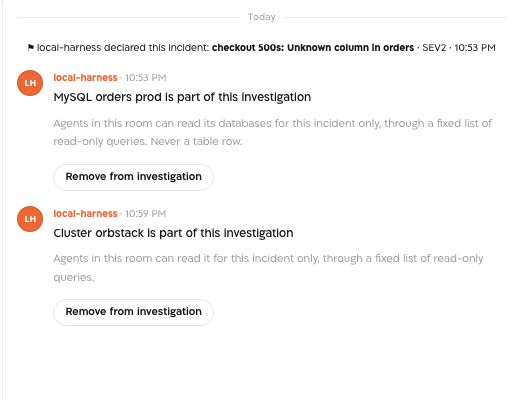
Both agents are OpenTelemetry Collector distributions built from upstream receivers (the Kubernetes cluster and objects receivers; the MySQL and SQL query receivers). Landfall's own code is a shared core (the protocol, the job runner, redaction, the bounded buffer) and, per agent, the module that answers reads.
The comms-channel tier: Slack, Microsoft Teams, Telegram, and Email
A comms channel sits one layer below the connector framework above: it is a CommsAdapter, not an IntegrationAdapter: an outbound target for a stakeholder update, milestone message or on-call page, never a source agents read from. Slack, Microsoft Teams and Telegram are all real, send-capable channels today, each backed by a genuine provider call (a Slack API post, a Teams incoming-webhook Adaptive Card, a Telegram Bot API message) gated by the same per-tenant switch: real egress, off by default for every tenant. It has no screen yet: an organization admin sets it through the API with PUT /o/<your-org>/oncall/egress, and the change is audited. With real egress off, every send is simulated and nothing reaches a real workspace or inbox.
Email is the fourth channel in this tier, and unlike the other three it needs no per-tenant credential or connection at all: it rides Landfall's own outbound mail transport (the same one that sends invite and password-reset email), targeting a responder's already-known address directly. This has one consequence worth stating plainly: for a tenant that already has real egress turned on, enabling it was previously never sufficient by itself to send anything real (every other channel still needed its own configured credential). Email changes that. The moment a responder has a known email address, real egress alone is enough to send them a real page, with no separate opt-in beyond the existing switch. Every comms send, on every channel including email, still goes through the same single approval gate: a human approves a drafted message before anything is delivered. See PagerDuty for how that works for on-call paging.
GitHub's shape: one platform App, not a per-tenant secret
Most providers ask each tenant for their own API key or role, an independent secret per organization. A GitHub App works differently by GitHub's own design: Landfall registers one App at the platform level (an App id and a private key), and each organization installs that App, choosing which repositories it can see. Landfall's ConfigStore row for a GitHub connection holds only two non-secret, tenant-identifying fields, the org login and the installation id, never a credential. At call time, a platform-level component signs a JWT with the App's private key, exchanges it for a short-lived (about one hour) access token scoped to that one installation, and caches it in memory until shortly before it expires. No installation token is ever persisted; a process restart just means the next call re-mints one.
This is why GitHub's setup guide has no “paste your API key here” step: see Connecting GitHub.
Any MCP server as a source
A source does not have to be a provider Landfall wrote a plugin for, because agents find sources through the catalog rather than through per-provider code (see What an agent sees below). The MCP server integration connects any server that speaks the Model Context Protocol over Streamable HTTP, and its factory builds the catalog entry from the server's own tools/list: one operation per tool, parameter hints from the tool's input schema, and the connection's label so two servers stay distinguishable. The filter is the protocol's own annotation: only tools the server marks readOnlyHint: true are offered, and an unannotated tool is treated as not read-only, which is the MCP specification's default rather than a Landfall guess. A call is tools/call with the result passed through verbatim as data; a transport or tool error degrades that one read, never the catalog. The credential is the bearer token the server requires, if any, sent on every request and stored like any other secret. Connecting Grafana's own MCP server, for instance, gives the agent its 53 read-only tools with no Grafana-specific code added to Landfall; Grafana's native connection above remains the narrower, typed path.

Other integrations
Six integrations are not provider connectors in the sense above, and each has its own page:
- Voice room. Every war room has one. A media server carries the audio between people and a speech engine turns a recording into text; a deployment chooses them with VOICE_MEDIA_PROVIDER (LiveKit, or a simulated token) and VOICE_STT_PROVIDER (any OpenAI-compatible speech API, or a mock engine). Recording is off unless VOICE_AUDIO_ENABLED is true; with it on, the transcript is written to the incident timeline as segment events.
- Manager connector. A remote MCP server at /o/<your-org>/mcp that Claude connects to. It is read-only and scoped to the organization; a member signs in with the organization's usual method.
- Architecture map uploads. An admin uploads diagrams and docs. A background worker redacts secrets from each one's text, then reads it into the map of services, dependencies and external systems; the original file is kept, and only admins can open it. Beacon reads the map through query_org_memory, where its elements come back beside the Company second brain's lessons. The automatic counterpart is Automatic architecture mapping.
- Vendor Status Watch. Landfall polls the public status feeds of Cloudflare, Datadog, GitHub and Stripe every five minutes and matches each disruption against the architecture map. Per provider, an admin chooses Notify only, or Open incident automatically above a severity. Agents read the watched providers and their open advisories through the catalog.
- Heartbeats. Your scheduled job pings a heartbeat you registered. A sweep inside Landfall checks every heartbeat every five minutes. A silent one opens an incident, and while that incident is open the same heartbeat does not open another.
- CloudWatch alerts. A CloudWatch alarm publishes to SNS, and a small forwarding Lambda posts it to POST /triggers with the organization's ingest token, because an SNS subscription cannot add an Authorization header. Landfall recognizes the alarm by its shape and keys repeats on the alarm.
Edge components: the room where your agent already is
Everything above brings a system's data to the room. Edge components bring the room to the person, inside the Claude they already use. They are not provider connectors: they add no source, and they open no incident. They draw the room on two surfaces.
- The Claude Code mod. A person has two connections to the room. Their agent is in it through landfall serve, the MCP server. The mod reads it through landfall watch, a stream the room daemon feeds from its realtime socket, so room news reaches the band in about a second without anyone typing. One command, /landfall, opens the console: Home, Vote, Context, Wall, People, Timeline, Load balancers, Incidents and More. Joining an incident from it also puts the agent in the room, with no link to paste, and adds the room's shared context to the conversation without starting a turn. Every key runs the landfall CLI, never an MCP call, so nothing raises a permission dialog and nothing starts a turn; keys draft a prompt and never send it. A vote is recorded as the person, with their own sign-in.
- The hosted connector in Claude desktop chat. The connector serves three MCP App frames: the incident's canvas, a switchboard of open incidents, and a room card. A tool result points at its frame; a host that does not render MCP Apps shows the same text. A frame carries no identifiers, no network and no write tool. The canvas re-reads each widget as the viewer, so the credential wall holds in chat as it does in the room.
Both surfaces keep the platform's rules. Suggest only: nothing runs a remediation or approves a stakeholder update. Status, severity, focus and pins stay in the web app, and an edge session is refused those events. A finding another person staged reaches the mod as a vote request only once the admission gate allows it, and the daemon asks for it every 1.5 seconds while the mod is watching, because a staged claim is never pushed to an edge socket. Measured on a real stack, Beacon's step reaches the band in 0.29 seconds, a staged finding becomes a vote card in 1.6 seconds, and a key press becomes an admitted vote in 0.70 seconds. The full record, with the join sequence and the open gaps, is the repository's docs/architecture/edge-components.md.
The incident-triggering model
A source that can only be queried during an investigation is half an integration: the platform's other premise is that any signal can open the investigation in the first place. Every trigger source, GitHub included, goes through the same pipeline (libs/triggers):
- Signature verification first. A dedicated guard checks the delivery's signature before anything else runs; an unverified delivery never reaches parsing, let alone incident creation.
- Uniform rejection. A bad signature and a signature that's valid but names a tenant that isn't actually connected get the identical refusal from the outside. The distinct reason is recorded only in an internal audit trail, never in the response, so the endpoint can't be used to enumerate which organizations are connected.
- Normalize, then resolve entity and severity. The provider-specific payload becomes the same shared trigger shape every source produces, with severity derived from that provider's own native severity field where one exists.
- externalRef dedup. Before creating an incident, the delivery's own identifier (a GitHub delivery id and alert or run id, a PagerDuty incident id, and so on) is checked against existing incidents. A match means “already handled,” accepted and ignored, never a second incident. This is the same mechanism PagerDuty and Opsgenie already use, not a new one built for GitHub.
See Triggering Integrations: GitHub for the event types GitHub routes through this pipeline, and how the deploy-critical-workflow opt-in keeps a flaky CI run from opening a war room on its own.
One room per alert: open, attach, record, ignore
A delivery that carries an alert identity (a Datadog alert_id, or the monitor title and tags when the webhook predates it; a CloudWatch alarm ARN; an Alertmanager group key; a PagerDuty incident id; an Opsgenie alert id) is decided one at a time per alert, against the rooms that are still open:
- Open: a trigger for an alert with no open room opens one, exactly as before.
- Attach: a trigger or re-notification for an alert whose room is open is recorded on that room as a repeat; nothing else changes.
- Record: a recovery (Datadog Recovered, CloudWatch OK) is written on the open room as a fact. The room stays open: a provider saying its alert stopped is not the same as the incident being over, and resolving is a person's decision, the same rule PagerDuty resolutions follow.
- Ignore: a recovery or no-data notification for an alert with no open room is accepted and does nothing; a redelivered notification is recognised by its provider event id and never recorded twice.
Once a person resolves or archives a room, the next trigger for the same alert is a new situation and opens a new room.
The trigger families
The pipeline is the same for every source; what differs is the door a delivery comes in by and how it proves who sent it.
| Family | Route | How the sender is checked | Sources | What attaches a repeat |
|---|---|---|---|---|
| Signed | POST /triggers/pagerduty/<org>, /triggers/github, /triggers/cortex-xdr/<org> | An HMAC-SHA256 signature. PagerDuty and Cortex XDR (its own X-XDR-HMAC-SHA256 header) use a per-organization secret; GitHub uses the one platform App's secret and finds the organization from the installation. | PagerDuty, GitHub, Cortex XDR | The PagerDuty incident id; the GitHub delivery and alert or run id; the Cortex XDR incident id |
| Shared secret header | POST /triggers/opsgenie, /triggers/alertmanager, /triggers/buzz/<org>, /triggers/grafana | A static per-organization secret header, for senders that can set a header but cannot compute a signature. Grafana's header carries the organization's ingest token. | Opsgenie; Alertmanager, which Prometheus, Loki's ruler and Grafana's Alertmanager contact point all deliver through; Buzz; Grafana's own webhook contact point | The Opsgenie alert id; the Alertmanager group key; the Buzz message id; the Grafana group key, or the rule name when there is none |
| Shared bearer route | POST /triggers | The organization's ingest token as a bearer token, refused with one uniform 401; the provider is recognized from the body's shape | CloudWatch, Datadog, Coralogix, Sentry, Remote source | The CloudWatch alarm ARN; the Datadog alert id; a remote source's own key, per connection. Coralogix and Sentry state no alert identity yet, so a redelivery from either still opens a second incident. |
| Internal | No inbound route | Nothing to check: no outside caller | A member declaring an incident, an engineer's edge investigation, Vendor Status Watch, Heartbeats | The matched advisory's id; the heartbeat's id |
On the shared bearer route, steps 1 and 2 above are the ingest token's uniform 401 rather than a signature check, and step 3 is identical. Cortex XDR is kept off that route on purpose, because its incident objects carry a tags field that would collide with Datadog's detector there. A remote source is recognized last on that route, by a body carrying landfallSource: "remote" and the connection it belongs to, so nothing above it changes; the named connection must exist, be installed and be connected before an incident opens, otherwise the delivery is rejected and audited. Loki's ruler adds no new route: it pushes into an already-running Alertmanager, the same entry point Prometheus uses. Grafana can do the same through its Alertmanager contact point, and that incident carries Alertmanager provenance, or post its own alert body to POST /triggers/grafana. See Grafana opens a war room for both.
One connected source belongs to no trigger family at all, by design rather than by omission: an MCP server answers tool calls and never initiates a delivery, and Landfall only calls the tools it marks read-only, so there is no event it could send that the pipeline above would receive. The provider behind such a server keeps its own trigger (Grafana's alerting, Sentry's issue alerts). See Triggering Integrations: MCP servers.
Inbound is a separate, narrower door than triggering
Everything above describes a signal opening an incident. A connected chat workspace can also do something narrower and quite different: let a person who is already in the loop act on an incident that is already open, without leaving the tool they are watching. Today that means one action, voting on an open decision from Slack (see Slack), and it deliberately does not extend the incident-triggering model: Slack cannot open a war room, and it is not a trigger source.
It reuses the trigger family's trust boundary wholesale rather than inventing one. The route is public and unauthenticated by URL; a dedicated guard verifies the delivery's signature against a per-organization secret before anything else runs; every refusal is the same reason-free rejection, so the endpoint cannot be used to enumerate which organizations have connected anything; and the distinct reason is recorded only in an internal audit trail. Two things differ, and both follow from what is behind the door being a decision rather than an alert:
- A replay window is part of the signature check. The signature covers a timestamp as well as the body, and a delivery more than five minutes old is refused. A captured alert replayed later is a duplicate; a captured vote replayed later is a person's position re-cast at a moment they did not choose, on a decision whose standing has since moved.
- The click must resolve to a real Landfall person, or nothing happens. The chat account is resolved to the same identity a vote cast inside the app would carry. If it cannot be (no matching account, or no membership in that organization), the vote is refused and the refusal is recorded on the incident's timeline. It is never recorded under an invented, chat-scoped identity: that would let one person count twice under two names, and the resulting failure would look like agreement rather than like a bug.
In the other direction, entries posted into a chat workspace go through the same human-approval gate as every other outbound message Landfall sends. Posting each entry without a per-message click is authorized by a standing approval bound to a content hash of the exact bridge configuration a human approved, so re-pointing the channel or turning voting on invalidates it immediately and entries go back to waiting for a person. Nothing reaches a customer's workspace on nobody's authority.
Read-only is enforced at the credential, not by convention
For every integration on this platform, “the agent only reads” is not a prompt instruction, it's a property of the credential itself. GitHub's App has no write scope at all in its registration; there is no code path capable of issuing a write call, because the token GitHub issues literally cannot perform one. The same bar applies across every provider: the credential can't write, so there's nothing relying on application-layer discipline alone to keep it that way.
PagerDuty and Opsgenie are the one deliberate exception, and only for a human, never for the investigator agent (which still only reads either, unchanged, per What an agent sees below). An org admin can separately opt a connection into writes: a room member can acknowledge or resolve or close the linked incident or alert, and Landfall posts a room-link note back into it. Every such write rides the draft, approve and send gate a Slack, Teams or Buzz message uses: a person approves the action, there is no automatic approval, and the write only touches the paging tool's own bookkeeping, never the customer's monitored infrastructure; suggest-only is unchanged. See the PagerDuty and Opsgenie setup guides for the toggle.
Who can actually reach a connection during an incident
Everything above describes how an organization connects a provider. Separately, every read the investigator agent (or a human, through the app) makes against a connected provider passes through one proxy: the caller never receives the underlying credential, only the result. That was already true for a signed-in member using the app directly. It is now equally true for an Edge Bridge investigator, a human's own local coding agent joined to a specific war room (see Using Claude Code). That closed a real gap: an edge-session token used to reach a provider's data without Landfall checking the investigator was still an authorized participant.
The fix is a SignalsProxyGrant: minted the moment an investigator (not a guest; see below) joins a war room, checked fresh on every proxied call, and revoked the moment they leave or the incident resolves. Two properties fall out of that shape directly:
- Scoped to the war room, not the organization. Joining one incident's room grants proxied read access to that incident's context only, for as long as the investigator is present in it, which is narrower and shorter-lived than organization membership.
- A guest gets the room, not the data. A war room can admit an unauthenticated guest (a named, view-and-contribute participant with no organization membership at all) so people outside the org can help investigate. A guest's session never gets a SignalsProxyGrant. Guests can see and contribute to the conversation and timeline but cannot pull fresh provider data.
Every proxied call, allowed or denied, is attributed to both the human who authorized it and the specific agent instance that placed it, appended to the same audit trail every other security-relevant action uses, not a parallel log. A denied call also appears as a visible event on the war room's own timeline, so “why didn't that query return anything” is answerable without leaving the conversation to go read an audit log.
Where you see it
Integrations in the left menu opens the catalog. It has three tabs: Integrations, Marketplace and Vendor Status Watch. The catalog groups its tiles under Context sources, Paging & on-call, Chat and Source control, and selecting a tile opens its connection panel beside the grid.


What an agent sees: no per-provider agent code
Beacon doesn't have a hardcoded list of “sources it knows about.” It reads one thing: ctx.scope.capabilities, built fresh for every investigation from the tenant's actually-configured connections. The moment a connection exists, GitHub or otherwise, three things happen automatically, with zero source-specific agent code:
- It's listed by the signals service's plugin catalog for that tenant, alongside every other connected source.
- It's folded into ctx.scope.capabilities, carrying its real operation descriptors, for GitHub that's search/read-file/list-commits/diff/blame/correlate-deploy, each with its own parameter shape.
- It's given a generic {source}/query scope-resource key by the same widening step every connected, non-canonical source goes through; GitHub gets no special case here at all.
In plain terms: connecting GitHub doesn't require shipping a new agent tool or a new prompt. The agent's existing generic query mechanism just gains a new source to query, exactly the way it gained AWS, Datadog, or Coralogix: a genuinely new integration widens what the agent can reach without widening the agent's own code.
Each capability entry can also carry a short, trusted contextHint (plain text, assembled server-side from the tenant's own connection config, never from alert or chat text) folded into the agent's opening framing alongside the operation list. GitHub is the first source to use this slot: it carries the organization's own service-to-repository mapping, so the agent starts an investigation already knowing which repository a service lives in instead of guessing from the service's name. Like every other field here, it only ever shapes the prompt's framing; it cannot widen ctx.scope itself, so a hostile or malformed hint can change what the agent is told, never what it's allowed to query.
Kinds: what every operation declares, and who reads the catalog
The operation descriptors above carry one more field since the Data Source SDK: a kind, one of metrics, logs, changes or chat. A source that declares metrics or logs also provides that kind's canonical calls (list what exists, read over a window) and its own window declaration, so the investigator's discovery tools reach every connected source in that source's own vocabulary with no vendor names in the agent, and the dashboard engine admits whatever the catalog lists instead of a fixed provider list. The provider's raw payload still passes through verbatim; a source may offer an optional shape adapter for charts, and every consumer falls back to raw when it is absent.
The same catalog is no longer Beacon's alone. An agent that joins the war room through Landfall Edge, the landfall CLI, or the hosted manager connector reads it with get_signal_catalog and queries it with query_signals, through the existing gated read routes under its own grant (see above), with every read audited under the agent as actor. Which sources appear at all is decided per organization by the marketplace: an uninstalled source has no wizard card, no trigger door and no catalog entry for that organization. The whole model, including the query round-trip, is on Data sources architecture.
Landfall Edge is the same idea pointed at the responder's own machine. It attaches to a coding harness at one of three levels (running the agent through Landfall's bundled ACP adapter, one journaled capture hook in the harness's own configuration, or the landfall CLI's tools unchanged), and for a third-party host such as Buzz Desktop it prepares an import file the owner imports once, never writing into the host's files or holding its identity. What it needs to run ships inside the app; the one thing it can install, the CLI, is a pinned, checksum-verified release, and everything it placed is removed by the same uninstaller the fleet path uses.
In one sentence, per integration
“Agent-readable” means Beacon can query this source today, through the dynamic discovery mechanism described above; not every configurable integration is wired into it.
| Integration | Credential shape | Agent-readable? | Can trigger? |
|---|---|---|---|
| AWS | Per-tenant IAM role (recommended: a guided wizard generates the external id, trust policy and a least-privilege policy for Landfall's CloudWatch use) or static keys | Yes: CloudWatch; GuardDuty, Security Hub and WAF once the role has their read permissions | Yes for CloudWatch (alarm → SNS → webhook). GuardDuty, Security Hub and WAF have no trigger path yet; they are read-only findings today, not pushed alerts |
| Azure | Per-tenant app registration (tenant and client id plus a secret) | Yes: Azure Monitor metrics and Log Analytics logs | No. Azure Monitor Action Groups could feed a webhook trigger, but that work is not built yet |
| Google Cloud | Per-tenant service-account key | Yes: Cloud Monitoring metrics and Cloud Logging entries | No. Cloud Monitoring notification channels could feed a webhook trigger, but that work is not built yet |
| Datadog | Per-tenant API and application key | Yes | Yes: monitor alert webhook |
| Coralogix | Per-tenant API key | Yes | Yes: alert webhook |
| PagerDuty | Per-tenant read-only API key and webhook | No | Yes: incident.triggered, escalated and resolved |
| Opsgenie | Per-tenant API key and webhook shared secret | No | Yes: POST /triggers/opsgenie (Create, Acknowledge, Close) |
| Slack | Per-tenant bot OAuth token | No: outbound notification channel only | No |
| Microsoft Teams | Per-tenant incoming webhook URL | No: outbound notification channel only | No |
| Telegram | Per-tenant bot token | No: outbound notification channel only | No |
| None: no per-tenant credential or connection. It uses Landfall's own outbound mail transport, gated only by the real-egress switch | No: outbound notification channel only | No | |
| GitHub | One platform App; per-tenant installation id only | Yes | Yes: security alerts and deploy-critical workflow failures |
| Sentry | Per-tenant auth token (org and optional project slug) | Yes | Yes: issue-alert webhook |
| Cortex XDR | Per-tenant API key and API key ID (Standard type only) and tenant API base URL | Yes: alerts, incidents and incident extra data | Yes: signed incident-notification webhook (own hmac-sha256 route) |
| Prometheus | Per-tenant base URL and optional bearer or basic auth | Yes | Yes: an alerting rule fires, delivered through Alertmanager (see below) |
| Alertmanager | Per-organization shared-secret webhook header (own dedicated route, Opsgenie's model) | No; reads go through the Prometheus connection above, not this route | Yes: firing and resolved notifications, deduplicated by groupKey |
| Loki | Per-tenant base URL, optional tenant id (X-Scope-OrgID) and optional bearer or basic auth | Yes | Yes: its own ruler notifies through the Alertmanager route above |
| Grafana | Per-tenant base URL and service account token (Viewer role) | Yes; reaches any datasource Grafana itself has configured, not just Prometheus and Loki | Yes: its Unified Alerting notifies through the Alertmanager route above, or straight to its own route |
| Buzz | Server-generated Nostr identity (public key shown, private key kept) and a per-organization secret header for the trigger route | Yes: channel messages and threads through the same signal catalog | Yes: a Buzz workflow's call_webhook, deduplicated per message id |
| Remote source | Per-connection base URL, transport, and a bearer token or mTLS client certificate; capabilities stored on the connection | Yes: the service's own operations, with kinds, through the same signal catalog | Yes: the Source Protocol trigger payload on POST /triggers, attributed to the connection, deduplicated by its own key |
| MCP server (any) | Per-tenant endpoint URL, optional bearer token and a label; several may be connected | Yes: the server's tools annotated readOnlyHint, through the same signal catalog | Not applicable: a read-only tool source has no outbound signal (see above) |
| Kubernetes (agent) | A per-cluster agent token; the agent dials out, Landfall holds no cluster credential | Yes, only for incidents the cluster is added to | No, not yet |
| MySQL (agent) | A per-agent token; the database password stays in your network | Yes, only for incidents the databases are added to | No, not yet |
| Vendor Status Watch | None: the vendors' status feeds are public | Yes: watched providers and their open advisories | Yes, when an admin chooses Open incident automatically for a provider |
| Heartbeats | A heartbeat you register; your job pings it | No | Yes: a silent heartbeat, found by a sweep every five minutes |
| CloudWatch alerts | The organization's ingest token, sent by a forwarding Lambda | Not this route; reads go through the AWS connection | Yes: alarm state changes on POST /triggers, keyed on the alarm |
| Voice room | Deployment settings, not a per-tenant connection: a media server and a speech engine | Its transcript, on the timeline, when recording is on | No |
| Manager connector | A member's own sign-in to the organization | It is a read surface for assistants, not a source | No |
| Architecture map | None: documents an admin uploads | Yes: elements come back through query_org_memory | No: a document is not a live signal |
Why it is built this way
A connected system the room's agents can't see, or that can't itself raise an incident, is a second-class integration: it undermines both premises the platform is built on, that every responder, every responder's favorite harness and Beacon, the room's AI agent, work from the same live context, and that any signal can start a war room. So every integration is held to the same four requirements: a documented setup guide with real screenshots, automatic agent access with no per-provider code, the ability to open an incident, and (this page) one current, shared description of how all of that actually works, updated as integrations are added rather than forked into a new document each time.
What is not here yet
- Incident triggers for Azure, Google Cloud, GuardDuty, Security Hub, WAF, Kubernetes and MySQL.
- An alert identity for Coralogix and Sentry. Without one, a redelivery from either opens a second incident.
- A screen for real egress. Today it is the admin API call above.
- A control in the room for adding a cluster or a MySQL agent to an incident. Today a person adds it with an API call, described on the Kubernetes and MySQL pages; the room's card can remove it.
- Read permissions for GuardDuty, Security Hub and WAF in the role the AWS wizard generates.