
Connecting Opsgenie to Landfall
Connect Opsgenie so its alerts open Landfall war rooms and, if you choose, so responders can acknowledge or close those alerts from the room. Each direction is set up on its own:
- As a source: not yet. Landfall reads no alerts or schedules from Opsgenie. The API key (GenieKey) is checked by Test connection and used for writes.
- As a trigger: an Opsgenie alert opens a Landfall war room. Takes a webhook secret Landfall issues; see Opening a war room from an Opsgenie alert.
- Writes (optional): acknowledge or close the linked alert from the room, each approved by a person. Takes the same GenieKey with Update Access.
What you'll need
- An Opsgenie account that can add an API integration.
- An admin on your Landfall organization.
- Your Opsgenie account's region. EU accounts use api.eu.opsgenie.com.
1. Create an API key in Opsgenie
Opsgenie → Settings → Integrations → Add integration → API
Add an API integration and copy its key, the GenieKey. Give it Update Access only if you will turn on writes in section 3.
2. Add it to Landfall
Integrations → Paging & on-call → Opsgenie
Open Integrations in the left menu and pick the Opsgenie tile under Paging & on-call. Paste the key into API key (GenieKey) and pick the Region: us (also used when you leave it empty) or eu.
app.landfalls.ai · Integrations · Opsgenie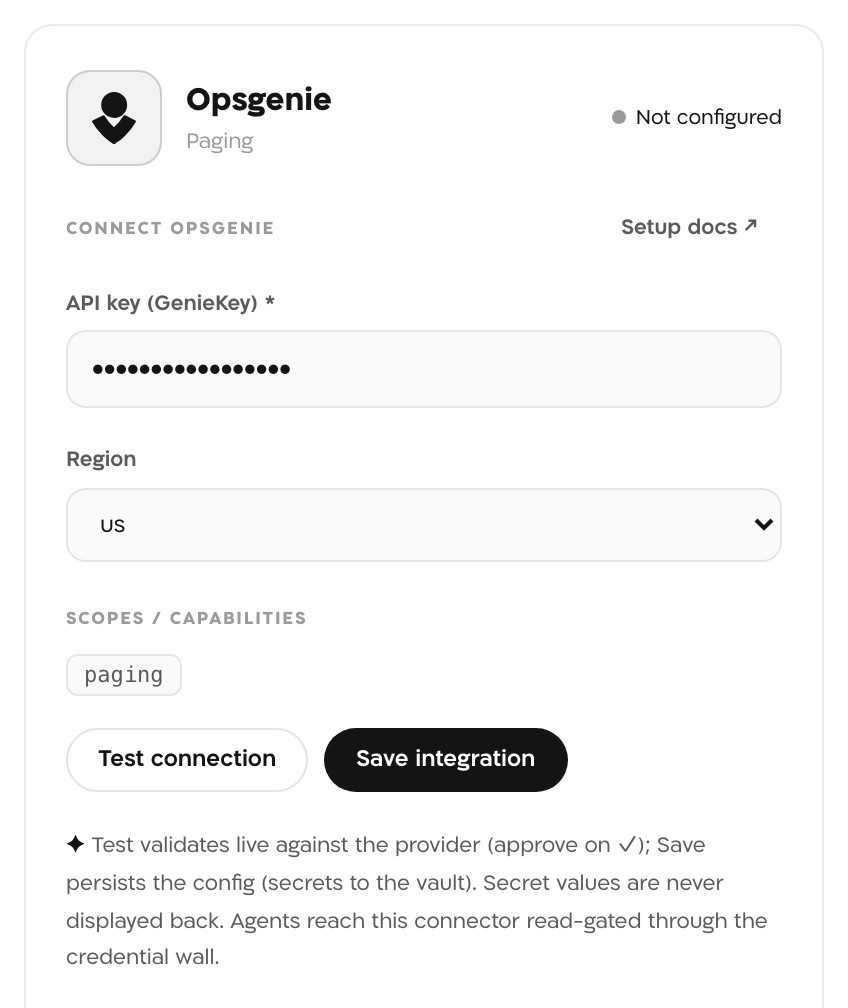
The Opsgenie panel with a key and Region us, before it is tested or saved. The key in this picture is masked. Test connection
Landfall calls GET /v2/account on your region's API host with the key. A working key shows ✓ connected and the line connected to Opsgenie.
Save integration
Save stores the key in Landfall's secret store and the tile reads Configured. Save does not check the key itself, so test first.
- Opsgenie HTTP <status>: Opsgenie refused the key. Check you copied all of it, and that Region matches your account: Landfall sends the key to api.eu.opsgenie.com only when Region is eu.
- apiKey required: the API key field was empty.
- Any other line is the network error Landfall saw reaching Opsgenie.
3. Optional: acknowledge or close from the room
By default Landfall never writes to Opsgenie. An admin can let a room member acknowledge or close the linked alert without leaving Landfall. No new credential is needed. The same GenieKey is reused, and it must have Update Access for a write to succeed. The Integrations page has no switch for this yet, so an admin turns it on with one API call:
SESSION=$(curl -s -X POST https://api.landfalls.ai/auth/login \
  -H "Content-Type: application/json" \
  -d '{"email":"<you>","password":"<your password>","orgSlug":"<your-org-slug>"}' \
  | jq -r .accessToken)

curl -X POST https://api.landfalls.ai/o/<your-org-slug>/integrations/opsgenie/write-enable \
  -H "Authorization: Bearer $SESSION" \
  -H "Content-Type: application/json" \
  -d '{"enabled": true}'
In a room an Opsgenie alert opened, responders then see Acknowledge in Opsgenie and Close in Opsgenie. Each button drafts the write, and a person approves and sends it from the incident's Comms tab. Landfall also drafts a note for the alert linking back to the room, and drafts no more once one has been sent. It recognizes its own writes when Opsgenie echoes them back, so nothing is recorded twice. Writes need exactly one Opsgenie connection on the organization; send {"enabled": false} to turn them off.
This write path is kept small, for teams still moving off Opsgenie before that date. As with PagerDuty, every write is a room action a person approves, never automatic. Opsgenie accepts each acknowledge or close call asynchronously (202 with a request id).
What it looks like
A room an Opsgenie alert opened takes the alert's message as its title and shows an Opsgenie badge in the Incidents list. When someone acknowledges or closes the alert in Opsgenie, the room's timeline records it. With writes on, the room also shows the Acknowledge and Close buttons.
What Beacon can read
Not applicable. Opsgenie has no operations in get_signal_catalog or query_signals, so Beacon and every joined agent cannot query it. The Agent-readable column in Integrations architecture lists the sources agents can query.
Opening incidents from Opsgenie
An Opsgenie Webhook integration opens a Landfall war room when an alert is created, and records Acknowledge and Close on that room. It needs no API key; it uses its own secret, sent in a header. Setup: Opening a war room from an Opsgenie alert.
Troubleshooting
Expected. Opsgenie is not in the signal catalog, so Beacon has nothing to query there.
The buttons appear only in a room an Opsgenie alert opened through the trigger, and only while writes are on.
Opsgenie refused it, most often because the API integration lacks Update Access. Turn Update Access on for that integration in Opsgenie and draft the action again.
Reference
| Field | Value |
|---|---|
| API key (GenieKey) | Required. An Opsgenie API integration key. |
| Region | us (default) or eu; eu sends every call to api.eu.opsgenie.com. |
| Scopes | paging |
| Read operations | GET /v2/account, for Test connection only. |
| Access | No writes by default. With writes on: POST /v2/alerts/{id}/acknowledge, /close and /notes, each after a person approves it. |
| Where the key is stored | Landfall's secret store (AWS Secrets Manager on the hosted service), per organization. Secret values are never displayed back. |
| Revoke | Delete or disable the API integration in Opsgenie. To remove the connection from Landfall, an admin calls DELETE /o/<your-org-slug>/integrations/opsgenie/connections/default; there is no button for it yet. |
| Trigger URL | https://api.landfalls.ai/triggers/opsgenie |
| Secret header | x-landfall-opsgenie-secret, issued by POST /o/<your-org-slug>/triggers/opsgenie-secret |
| Trigger actions handled | Create · Acknowledge · Close |
See Integrations architecture for how every integration shares this connector shape.