
Connecting Sentry to Landfall
Connect Sentry so Beacon, the room's AI agent, can read your issues and their error events during an investigation.
- As a source: a Sentry Internal Integration token, pasted into Landfall.
- As a trigger: your organization's trigger ingest token; see Opening incidents from Sentry.
What you'll need
- A Sentry account that can create an Internal Integration, and your organization's slug, shown in the URL after sign-in (for example sentry.io/organizations/<org-slug>/).
- An admin on your Landfall organization, to save the connection.
- If you host Sentry yourself, your instance's base URL. Landfall calls the same /api/0/… API on any origin.
1. Create an Internal Integration token in Sentry
Landfall only reads from Sentry. An Internal Integration's token is the narrowest option, tied to one integration you create and name.
Sentry → Settings → Developer Settings
Create an Internal Integration and name it something you will recognize later, for example landfall-integration. Under permissions, set Issue & Event to Read and Organization to Read. Nothing else is needed. Every call Landfall makes to Sentry is a read, so it never resolves, assigns or changes an issue.
Save, then copy the token
When you save, Sentry creates the integration's auth token. Copy it now; you paste it into Landfall in the next step. You can create more tokens or revoke one later under Settings → Developer Settings → your Internal Integration.
2. Add it to Landfall
Integrations → Context sources → Sentry
Fill in Auth token and Organization slug. Two fields are optional: Default project slug, used when a read names no project, and API base override, which you leave blank for Sentry Cloud and set only for a self-hosted Sentry.
app.landfalls.ai · Integrations · Sentry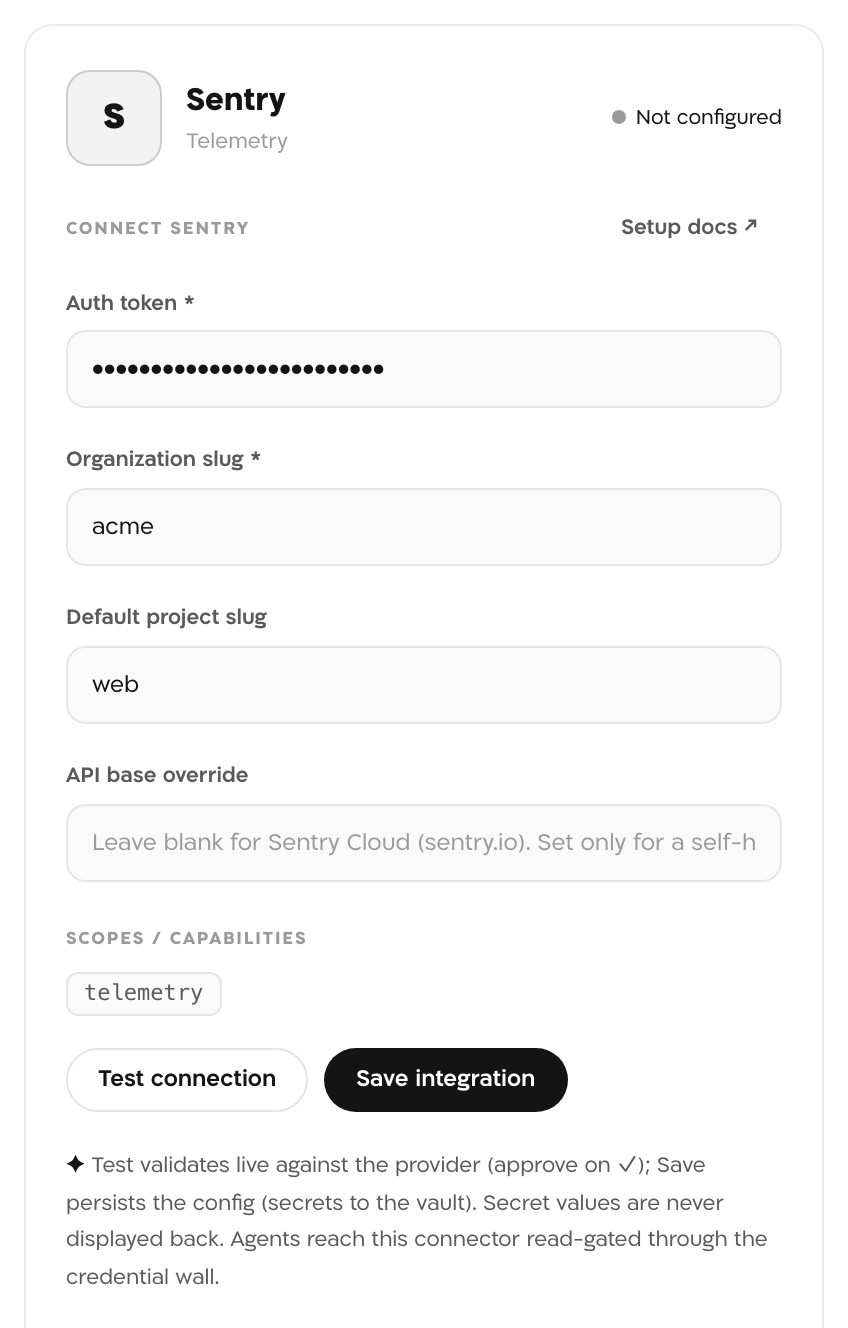
The Sentry panel filled in, before Test connection: the auth token is masked, the organization slug is acme and the default project is web. The panel still reads Not configured. The token in this picture is masked. Test connection
Landfall calls Sentry's organization details API with the token. When the token works and the slug is right, the panel shows connected and the line:
Sentry organization "<slug>" verified
Save integration
Saving runs the same check again, and a token Sentry refuses is never saved. The token goes to Landfall's secrets store and is never shown again. The Sentry tile now reads Configured.
What it looks like
With Sentry configured, Beacon can list a project's unresolved issues and read an issue's events during an investigation. Each read through the signal catalog is recorded in your organization's audit log.
What Beacon can read
| Operation | What comes back |
|---|---|
| listIssues | A project's issues, by default is:unresolved, with optional search, sort and time period. Uses the default project slug when the read names no project. |
| listIssueEvents | An issue's error events: stack traces, tags and breadcrumbs, not performance or tracing data. With full=true it returns the complete event payload, which can include request and user context. |
Both return Sentry's response exactly as Sentry sends it, never filtered. These operations reach Beacon and every agent that joins the room through get_signal_catalog and query_signals. See Integrations architecture.
Opening incidents from Sentry
A Sentry issue alert can also open a war room, through Landfall's shared trigger endpoint and your organization's ingest token. Sentry's webhook cannot add that token by itself, so read the setup before you rely on it. See Opening a war room from a Sentry alert. Reading and triggering are independent.
Troubleshooting
- Sentry organization "<slug>" not found (404): the organization slug does not match the one in your Sentry URL. A typo is the most common cause.
- Sentry auth token rejected (401): the token is wrong, was revoked, or the Internal Integration was removed since you copied it.
- Sentry auth token lacks required scope (403): the token needs Read on Organization at minimum.
- Self-hosted Sentry: the API base override should be the origin only. Landfall adds /api/0/… itself.
- The test only checks organization access. If the token lacks Issue & Event: Read, issue and event reads fail with a permission error even though the tile reads Configured. Add the permission to the Internal Integration in Sentry.
- listIssues needs a project. Set a default project slug, or name the project when you ask Beacon.
Reference
| Field | Value |
|---|---|
| Panel | Integrations → Context sources → Sentry |
| Auth token | Required. A Sentry Internal Integration token or Organization Auth Token, sent as Authorization: Bearer |
| Organization slug | Required. Your Sentry organization's slug, from the URL after sign-in |
| Default project slug | Optional. Used when a read names no project |
| API base override | Optional. Blank for Sentry Cloud (sentry.io); set only for a self-hosted Sentry |
| Permissions | Issue & Event: Read and Organization: Read (event:read and org:read) |
| Verified with | GET /api/0/organizations/<slug>/?detailed=0, on Test connection and again on Save |
| Read operations | listIssues, listIssueEvents |
| Access | Read-only. Landfall makes only GET calls to Sentry. |
| Secret storage | Landfall's secrets store, never a database column, and never shown back |
| Revoke | Revoke the token in Sentry under Settings → Developer Settings → your Internal Integration |
| Trigger endpoint | POST https://api.landfalls.ai/triggers with the ingest token; see the triggering page |