
Opening a war room from an Alertmanager notification
When Alertmanager sends Landfall a firing notification, Landfall opens an incident and its war room, or attaches the notification to the incident its alert group already opened. This setup is shared by every rule engine that delivers through Alertmanager: Prometheus, Loki's ruler and Grafana. Do it once, then follow your engine's page for its rules.
It is not about reading telemetry; see Prometheus, Loki or Grafana. The two are independent.
How it works
Alertmanager posts each notification to POST https://api.landfalls.ai/triggers/alertmanager. It authenticates with a per-organization shared secret in the X-Landfall-Alertmanager-Secret header, because an Alertmanager receiver can send a static header but cannot sign a body the way PagerDuty and GitHub webhooks do. The secret alone identifies your organization, so the URL carries no organization name. Landfall reads a body as an Alertmanager notification when it has "version": "4" and an alerts list. Alertmanager's groupKey is the attach identity, so every notification for one alert group lands on one incident.
Prometheus, Loki's ruler and Grafana all reach this endpoint through Alertmanager, with the same secret, so every incident opened this way carries an Alertmanager badge. The rule's own name, labels and summary say which condition fired. Grafana can also skip Alertmanager and post to its own endpoint; see Grafana.
What you'll need
- An owner or admin on your Landfall organization, to issue the webhook secret.
- Alertmanager v0.28.0 or later. The receiver below sets its header with http_config.http_headers, which older versions reject at amtool check-config.
- A network path from wherever Alertmanager runs to Landfall's public API.
1. Issue the webhook secret
There is no button for this in the app yet. An owner or admin issues it through the API with their own session.
SESSION=$(curl -s -X POST https://api.landfalls.ai/auth/login \
  -H "Content-Type: application/json" \
  -d '{"email":"<you>","password":"<your password>","orgSlug":"<your-org>"}' \
  | jq -r .accessToken)

curl -X POST https://api.landfalls.ai/o/<your-org>/triggers/alertmanager-secret \
  -H "Authorization: Bearer $SESSION"
The response is { "secret": "<64 hex characters>" }, shown once. Store it now; Landfall keeps only its SHA-256 hash and can never show it again. Issuing a new one replaces the hash at once, with no overlap, so the old secret stops working immediately. That is also how you rotate it. Each issue is recorded in the audit log as trigger.alertmanager_webhook_secret.issued. This secret is separate from your organization's ingest token and Opsgenie secret, so rotating one never revokes the others.
2. Point Alertmanager at Landfall
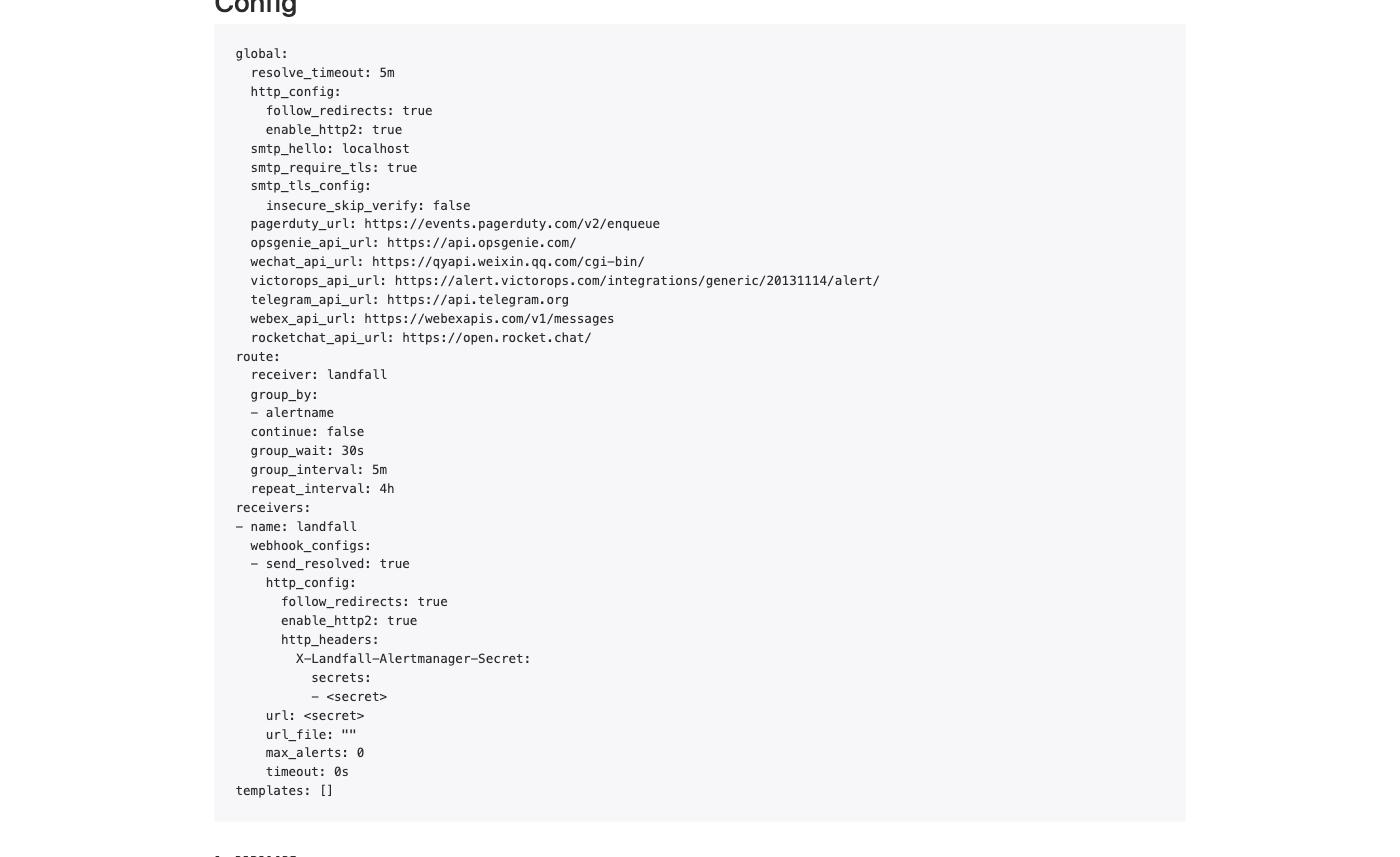
Add a webhook_configs receiver to alertmanager.yml that targets the endpoint and sends the secret from step 1 as a header. http_config.http_headers is the field that sets a custom header; authorization: only ever sets the Authorization header.
route:
  receiver: landfall
  group_by: ['alertname']
  group_wait: 30s
  group_interval: 5m
  repeat_interval: 4h

receivers:
  - name: landfall
    webhook_configs:
      - url: https://api.landfalls.ai/triggers/alertmanager
        send_resolved: true
        http_config:
          http_headers:
            X-Landfall-Alertmanager-Secret:
              secrets:
- <the secret from step 1>| Setting | Value |
|---|---|
| URL | https://api.landfalls.ai/triggers/alertmanager |
| Header | X-Landfall-Alertmanager-Secret |
| Header value | The secret from step 1 |
| Notifications | firing opens or attaches. resolved is accepted and changes nothing, so send_resolved can stay on. |
Then confirm the config loaded on Alertmanager's own Status page. Alertmanager shows anything under a secrets: field, and the receiver's url, as <secret>.
What Alertmanager's fields become
| Alertmanager field | Becomes |
|---|---|
| alertname | The incident title, read from commonLabels, then groupLabels, then the first alert's labels. Falls back to "Alertmanager alert". |
| service, job | The affected entity, as service:<name>. service wins over job when both are present. |
| severity | critical is SEV1, page is SEV2, anything else or none is SEV3. |
| alerts[0].startsAt | When the incident occurred. Falls back to the time Landfall received it. |
| summary, description | The incident's summary, shown on its row in the Incidents list. summary is read from the common annotations, then the first alert's; description is used the same way when there is no summary. Falls back to the alert name. |
| runbook_url, generatorURL | Links on the incident. A runbook_url annotation becomes a runbook Beacon reads when its investigation starts; each alert's generatorURL becomes a link to the expression that fired. |
| groupKey | The attach identity. See Repeats and recovery. |
3. Test it
Post a sample notification shaped like Alertmanager's own, without waiting for a rule to fire.
curl -i -X POST https://api.landfalls.ai/triggers/alertmanager \
  -H "X-Landfall-Alertmanager-Secret: <your secret>" \
  -H "Content-Type: application/json" \
  -d '{
    "version": "4",
    "status": "firing",
    "groupKey": "{}:{alertname=\"CheckoutHighErrorRate\"}",
    "receiver": "landfall",
    "groupLabels": { "alertname": "CheckoutHighErrorRate" },
    "commonLabels": { "alertname": "CheckoutHighErrorRate", "severity": "page", "service": "checkout" },
    "commonAnnotations": { "summary": "checkout 5xx rate above 2% for 5 minutes" },
    "alerts": [{
      "status": "firing",
      "labels": { "alertname": "CheckoutHighErrorRate", "severity": "page", "service": "checkout" },
      "startsAt": "2026-10-06T09:00:00Z",
      "fingerprint": "abc123"
    }]
  }'
The answer is 202 with "outcome": "opened", the new incident's id and a link to its war room. The incident is titled CheckoutHighErrorRate at SEV2 (from severity=page), with service:checkout as its entity. In the Incidents list its row shows an Alertmanager badge, the checkout entity and the summary. Post the same body again and the answer is "outcome": "attached" with the same incident id.
Resolve the test incident when you are done. Its group stays tied to it (see below), so change the alertname and the groupKey for the next test.
Repeats and recovery
Alertmanager keeps the same groupKey for every repeat notification of a group that keeps firing, at its repeat_interval. A repeat attaches to the incident the group opened and writes nothing new.
The lookup has no time bound and does not check the incident's status. A group that fires again after its incident was resolved still attaches to that incident and opens nothing. The route above groups by alert name, so give every rule in every engine a distinct name. A rule that shares a name with another engine's rule attaches to that rule's incident instead of opening its own.
A resolved notification is accepted and changes nothing. Landfall never resolves an incident on its own; a person does.
Troubleshooting
| What you see | What it means |
|---|---|
| 401 | The header is missing, malformed, or does not match this organization's current secret. Issuing a new secret invalidates the previous one at once, so check Alertmanager has the latest value. |
| amtool check-config fails on http_headers | Alertmanager is older than v0.28.0. Upgrade it; the older headers key does not work. |
| 202 with "outcome": "ignored" | The body's version is not "4", its status is not firing, or it has no groupKey. Landfall accepts it and does nothing. |
| Alertmanager retries a delivery again and again | Should not happen for an authenticated delivery. Every authenticated outcome, including one Landfall ignores, is a 2xx, so an odd payload never turns into a retry storm. The only other answers are a 401 for a wrong secret and a 503 for a Landfall-side failure. |
| An incident opens with no service attached | Expected when the alert has neither a service nor a job label. Landfall does not guess a name. |
| A firing group opens nothing new | Its groupKey already opened an incident, open or resolved. See Repeats and recovery. |
| Two incidents for one alert group | Should not happen while the groupKey stays the same. Check Alertmanager's group_by labels did not change between deliveries, since that changes the groupKey. |
Reference
| Endpoint | POST https://api.landfalls.ai/triggers/alertmanager |
|---|---|
| Auth | A per-organization shared secret in x-landfall-alertmanager-secret. The secret picks the organization; there is no organization in the path. |
| Issue or rotate | POST https://api.landfalls.ai/o/<your-org>/triggers/alertmanager-secret, owner or admin. Shown once; a new one replaces the old at once. |
| Recognized by | "version": "4" and an alerts list. Only a firing notification with a groupKey opens or attaches. |
| Attach identity | Alertmanager's groupKey, matched against every incident it opened, with no time bound or status check. |
| Each delivery | firing with a new groupKey opens an incident (202 opened). firing with a known one attaches and writes nothing (202 attached). resolved changes nothing (202 ignored). An active maintenance window that covers it opens nothing (202 suppressed). |
| Rejected payloads | An unrecognized version or a missing groupKey is 202 {"outcome":"ignored"}, never a 4xx, so Alertmanager does not retry it. A wrong secret is the one 401. A body over 512 KB is refused. A Landfall-side failure is a 503, which Alertmanager retries. |
| Incident badge | Alertmanager |
How every trigger source fits together is on Integrations architecture.