
Connecting MySQL to Landfall
The Landfall MySQL agent is a small program you run next to your databases. It dials out to Landfall, reads each database with a read-only user whose password never leaves your network, and answers questions only for an incident the database is part of.
- As a source: an agent token Landfall mints for the agent, plus a read-only MySQL user you create on each database. The user's password stays with the agent.
- As a trigger: not yet. See Opening incidents from MySQL.
How it works
- Outbound only. Landfall never connects to a database. The agent holds a long poll on its own job queue in Landfall, runs each read it is given, and posts the answer back.
- Quiet until involved. A database is read only for an incident it is part of. Until then the agent keeps its snapshots in its own memory and sends nothing.
- No rows, no statement text. The agent reads metadata and performance_schema summaries only. Statements appear as MySQL's normalized digests, with literals already replaced by ?. It never reads a table row, statement samples, lock data, column defaults or comments.
- Read-only, checked. Every hour the agent reads its user's grants. If the user holds anything beyond the published set, the database reads as degraded, naming the extra grant, and the agent refuses to read it.
- Standard parts. The agent is an OpenTelemetry Collector distribution: the upstream MySQL receiver and SQL query receiver do the collecting.
What you'll need
- MySQL 8.0 or later (RDS for MySQL, Aurora MySQL, or your own) with performance_schema on. On RDS it is a parameter-group setting, and the micro and small burstable classes cannot run it.
- Somewhere to run a container that can reach the database and api.landfalls.ai over HTTPS: a VM, a container service, or any Kubernetes cluster.
- An administrator on each database, to create the agent's user.
- An admin on your Landfall organization.
1. Add the agent in Landfall
Integrations → Context sources → MySQL → Add agent
In the left menu, open Integrations and choose MySQL under Context sources. Under Agent name, type the name the room will use (for example orders-prod) and click Add agent. Landfall mints the agent's token and shows three things under Run the agent: the database user to create, a docker run command and a helm install command. Copy what you need now. The token is shown once. Then click I have copied it.
app.landfalls.ai · Integrations · MySQL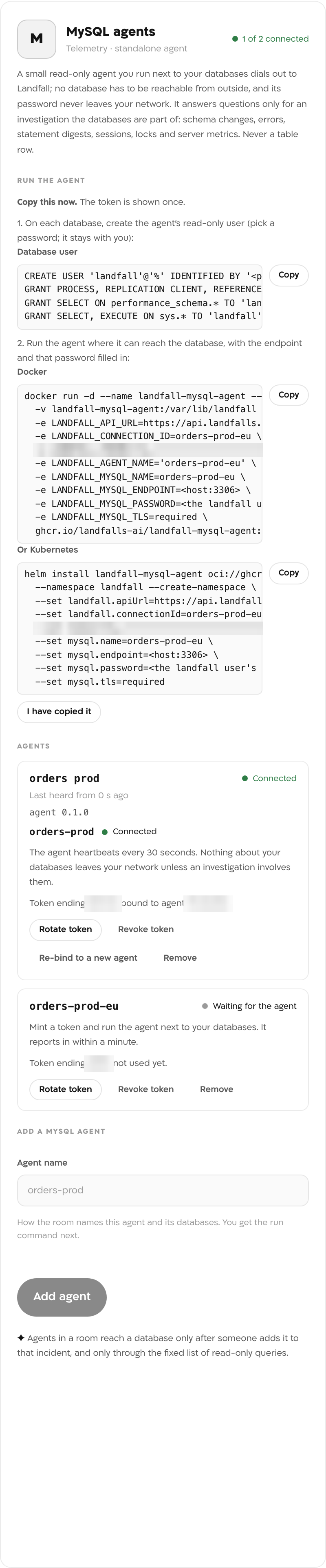
The token lines and token endings are blurred. This picture was taken before the image and chart moved to public.ecr.aws, so its commands name an older registry. The commands Landfall shows now are the ones in step 3.
2. Create the agent's user on each database
CREATE USER 'landfall'@'%' IDENTIFIED BY '<password>'
  REQUIRE SSL WITH MAX_USER_CONNECTIONS 10;
GRANT PROCESS, REPLICATION CLIENT, REFERENCES ON *.* TO 'landfall'@'%';
GRANT SELECT ON performance_schema.* TO 'landfall'@'%';
GRANT SELECT, EXECUTE ON sys.* TO 'landfall'@'%';

-- Optional, per migration history table, so applied migrations show with their time:
GRANT SELECT ON shop.flyway_schema_history TO 'landfall'@'%';
REFERENCES lets the agent see every table's columns and indexes without reading a row. Pick the password yourself; Landfall never sees it.
3. Run the agent
With Docker, one database
docker run -d --name landfall-mysql-agent --restart unless-stopped \
  -v landfall-mysql-agent:/var/lib/landfall \
  -e LANDFALL_API_URL=https://api.landfalls.ai \
  -e LANDFALL_CONNECTION_ID=orders-prod \
  -e LANDFALL_TOKEN=lfa_... \
  -e LANDFALL_AGENT_NAME='orders-prod' \
  -e LANDFALL_MYSQL_NAME=orders-prod \
  -e LANDFALL_MYSQL_ENDPOINT=orders.abc123.eu-west-1.rds.amazonaws.com:3306 \
  -e LANDFALL_MYSQL_PASSWORD=<the landfall user's password> \
  -e LANDFALL_MYSQL_TLS=required \
  public.ecr.aws/r9i3z7v6/landfall-mysql-agent:0.1.0
The volume keeps the agent id the token binds to, so a replaced container reconnects as the same agent. For several databases (a primary and its replica, say), set LANDFALL_MYSQL_TARGETS to a JSON list of {"name","endpoint","tls","role"} and give each password as LANDFALL_MYSQL_PASSWORD_<NAME> (upper case, dashes as underscores).
With Kubernetes
helm install landfall-mysql-agent oci://public.ecr.aws/r9i3z7v6/charts/landfall-mysql-agent \
  --namespace landfall --create-namespace \
  --set landfall.apiUrl=https://api.landfalls.ai \
  --set landfall.connectionId=orders-prod \
  --set token=lfa_... \
  --set mysql.name=orders-prod \
  --set mysql.endpoint=<host:3306> \
  --set mysql.password=<the landfall user's password> \
  --set mysql.tls=required
The chart keeps the token, the agent id and each password in one Secret (or use existingSecret), gives the agent no Kubernetes permissions, and lists several databases under mysql.targets.
4. Watch it connect
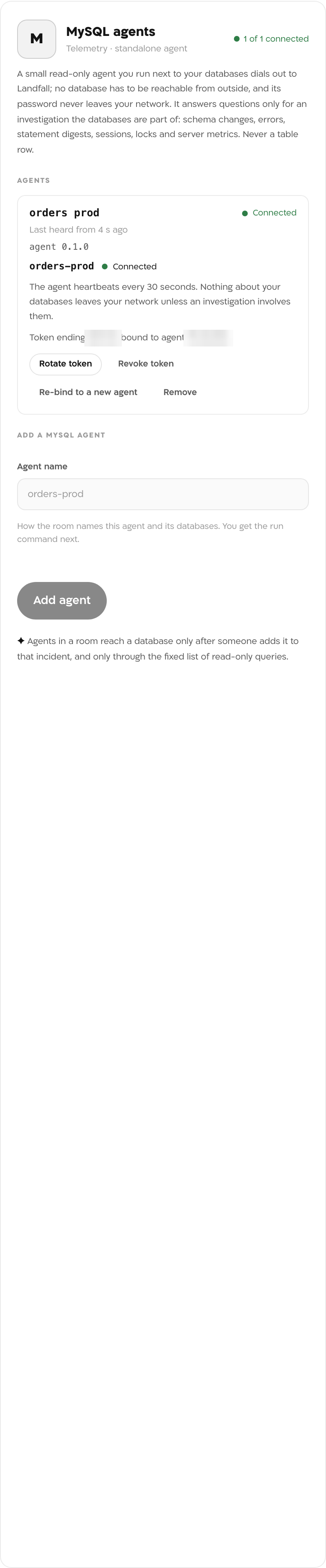
Within a minute the agent reads Connected in the same panel, and each database shows its own state from the agent's heartbeat: Connected, Sign-in refused, Unreachable, or Degraded with the reason.
What it looks like
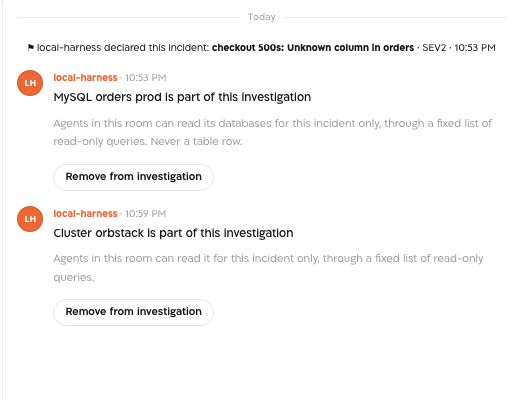
Once a person adds the agent to an incident, the room's chat shows a card saying MySQL name is part of this investigation, with a Remove from investigation button. On a real run, a migration that dropped orders.legacy_price while the app still read it showed up as four pieces at once: the dropped column between two snapshots, Flyway's V2 with its time, a spike of 1054 errors, and the app's own statement leading the errors ranking. The ALTER waiting behind a long transaction showed as a metadata lock wait.
What Beacon can read
A database answers only for an incident its agent is part of. The room has no control for adding one yet. A member of the organization adds the agent with one call to Landfall's API, using a personal API key from Your settings → API keys. The connection id is the LANDFALL_CONNECTION_ID value in the run command. An agent's own session is refused.
curl -X POST https://api.landfalls.ai/o/<your-org>/incidents/<incident id>/agents/mysql/<connection id>/involve \
  -H "Authorization: Bearer lf_key_..."
An agent cannot be added to a resolved incident, and adding one twice is refused. Remove from investigation on the room's card takes it out at once.
| Operation | What comes back |
|---|---|
| mysql.schema_changes | Tables created, altered or dropped, columns and indexes before and after, from 60 s snapshots, plus rows applied in Flyway, Liquibase, Prisma, Django, Atlas, Knex or goose history tables |
| mysql.error_spikes | Errors raised over the window by number, for example 1054 "Unknown column", with a 30 s series |
| mysql.top_statements | The statements that did the most work, as digests: calls, time, errors, rows examined |
| mysql.lock_waits | Who waits on whom now: row locks and metadata locks, with the statements on both sides |
| mysql.sessions | Active sessions: user, host, database, state, seconds running, statement |
| mysql.describe_table | One table's columns and indexes, now |
| mysql.status | The server's own metrics: threads, connections, operations, row locks, buffer pool |
| mysql.replication | A replica's threads, lag and last errors |
These operations reach Beacon and every agent that joins the room through get_signal_catalog and query_signals. How the agents fit with every other integration is on Integrations architecture.
Opening incidents from MySQL
Not yet. The agent answers questions for incidents that already exist. Open incidents from the alerts you already have, for example through Alertmanager or the other pages under Triggering integrations, and add the database's agent to the incident.
Troubleshooting
- Read the agent's log with docker logs landfall-mysql-agent.
- The agent needs outbound HTTPS to api.landfalls.ai. Egress through a proxy goes in proxy.httpsProxy on the chart.
- A token binds to the agent id the agent first registers with. A new container without the volume gets a new id; click Re-bind to a new agent.
- The agent is not part of this incident. Beacon's read then fails with this database is not part of this investigation. A person in the room can add it.
- Sign-in refused: check the password and the user's host in 'landfall'@'%'.
- Degraded, over-privileged: the database's state names the extra grant. Revoke it; the agent reads the grants again within the hour, or at its next restart.
- Degraded with performance_schema off: the agent still reports schema changes, and says per database why the rest is unavailable.
The agent's own reads are left out of the error counts it reports: on MySQL 8, scanning information_schema without data-dictionary access raises an internal error the server would otherwise count.
Reference
| Field | Value |
|---|---|
| Panel | Integrations → Context sources → MySQL, field Agent name, button Add agent |
| Image | public.ecr.aws/r9i3z7v6/landfall-mysql-agent:0.1.0 |
| Chart | oci://public.ecr.aws/r9i3z7v6/charts/landfall-mysql-agent, release landfall-mysql-agent |
| Agent settings | LANDFALL_API_URL (https only), LANDFALL_CONNECTION_ID, LANDFALL_TOKEN, LANDFALL_AGENT_NAME |
| Database settings | LANDFALL_MYSQL_NAME (default mysql), LANDFALL_MYSQL_ENDPOINT (host:port), LANDFALL_MYSQL_USERNAME (default landfall), LANDFALL_MYSQL_PASSWORD, LANDFALL_MYSQL_TLS, LANDFALL_MYSQL_CA_FILE, LANDFALL_MYSQL_ROLE (primary or replica), LANDFALL_MYSQL_TARGETS. The chart takes the same as mysql.name, mysql.endpoint, mysql.username, mysql.password, mysql.tls, mysql.caFile, mysql.role and mysql.targets |
| TLS | required (the default) verifies the server's certificate; for RDS, mount the region's CA bundle and set LANDFALL_MYSQL_CA_FILE. skip-verify encrypts without verifying, for a self-signed server. With a private CA such as RDS's, the snapshot connection encrypts without verifying the certificate, because the upstream SQL query receiver cannot take a CA file. The agent's own reads and the MySQL receiver verify against the CA file |
| Grants | PROCESS, REPLICATION CLIENT, REFERENCES on *.*; SELECT on performance_schema.*; SELECT, EXECUTE on sys.*; optionally SELECT on migration history tables. Checked every hour |
| Connections | Up to six per database, inside the user's limit of 10 |
| Read operations | The eight mysql.* operations above |
| Access | Read-only. Landfall writes nothing to a database and never holds its password |
| Token | lfa_ followed by 40 characters, shown once. Landfall stores only its SHA-256 hash. It binds to the agent id kept in the agent's volume or Secret |
| Rotate | Rotate token mints a new token; the old one keeps working for 24 hours |
| Revoke | Revoke token refuses the agent at its next call. To remove its access to a database, DROP USER 'landfall'@'%' |
| Trigger endpoint | None yet |