
Connecting Buzz to Landfall
Buzz is Block's open-source team chat where people and AI agents work side by side, and each agent runs on a team member's own machine. The Landfall investigator your team talks to in Buzz is a local agent that joins a war room through a share link, the way a responder's coding agent does.
- As an investigator: a Buzz agent that runs landfall serve. Takes the Landfall CLI's own sign-in on that Mac.
- Through Landfall Edge: the same agent, run by Edge, with room context, capture and Edge's guardrail. Takes Edge's sign-in; Buzz keeps the agent's identity and key.
- As a channel: incident updates and admitted findings in one Buzz channel. Takes no credential from you. Landfall generates a bot key and keeps it, and you admit its public key in Buzz.
How it works
The three directions are independent; set up any one of them alone. The investigator runs on a team member's Mac inside Buzz Desktop and reaches Landfall with that person's own sign-in. The channel updates run on Landfall's side: Landfall signs each post with a bot key it generates and never shows, and your relay accepts the posts once a channel owner admits the bot. Opening a war room from a Buzz message is a fourth, separate setup, on its own page.
What you'll need
- Buzz Desktop 0.5.19 or newer on the Mac that will run the agent, signed in to your team's relay.
- The Landfall CLI 0.7.4 or newer on that Mac, signed in (brew install landfalls-ai/landfall/landfall && landfall login). Check the version with brew list --versions landfall.
- For the Edge path: Landfall Edge on the same Mac.
- For channel updates: an admin seat on your Landfall organization, owner or admin rights on the Buzz channel, and a personal Landfall API key to turn on real egress.
1. Add a Landfall investigator in Buzz
The Landfall Investigator persona pack is published at landfalls-ai/landfall-buzz-pack. On Buzz 0.5.19 you create the agent by hand from the pack's persona; newer Buzz versions that install packs directly can use the release archive instead.
Print the persona
Run this from any folder outside your own code.
Terminalgit clone https://github.com/landfalls-ai/landfall-buzz-pack.git /Applications/Buzz.app/Contents/MacOS/buzz pack inspect ./landfall-buzz-pack
Buzz Desktop → Agents → New agent
Name it Landfall, paste the persona body (everything after the frontmatter in agents/landfall-investigator.persona.md) as its instructions, and set the MCP command to landfall serve. Choose who may talk to it; owner-only is Buzz's default and an allowlist suits a team.
Hand it an incident
In any channel the agent is a member of, mention it with a share link minted from a war room's Share control. The link alone is the whole ask.
Buzz@Landfall https://app.landfalls.ai/j/<code>The agent joins, reads the brief, and replies in the thread naming the incident. On the Landfall timeline you see its join, then whatever it shares. Every claim goes through the room's admission gate like any other external agent's, and any fix it suggests is a proposal for a person to apply. It never executes anything.
2. Attach it through Landfall Edge instead
With Landfall Edge on the same Mac, the Buzz agent becomes a full war-room member. Every turn carries the current room context, what the agent does is captured into the incident timeline, and Edge's local guardrail decides on each tool call. Nothing is written into Buzz's own files; Buzz keeps the agent's identity and key.
Landfall Edge → Attach → Buzz Desktop
One click. Edge writes an import file for the Landfall agent (the persona, the in-bundle command landfall-edge acp, no MCP command because Edge declares its own tools, and no identity: Buzz mints that on import), selects it in Finder and brings Buzz to the front. The sheet waits for Buzz.
Landfall Edge · Attach · Buzz Desktop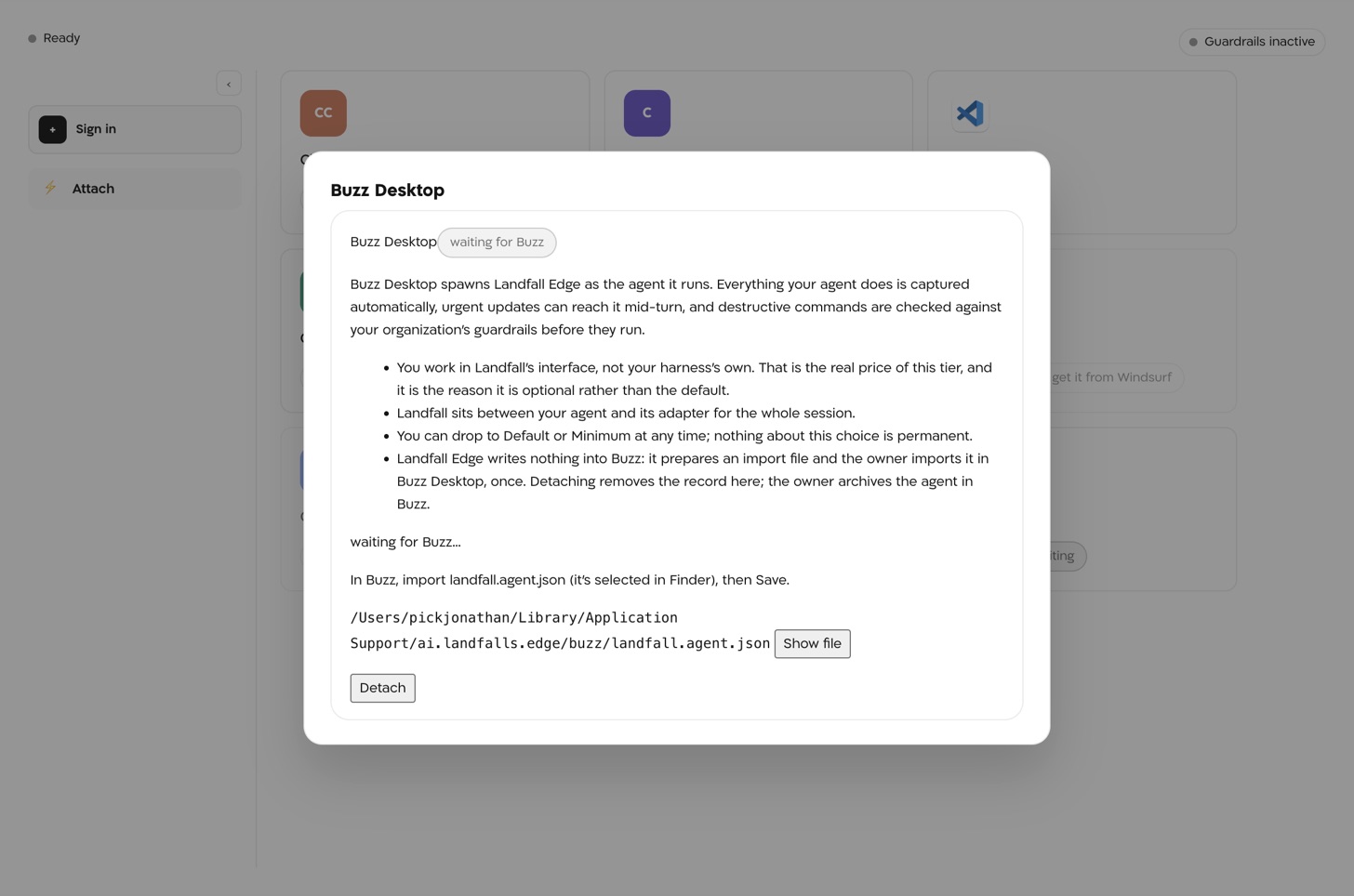
The sheet after one click, waiting for Buzz. It tells you to import landfall.agent.json; Show file reveals it in Finder. The import file's path is blurred in this picture. Buzz Desktop → import landfall.agent.json → Save
Import the file, pick the channel Buzz asks for, and save. Edge flips to attached when it sees the agent; nothing is typed or pasted.
What changes
A share link in a Buzz message joins through Edge even before Edge itself has joined anything; later turns are bound to that incident. Detach in Edge removes the attachment and shows the owner's archive step in Buzz.
3. Post incident updates into a Buzz channel
Landfall can post the incident lifecycle and admitted findings into one channel of your Buzz workspace, threaded per incident, and keep the channel canvas as a markdown summary of the incident dashboard with a link to the live canvas. The private key Landfall generates for this never leaves Landfall; you only ever see the public one.
Integrations → Chat → Buzz
Open Integrations in the left menu and select the Buzz tile under Chat. Enter the Relay URL (your community relay, for example https://acme.communities.buzz.xyz) and the Channel id (the UUID from buzz channels list), then click Connect. The panel shows the new bot's Bot public key and an Add member command, each with a copy button.
Admit the bot in Buzz, then Verify membership
A channel owner or admin runs the command the panel shows. Back in Landfall, click Verify membership. Landfall makes a signed read of the channel; on success the panel says the relay accepted a signed read of the channel and the state reads Connected.
Terminalbuzz channels add-member --channel <channel-id> --pubkey <bot pubkey> --role botOwner attestation (closed channels)
For a closed channel, Buzz's relay also expects an owner attestation of the bot. The channel owner signs the bot's public key with their own key and gives you the resulting ["auth", …] tag. Paste it into the panel and click Save attestation. Landfall checks it against this bot's key before storing it.
Approve the message templates
Posts are templated facts (opened, status, severity, acknowledged, resolved) and already-admitted claims, never free text an agent wrote. Click Approve templates v1 once; that standing approval lets them post without a per-message click. Until it is given, nothing is posted. A template change pauses posting until an admin approves the new version.
Turn on real egress (API only)
Real egress is off by default. Until it is on, the panel says posts are simulated, every post is recorded on the timeline as simulated, and nothing leaves Landfall. The panel points at an On-call setting that has no screen; an admin turns egress on through the API with a personal API key from Your settings → API keys. The switch covers every chat connection in the organization, and the change is audited.
Terminalcurl -X PUT https://api.landfalls.ai/o/<your-org>/oncall/egress \ -H "Authorization: Bearer lf_key_…" \ -H "Content-Type: application/json" \ -d '{"enabled": true}'
What it looks like
- A root message per incident (title, severity, war-room link), and every later update as a reply in that thread.
- Status and severity changes, page acknowledgements, resolution, and each claim once it is admitted. Staged or contested claims are never posted; a demoted claim posts a retraction.
- The channel canvas gets a clearly marked Landfall section with one line per widget and the live-canvas link; everything outside that section is left exactly as your team wrote it.
- An incident opened from a Buzz message gets its root post as a reply in the thread it came from, when Landfall can read that message on your relay. Otherwise the root post starts a new thread.
- Never: agent-drafted prose, remediation approvals, credentials, or anything from a channel Landfall was not connected to.
What Beacon can read
Once the bot is admitted, Buzz appears in the signal catalog. Every read is a signed read of the one connected channel; nothing here can post or react.
| Operation | What comes back |
|---|---|
| channel.messages | Messages in the connected channel, newest first, as raw Buzz events. Optional since and until (unix seconds) and limit (default 50, at most 200). |
| thread | One message and the replies in its thread, by its 64-hex message id. Optional limit (default 100, at most 500). |
These operations reach Beacon and every joined agent through get_signal_catalog and query_signals, with no Buzz-specific agent code. Message content is treated as data, never as instructions. See Integrations architecture.
Opening incidents from Buzz
A Buzz workflow can open a war room from a reaction, a keyword or a manual run. It calls Landfall's /triggers/buzz/<org-slug> route with a per-organization secret, and each distinct message opens one incident. The setup, the workflow YAML and a worked example are on Opening a war room from a Buzz message.
Troubleshooting
- The relay refused the bot's identity: run the add-member command as a channel owner or admin, and for a closed channel save the owner attestation too.
- relayUrl must be an https URL or channelId must be a UUID: fix the field and connect again. To change the relay, disconnect first; membership is per relay.
- After Rotate identity, the old membership and attestation no longer apply. Run the new add-member command and attest again.
- Buzz enters the signal catalog only after Verify membership succeeds.
- Reads cover the one connected channel. Messages in any other channel are out of reach.
- The panel reads posts are simulated (real egress is off under On-call): real egress is off. Turn it on (step 3).
- The state reads Waiting for the bot to be admitted in Buzz: verify membership first.
- Nothing is recorded at all: the templates are not approved, or the state reads Paused: message templates changed, re-approve to resume.
- An Edge-attached agent still answers with Landfall's tools only, and says once in the thread that capture and the guardrail are off. Start Edge to bring them back.
Reference
| Field | Value |
|---|---|
| Relay URL | Your community relay, https only. Changing it means disconnecting first. |
| Channel id | The UUID of the channel that receives updates, from buzz channels list. |
| Bot public key | Generated by Landfall on Connect and shown as an npub. The private key stays in Landfall's secrets backend and is never shown or returned by any route. |
| Owner attestation | Closed channels only. An ["auth", "<owner pubkey>", "", "<signature>"] tag, checked against the bot's key before it is stored. |
| Message templates | Version v1, approved once by an admin as a standing approval. |
| Read operations | channel.messages, thread, and the signed read Verify membership makes. |
| Access | Posts templated lifecycle updates and admitted claims into the one channel, and edits its own section of the channel canvas. Nothing else. |
| Real egress | Off by default. PUT /o/<org>/oncall/egress with {"enabled": true}; admin only, audited. |
| Persona pack | https://github.com/landfalls-ai/landfall-buzz-pack |
| MCP command | landfall serve (CLI path); Edge's import file uses landfall-edge acp instead. |
| Edge import file | landfall.agent.json, written by Edge and imported once by the owner in Buzz Desktop. |
| Rotate | Rotate identity in the panel generates a new bot key. Run the add-member command again and re-attest; open incidents start a new thread on their next post. |
| Revoke | Disconnect in the panel removes the connection and its key; posts still waiting are abandoned. |
| Trigger | POST https://api.landfalls.ai/triggers/buzz/<org-slug>; see Opening a war room from a Buzz message. |