
Connecting a Kubernetes cluster to Landfall
The Landfall Kubernetes agent runs inside your cluster and dials out to Landfall, so nothing in the cluster has to be reachable from the internet. It answers a fixed list of read-only questions, and only for an incident the cluster is part of.
- As a source: an agent token Landfall mints for the cluster, which you pass to the agent's Helm chart.
- As a trigger: not yet. See Opening incidents from Kubernetes.
How it works
- Outbound only. The agent opens HTTPS connections to Landfall and holds a long poll on its own job queue. A read in an incident becomes a job on that queue; the agent runs it and posts the answer back, usually within a tenth of a second. It has no inbound port, Service or Ingress.
- Quiet until involved. A cluster is read only for an incident it is part of. A person adds it to the incident, and any member of the organization can take it out again. Agents can do neither. Outside an incident, including for widgets on a dashboard, a cluster answers nothing.
- Read-only by construction. The agent's ClusterRole grants get, list and watch only, with no write verb and nothing on Secrets or ConfigMaps. Every object is stripped (managed fields, the last-applied annotation, environment variable values, annotations outside an allow-list) and every string is redacted before it is sent.
- Standard parts. The agent is an OpenTelemetry Collector distribution built from upstream receivers. Landfall's own code is the extension that speaks to Landfall and answers reads.
What you'll need
- Kubernetes 1.27 or later, and Helm 3.
- Outbound HTTPS from the cluster to api.landfalls.ai, directly or through a proxy.
- metrics-server in the cluster, if you want current CPU and memory. Every other read works without it.
- An admin on your Landfall organization.
1. Add the cluster in Landfall
Integrations → Context sources → Kubernetes cluster → Add cluster
In the left menu, open Integrations and choose Kubernetes cluster under Context sources. Under Cluster name, type the name the room will use (for example prod-eu) and click Add cluster. Landfall mints a token for this cluster and shows one helm install command with it, under Install the agent. Copy it now. The token is shown once. Then click I have copied it.
app.landfalls.ai · Integrations · Kubernetes cluster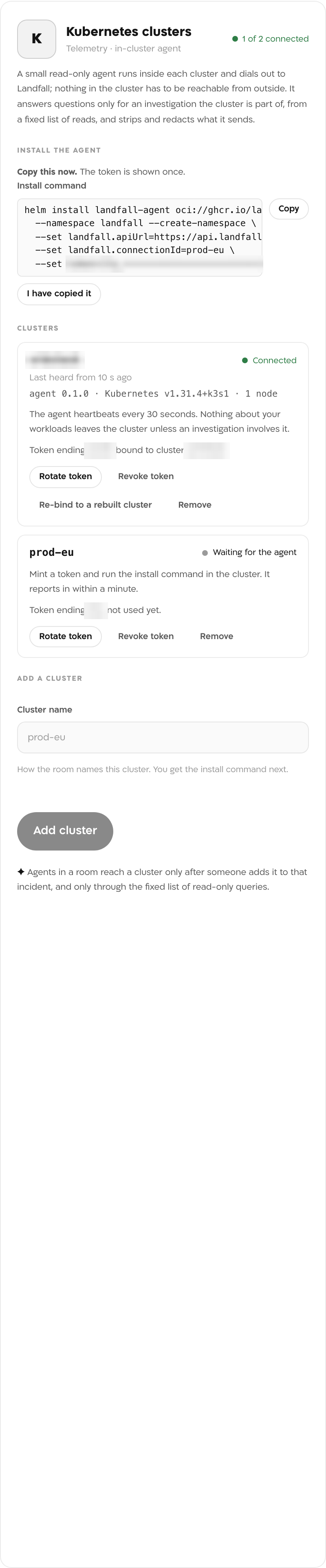
The token line, the token endings and the connected cluster's name are blurred. This picture was taken before the chart moved to public.ecr.aws, so its command names an older registry. The command Landfall shows now is the one in the next step.
2. Install the agent in the cluster
Run the install command
Terminalhelm install landfall-agent oci://public.ecr.aws/r9i3z7v6/charts/landfall-agent \ --namespace landfall --create-namespace \ --set landfall.apiUrl=https://api.landfalls.ai \ --set landfall.connectionId=prod-eu \ --set token=lfa_...
The chart puts the token in a Secret. To keep it out of your shell history, create the Secret yourself and pass --set existingSecret=<name> instead. Raise the memory limit with the size of the cluster; the Reference has the table.
Watch it connect
Within a minute the cluster reads Connected in the same panel, with the agent's version, the Kubernetes version and the node count.
app.landfalls.ai · Integrations · Kubernetes cluster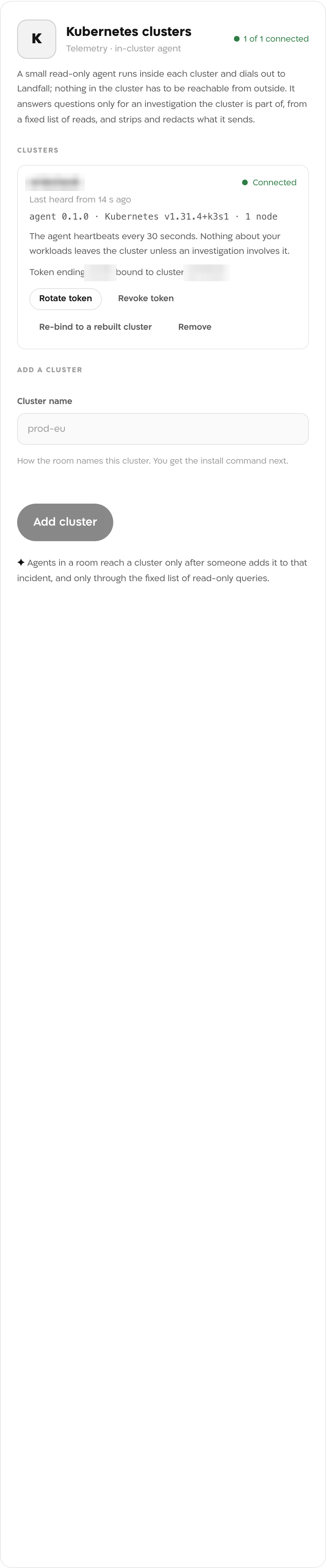
A test cluster after its first heartbeat. Its name, the token ending and the cluster it is bound to are blurred.
What it looks like
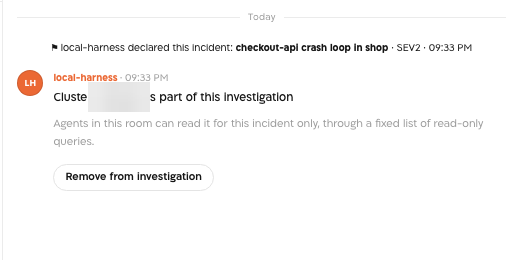
Once a person adds the cluster to an incident, the room's chat shows a card saying the cluster is part of this investigation, with a Remove from investigation button. From then on Beacon and every agent in the room can read it for this incident, and widgets on the room's canvas can chart it.
What Beacon can read
A cluster answers only for an incident it is part of. The room has no control for adding one yet. A member of the organization adds it with one call to Landfall's API, using a personal API key from Your settings → API keys. The connection id is the landfall.connectionId value in the install command. An agent's own session is refused.
curl -X POST https://api.landfalls.ai/o/<your-org>/incidents/<incident id>/clusters/<connection id>/involve \
  -H "Authorization: Bearer lf_key_..."
A cluster cannot be added to a resolved incident, and adding one twice is refused. Remove from investigation on the room's card takes it out at once.
| Operation | What comes back |
|---|---|
| k8s.workloads.status | Deployments, StatefulSets, DaemonSets and Jobs: replicas, readiness, conditions, restarts, images |
| k8s.pods | Pods with phase, node, readiness, restarts and last termination reason, unhealthy first |
| k8s.events | Kubernetes events, newest first |
| k8s.rollouts | A Deployment's revisions with images, times and change cause |
| k8s.topology | Services, workloads, ReplicaSets, Pods and Nodes as a graph |
| k8s.resources | Current CPU and memory from metrics-server |
| k8s.logs | The tail of one container's log, redacted. Only when installed with logs.enabled=true |
These operations reach Beacon and every agent that joins the room through get_signal_catalog and query_signals. How the agents fit with every other integration is on Integrations architecture.
Opening incidents from Kubernetes
Not yet. The agent answers questions for incidents that already exist; it does not open them. Open incidents from the alerts you already have, for example through Alertmanager or the other pages under Triggering integrations, and add the cluster to the incident.
Troubleshooting
- Read the agent's log with kubectl -n landfall logs deploy/landfall-agent. An agent that cannot reach Landfall logs cannot reach Landfall to register; check api_url and that the cluster can reach it.
- A NetworkPolicy that denies egress needs Landfall's addresses and the API server's. The chart's networkPolicy values take them as CIDRs.
- Egress through a proxy goes in proxy.httpsProxy.
- A token binds to the cluster it first registers from. The same token in another cluster is refused; after you rebuild or restore a cluster, click Re-bind to a rebuilt cluster.
- The cluster is not part of this incident. Beacon's read then fails with this cluster is not part of this investigation. A person in the room can add it.
- k8s.resources needs metrics-server in the cluster.
- k8s.logs exists only when the chart was installed with logs.enabled=true.
States you will see
| State | Meaning |
|---|---|
| Waiting for the agent | A token exists; no agent has registered with it yet |
| Connected | A heartbeat within the last 90 seconds |
| Degraded | The agent is heard from but reports a problem, for example a read the API server refused |
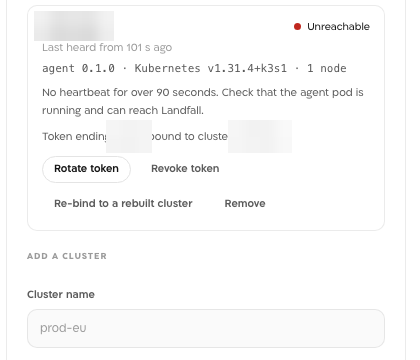
| Unreachable | No heartbeat for over 90 seconds. Admins are told once |
| Uninstalled | The Helm release was deleted and the agent deregistered |
| Token revoked | The token was revoked and the agent is refused |
Reference
| Field | Value |
|---|---|
| Panel | Integrations → Context sources → Kubernetes cluster, field Cluster name, button Add cluster |
| Chart | oci://public.ecr.aws/r9i3z7v6/charts/landfall-agent, release landfall-agent in namespace landfall |
| Image | public.ecr.aws/r9i3z7v6/landfall-cluster-agent, the chart's own version by default |
| Helm values | landfall.apiUrl (default https://api.landfalls.ai, https only), landfall.connectionId, token or existingSecret, logs.enabled (default false), networkPolicy.enabled (default false), proxy.httpsProxy |
| Memory limit | 128Mi up to 50 nodes (the default), 384Mi up to 250 nodes, 1Gi up to 1,000 nodes |
| Kubernetes role | A ClusterRole with get, list and watch on pods, nodes, namespaces, events, services, endpoints, workloads, jobs, autoscalers, disruption budgets and volumes; get and list on metrics. Nothing on Secrets or ConfigMaps. With logs.enabled=true, a second role grants get on pods/log only. On helm uninstall, a short-lived hook may patch the agent's own Deployment so it deregisters; its role is deleted with it |
| Network | Outbound HTTPS to api.landfalls.ai, plus the cluster's own API server; no inbound port, Service or Ingress |
| Read operations | The seven k8s.* operations above |
| Access | Read-only. Landfall writes nothing to the cluster |
| Token | lfa_ followed by 40 characters, shown once. Landfall stores only its SHA-256 hash. It binds to the cluster it first registers from (the kube-system namespace UID) |
| Rotate | Rotate token mints a new token; the old one keeps working for 24 hours so you can upgrade the release without a gap |
| Revoke | Revoke token refuses the agent at its next call. helm uninstall deregisters the agent, and the cluster reads Uninstalled |
| Trigger endpoint | None yet |