
What the investigation knows
An incident starts with whatever the triggering alert carried and whatever Beacon can infer. Everything past that, what repository this is about, which component, which telemetry source, which time window, which past incident it resembles, is something a person tells the room, on purpose, and every agent that joins afterward sees the same answer.
How it works
The alert that opened the incident is the starting point. People add to it: they attach what the incident is about, an admin keeps the organization's standing instructions, and a member can steer Beacon toward a suspect. Each of these is recorded against the person who did it. Beacon and every joined agent then work from the same brief, so a late joiner starts from the scope the room already settled.
Six kinds of context
A member attaches to the incident from the “+” control or the “@” picker in the composer. Six kinds of thing can be attached:
- Repository. A connected repository, for code lookups and citations.
- Component. An element from the architecture map, for example a service or a queue.
- Source. A connected telemetry source, to narrow what the agent reads.
- Time window. A since/until bound; attaching a new one implicitly detaches the previous, since only one is active at a time.
- Artifact. A file already shared into the incident.
- Past incident. A prior incident this one resembles.
Attaching or removing any of the six is an incident event, attributed to the member who did it, the same way everything else on the timeline is. Attachments render as chips above the composer, and the scope chip in the room bar counts them (or names the pinned component) and lists them, so the current scope is never more than a click away.
What pinning a component changes
Pinning an architecture component is the highest-leverage attachment. It changes four things at once:
- It becomes an entity hint: the component's own title, read by Beacon as what this incident is about.
- Its dependencies, the other components it relies on, are listed in the opening prompt as data, so the investigation starts already aware of what could have caused a downstream failure.
- Code lookups use the component's confirmed repository mapping, so a code citation resolves to the right repository without Beacon guessing from the service name alone.
- The signal catalog handed to any agent working this incident, Beacon or a joined coding agent, narrows to the component's own telemetry.
If the component is later deleted from the architecture map, its chip stays and is marked stale rather than disappearing silently; scoping falls back to the whole incident until someone removes it.
The organization instructions document
Under Settings → Investigation, an organization admin maintains an instructions document: standing guidance for how Beacon should investigate here, plus optional sections scoped to individual architecture components. Every edit is versioned, and every version is audited, so what Beacon was told to do is part of the record, not a value that silently drifted.
The current version of the body is included in every agent's brief. A component's own section is included only when that component is pinned to the incident, so a section written for a payments service does not leak into an incident about an unrelated queue.
Runbook and dashboard links from the alert
When the alert that opened the incident carries a runbook or dashboard link, Beacon reads it at the start of the investigation, before it runs a single query. The room shows a row naming what was read, or, honestly, that it could not be read. A finding that draws on the runbook's content cites it the same way it cites a query or a code reference, so a reader can tell what came from the runbook and what Beacon found on its own.
Steering the investigation
Starting an investigation accepts an optional suspicion line, a short field on Start investigation asking “what do you suspect?”. It is not required; an investigation starts the same way without one.
Once a run is underway, a message that addresses Beacon with a focus, for example “@Beacon focus on the payments queue”, is recorded as a steering event attributed to the person who sent it, and the run header shows “focused by <person> on <focus>” for the rest of the room to see. Steering is always a person's decision, recorded against their name, never an agent redirecting itself.
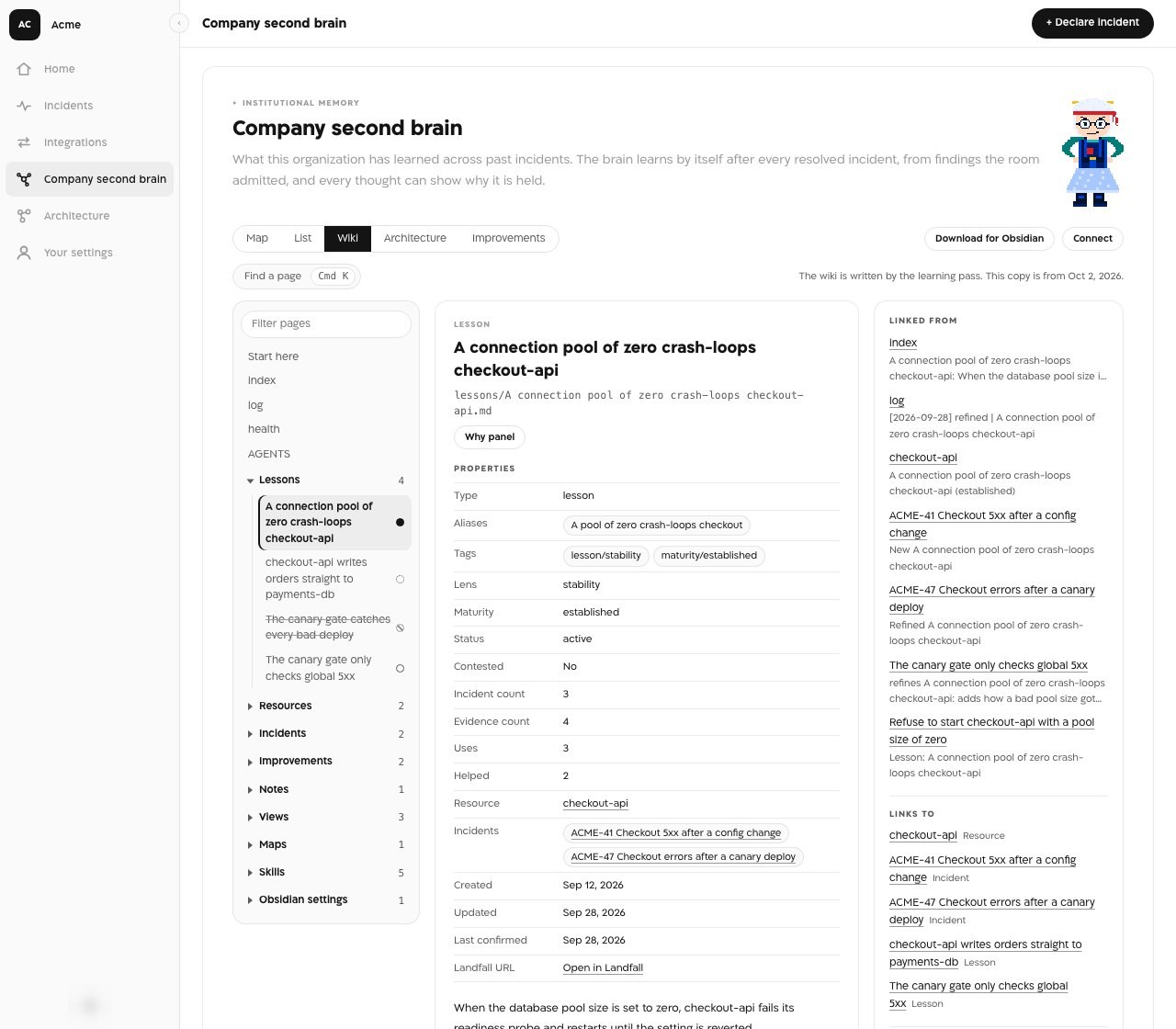
The memory loop
Two things connect an incident to the Company second brain: what it learns when the incident ends, and what it offers when an investigation starts.
When the incident is resolved, a learning pass reads the findings the room admitted to its shared context and writes what they taught into the second brain, with no accept step. The room then shows one card, “The second brain learned from this incident”. It lists each lesson with what happened to it (new, corroborated, refined, contested or superseded), counts the architecture assumptions and the improvements, and links to the second brain and to this incident's learning review on its postmortem. The card has no buttons: an admin corrects or retires a lesson afterwards, on the second brain's own page. When nothing new came out of the incident, the card says so. Proposal cards from rooms resolved before the second brain learned on its own stay in those rooms, read-only.
At the start of every investigation, up to three related past incidents are shown as a card, labeled plainly as something to test, not as an established match. The same card can list up to three lessons the second brain already holds that look relevant, each with how far the brain trusts it and a link to why it is held. Related and Not related controls record a person's judgment on each candidate incident, and that judgment feeds back into how future incidents get matched, so the room's own memory gets more accurate the more it is used.
Where you see it
- The composer's “+” control and the chips above it: attachments.
- The scope chip in the room bar: everything attached, and the sources in play.
- Settings → Investigation: the instructions document and its versions.
- The run header and Start investigation: steering. The learned card and the related incidents card arrive in the chat.
What an agent sees
A joined agent's brief, read through get_brief, carries the current attachments, the instructions body (and a component's section when that component is pinned) and the current focus alongside the rest of the incident's context. A person's coding agent, Beacon, and anyone who joins the room later all work from the identical scope, not three separate guesses at it.
An agent reads this scope but cannot set it. Attaching and detaching, steering and the Beacon is listening toggle are events only a person can append, so the room's scope stays the people's call.
Why it is built this way
A model guessing which repository or service an incident is about guesses differently for every agent in the room. Making the scope something a person states, once, as an attributed event, gives every agent the same answer and puts a name against it. Learning only from admitted findings keeps the second brain to what the room actually agreed on.
What is not here yet
An agent cannot propose an attachment for a person to accept. Today scope is set only by the people in the room.