
Opening a war room from a Datadog monitor
A Datadog webhook can open a Landfall incident the moment a monitor alerts, and later notifications for the same alert land in that room. This page is not about reading telemetry; for that, see Connecting Datadog to Landfall. The two are independent.
How it works
Datadog posts each notification to POST https://api.landfalls.ai/triggers with the header Authorization: Bearer <ingest token>. The token belongs to one organization and decides where the incident opens, so the URL carries no organization name. A missing or unknown token gets a 401 and opens nothing.
CloudWatch, Coralogix and Sentry alerts use the same endpoint and the same token. Landfall tells them apart by the body. A body with an alert_type string or a tags array is read as Datadog's. CloudWatch is checked first, then Datadog, then Coralogix and Sentry.
Each alert is identified by its alert_id, so repeats and the recovery land on the room the first notification opened.
What you'll need
- An owner or admin of your Landfall organization, to mint the ingest token.
- curl and jq, for the two calls in step 1.
- In Datadog, access to Integrations → Webhooks and to the monitors that should open incidents.
- Optional: the Datadog source connection, so Beacon can query the telemetry the alert came from.
1. Mint the ingest token
No screen issues this token yet, so it is two calls made with your own Landfall account. The first signs in, the second issues the token. If you already minted one for CloudWatch, Coralogix or Sentry, reuse it. One token serves every source on this endpoint.
SESSION=$(curl -s -X POST https://api.landfalls.ai/auth/login \
  -H "Content-Type: application/json" \
  -d '{"email":"<you>","password":"<your password>","orgSlug":"<your-org>"}' \
  | jq -r .accessToken)

curl -X POST https://api.landfalls.ai/o/<your-org>/triggers/ingest-token \
  -H "Authorization: Bearer $SESSION"
The answer is {"token": "<64 hex characters>"}. It is shown once, and Landfall keeps only a hash of it. A personal API key for this organization (Your settings → API keys) can stand in for $SESSION.
Minting again replaces the token at once, and the old one stops working everywhere it was set, so update every webhook that uses it. Each issue is recorded in the audit log as trigger.ingest_token.issued.
2. Point Datadog at Landfall
Integrations → Webhooks → New
Name landfall URL https://api.landfalls.ai/triggers Custom headers { "Authorization": "Bearer <your ingest token>", "Content-Type": "application/json" } Encode as form Leave unchecked. Landfall reads a JSON body. Paste this into the Payload field:
Payload{ "title": "$ALERT_TITLE", "alert_type": "$ALERT_TYPE", "alert_transition": "$ALERT_TRANSITION", "alert_id": "$ALERT_ID", "event_id": "$ID", "priority": "$ALERT_PRIORITY", "body": "$EVENT_MSG", "tags": ["service:$TAGS[service]", "env:$TAGS[env]"], "link": "$LINK" }Point a monitor at it
Add @webhook-landfall to the notification message of each monitor that should open an incident. Everything else is an ordinary monitor. Datadog counts each delivery under Notifications on the monitor's status page, which is the first place to look if no incident appears.
app.datadoghq.com · Monitors · Status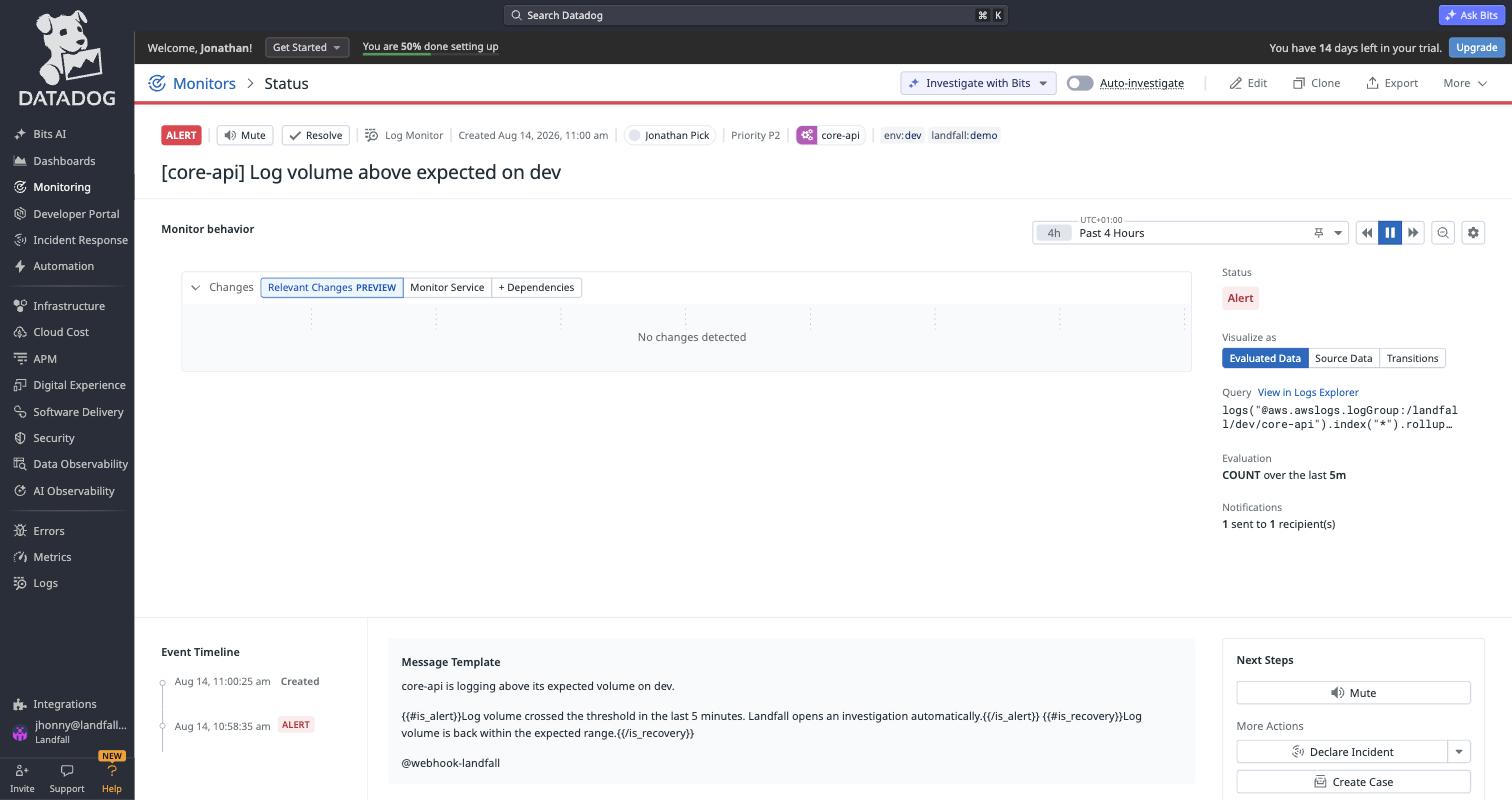
Notifications reads 1 sent to 1 recipient(s), which means the webhook fired. If it reads 0, the notification never left Datadog. The creator, the query, the greeting, the trial notice and the account menu are blurred in this picture.
What Datadog's fields become
| Payload field | Becomes |
|---|---|
| title | The incident title. "Datadog alert" when the field is missing. |
| priority | Severity, and it wins over alert_type: P1 is sev1, P2 sev2, P3 sev3, P4 and P5 sev4. |
| alert_type | Severity when no priority is set: error is sev2, anything else sev3. |
| alert_transition | What happened. Recovered is a recovery, No Data is a no-data notice, and every other value (Triggered, Re-Triggered, Warn) is an alert. |
| alert_id | Which alert this is, so later notifications find its room. |
| event_id | Which notification this is, so a redelivery is not recorded twice. |
| body | The summary on the incident's first timeline event. |
| tags | Entity context. A service:<name> entry resolves the incident to that service. |
| link | Kept with the alert's reference on the incident's first timeline event. |
Landfall reads a body as Datadog's when it carries an alert_type string or a tags array, so keep at least alert_type if you trim the payload.
3. Test it
Send one notification by hand. This body is what the payload above looks like once Datadog fills it in:
curl -i -X POST https://api.landfalls.ai/triggers \
  -H "Authorization: Bearer <your ingest token>" \
  -H "Content-Type: application/json" \
  -d '{
    "title": "[checkout] p99 latency above 2s",
    "alert_type": "error",
    "alert_transition": "Triggered",
    "alert_id": "1234567",
    "event_id": "8000000000000000001",
    "priority": "P2",
    "body": "p99 latency above 2s for 5 minutes",
    "tags": ["service:checkout", "env:prod"],
    "link": "https://app.datadoghq.com/monitors/1234567"
  }'
A new room answers 201 with "outcome": "opened", "entity": {"kind": "service", "id": "checkout"}, "proposedSeverity": "sev2" from P2, and a workspaceUrl that opens the room. The new row in Incidents carries the Datadog badge.
Send it again with a different event_id and the answer is 200 with "outcome": "attached" and the same incidentId. Change alert_transition to Recovered, with another event_id, and the outcome is recorded. The incident is real, so resolve it when you are done.
Repeats and recovery
- Attach identity: alert_id. A webhook set up without it still works, and Landfall then uses the title plus the sorted tags.
- Repeat: a notification for the same alert while its room is open (Re-Triggered, Warn, a renotify) is recorded on that room as a repeat. The outcome is attached.
- No Data: recorded on the open room as a no-data repeat. The outcome is recorded.
- Recovery: recorded on the open room, which stays open until a person resolves it. Landfall never resolves a room on its own.
- Nothing open: a recovery or No Data with no open room for that alert is ignored and opens nothing.
- Redelivery: a notification whose event_id the room already holds is not recorded again.
- After a resolve: once a person resolves or archives the room, the next alert opens a new one.
- Older payloads: without alert_transition, alert_type: success is read as the recovery and info as No Data.
Troubleshooting
| What you see | What it means |
|---|---|
| 401 Missing trigger ingest token | Datadog sent no Authorization: Bearer header. Check the webhook's custom headers. |
| 401 Invalid trigger ingest token | The token is mistyped, or a newer one replaced it. Paste the current token. |
| 422 Unrecognized trigger payload | The body has neither an alert_type string nor a tags array. No incident was created. Compare the Payload field with step 2. |
| The incident opens with no service attached | The tags line. The obvious version, "tags": "$TAGS", fails quietly. Datadog renders $TAGS as a comma-separated string, and Landfall reads tags only when it is an array. The per-key form $TAGS[service] pulls one tag's value, and the literal array around it gives Landfall the shape it reads. A monitor with no service tag renders an empty entry, which is skipped. |
| 200 with "outcome": "ignored" | A recovery or No Data arrived with no open room for that alert, or the room already holds that recovery or No Data (the same event_id). A redelivered alert answers attached instead and is not recorded again. |
| 200 with "outcome": "suppressed" | An active maintenance window matched the alert. See Settings → Maintenance windows. |
| The monitor's Notifications count stays at 0 | Datadog never sent the notification. Check that the monitor's message names @webhook-landfall. |
Reference
| Field | Value |
|---|---|
| Endpoint | POST https://api.landfalls.ai/triggers |
| Auth | Authorization: Bearer <ingest token>, one per organization, shared with CloudWatch, Coralogix and Sentry |
| Issue or rotate | POST /o/<your-org>/triggers/ingest-token as an owner or admin. Shown once; issuing again replaces it at once. |
| Recognized by | An alert_type string or a tags array, checked after CloudWatch |
| Attach identity | alert_id, else the title plus the sorted tags |
| Each delivery | Opens a room (201), attaches to or records on the open room (200), or is ignored or suppressed by a maintenance window (200). Never resolves a room. |
| Rejected payloads | 422 with no incident. A missing or unknown token is a 401. |
| Incident badge | Datadog |
How this endpoint sits beside the other trigger paths: Integrations architecture.